Before deleting a three-month-old session, Hermes now asks first
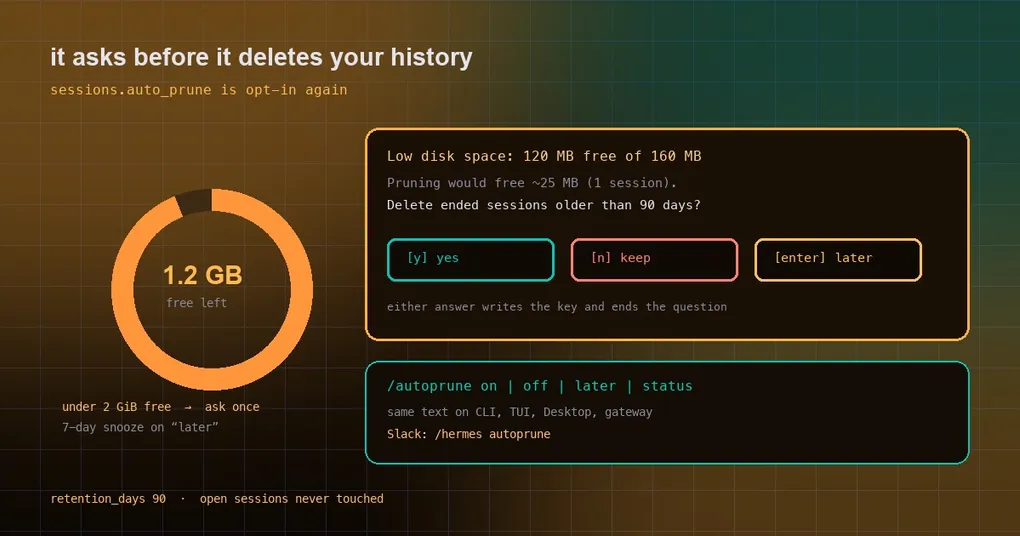
One day you go looking for a debugging session from three months ago and /resume simply does not have it. Then you remember: sessions.auto_prune was on, and anything past 90 days got deleted at some startup — no warning, no confirmation. That just changed. Automatic pruning is opt-in again, and it only interrupts you when the disk is genuinely running out.
What changed: nothing is deleted by default
The change is blunt: sessions.auto_prune defaults back to false. The three install states behave like this:
| Your setup | Before | Now |
|---|---|---|
Never set sessions.auto_prune |
pruned at 90 days, silently | not pruned; asked once when the disk is low |
Set auto_prune: true |
pruned | pruned, unchanged |
Set auto_prune: false |
kept | kept, never asked |
Note the second row: if you deliberately turned it on, nothing about your setup changed. What changed is the large group that never expressed an opinion — their history is no longer treated as free space by default.
When it speaks up
The logic lives in a new module, hermes_cli/prune_advisor.py, and the hot path is deliberately cheap: one os.stat, one shutil.disk_usage, and a small YAML read. It fires only when all of these hold:
- the disk really is low: under 2 GiB free, or under 10% free while also under 20 GiB of headroom (a 4 TB disk at 10% free is fine, and that clause exists for exactly that case);
- your
config.yamlhas nosessions.auto_prunekey; - no snooze is active.
Only then does it open the database read-only to estimate what a prune would actually free — ended sessions past retention_days, scaled by their share of messages. That estimate goes into the question itself, including the awkward case: “pruning will not fix this disk”, either because nothing is old enough or because too little is reclaimable to lift the disk out of the low band.
One question, four surfaces
- Classic CLI: a y / n / Enter (later) question at startup, TTY only, sitting next to the sandbox-image offer.
- TUI and Desktop: one sticky notification with key
sessions.auto_prune, per profile per process. The database estimate runs off-thread so the UI never waits on it. - Messaging gateway: the question is posted to the served profile’s home channel. One detail that matters — the “later” snooze is recorded only after a delivered post, so a gateway with no home channel cannot silently swallow the question the CLI is about to ask.
- Slash command:
/autoprune on | off | later | status, identical text on every surface because it goes through one registry executor. Slack’s 50-slash limit is full, so there it is/hermes autoprune.
What each answer actually does
onwritessessions.auto_prune: trueand prunes ended, inactive sessions pastretention_days(default 90). Open, pinned, or mid-turn sessions are never touched.offwritesfalse, keeps everything, and retires the question forever.latersnoozes for 7 days and asks again.
To see where you stand:
hermes config get sessions.auto_prune
/autoprune status
Still tight on disk? Clean up in layers
Automatic pruning is one layer. When you actually need space, go from least to most destructive:
hermes sessions optimize          # merge FTS5 segments + VACUUM, no data change
hermes sessions optimize-storage  # migrate the search index to the compact layout
hermes sessions archive           # bulk soft-hide, no deletion
hermes sessions prune             # real deletion, filterable by window / source / title
optimize and optimize-storage rebuild indexes and reclaim fragmentation without touching history, so run those first. archive hides sessions from the list without deleting them. prune is the real thing — check whether session_search still needs that history before you run it.
A practical way to choose
The question underneath this change is simple: what is your history worth versus your disk?
- Chronically tight disk (a small VPS, a container with a few dozen GB) and you rarely look back:
/autoprune onis less work. - You lean on
session_search, or you keep audit trails: leave the default (kept, not asked) and runoptimizeoccasionally. - Unsure: write nothing. The default is the conservative state.
If state.db is already misbehaving — say, Hermes reports another process holding an old WAL — pruning is not the fix; start with the session store recovery walkthrough. For how session boundaries work, read the session boundaries guide, and for exact flags the hermes sessions reference.
One status note worth stating plainly: this merged into main on 2026-10-16, after v0.22.2 shipped on 10-15, so it is not in any released version yet — it arrives in the build your next hermes update pulls.