Your local model server is down and Hermes asks you to sign in: that mix-up is fixed
Last week you finished an entire module on a flight with a locally hosted Qwen, offline the whole way, and it felt great. On Monday you opened the Webapp to keep going and got the familiar welcome instead: “Let’s get you setup…”, with two buttons under it — Nous Portal, and I have an API key.
Your first thought was “my session expired”, so you signed in again, pasted a key, and burned ten minutes. The truth is that nothing was wrong with your account. The local model server simply was not running — the desktop app stops it on quit, or it was still loading a model. The old interface treated “the model could not be resolved” and “nothing is configured” as the same thing, and sent you off to sign in.
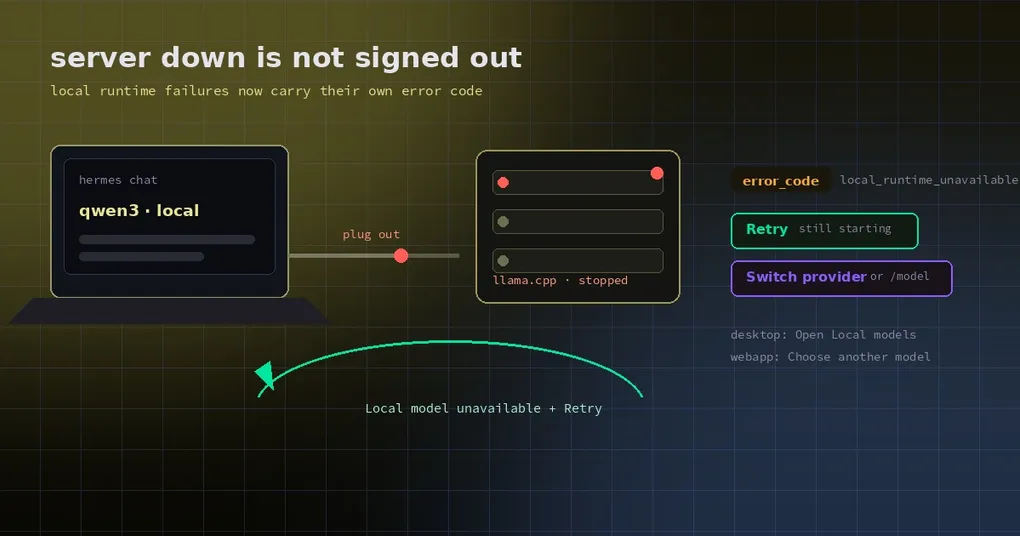
That is fixed now, and the fix is worth a look: it did not rewrite a sentence, it turned “which failure is this” into a structured field.
One error wearing another error’s clothes
Here is how the old build painted itself into a corner.
When the main model is the Hermes-managed local runtime (llama.cpp) and that server is down, the gateway’s setup.runtime_check answers ok: false while setup.status still says a provider is configured. Both statements are true, but the renderer’s onboarding gate (refreshOnboarding) only read the first one: it treated every ok: false as “nothing configured” and opened the provider sign-in overlay.
Then came the second half. If you ignored all that and sent a message anyway, the gateway stamped the resolution failure auth_permanent (a permanent authentication failure), so the front end showed you an “Update API key” card. A pure “server is not running” problem got dressed up as “your key is broken”.
One clarification, because this is a common misreading: Webapp auth was healthy the whole time; the reauth path in browser-transport.ts was never involved. What you saw was the provider-onboarding overlay, which happens to contain a sentence about the local model, and so looks like a login screen.
The new error code: local_runtime_unavailable
The core of the fix is separating the two failures:
- An unavailable local runtime raises a new named exception,
LocalRuntimeUnavailableError(aValueErrorsubclass, so existing callers still catch it), carrying the structured codelocal_runtime_unavailable. - The “switched on but not serving yet” variant is marked retryable. That distinction matters: a model takes a while to load, and telling you to switch models during those few seconds is bad advice.
setup.runtime_checkputserror_codeinto its answer through one shared helper. Note that it is a structured field, not a string the front end matches on — copy changes, fields do not.
The two states now say different things:
- Still starting: “The local model server isn’t running. It may still be starting — try again in a moment, or switch to another model with /model.”
- Definitely off: “The local model server is turned off. Start it from the Hermes desktop app or
hermes model→ Local models, or switch to another model with /model.”
Desktop and Webapp get different next steps
This detail deserves credit: the fix did not lazily show both surfaces the same hint.
| Where you are | What you see | What you can do |
|---|---|---|
| Desktop | The app opens normally (configured: true) with a “Local model unavailable” notice |
Open Local models, straight into that settings pane |
| Webapp | The app opens normally, with a notice that the local model is unavailable | Choose another model (the Webapp has no Local models pane — that pane is Electron-only) |
Why not offer “open the local models pane” in the Webapp? Because that pane does not exist in a browser, and a button that cannot work is worse than no button. So the Webapp copy deliberately does not mention it, and offers a model switch instead.
The failure card in the chat changed too
A turn that fails this way now carries failure_reason=local_runtime_unavailable up to the interface, and the card title changes from “your API key was rejected” to “Can’t reach your model server”, with two actions:
- Retry — correct while the server is still starting;
- Switch provider — faster when it is simply not running.
A sentence only an engineer could love also disappeared: the old build appended “setup.status reports configured credentials, but runtime resolution still failed”. The new build drops that jargon when there is a code to report.
When you still get sent to sign-in
The fix does not blame everything on the local runtime, which matters — otherwise it would hide real credential problems. You still get the onboarding path when:
- there are no usable credentials at all (Nous not logged in, no key configured);
- the provider is a cloud one and its key really is invalid.
In other words: you are only kept out of sign-in when the failure can be attributed to the local runtime.
Debugging it yourself
If your local model suddenly stops working, go in this order:
- Check whether the server is up. Desktop: Settings → Providers → Local Models, and see whether the model shows as running; if it is installed but stopped, start it. From a terminal:
hermes model→ Local models lists the catalog, starts the server, and makes the model your default. - Tell “not started” apart from “still loading”. In the first fifteen seconds after you press start, weights are still moving into VRAM, so retrying is the right move. If a minute passes, look at the logs.
- Switch models and keep working.
/modelswitches to another configured provider inside the session; note that a mid-session switch invalidates the prompt cache, which is not free on a long conversation. - Do not hunt for a pane that does not exist. If you cannot find Local Models settings in the Webapp, that is correct — it is desktop-only. From the Webapp, switch models, or go back to the desktop app and start the server.
Can you use it today
The fix landed on main on 2026-10-30 (PR #146883, labelled type/bug, P2) and shipped in v0.22.6 (2026-11-02) — once you are on it, a stopped local server is reported as unavailable instead of sending you to the sign-in screen.
On that build, when Hermes suddenly asks you to sign in, do not start re-authenticating: check whether the local model server is running first. That one check saves ten minutes and stops you from repeatedly trying to sign in on an offline machine.
We have covered two other corners of local models: how Hermes hosts llama.cpp for you, and how to tell what your GPU can actually run. This piece is the third one: what the interface is actually telling you when something breaks.