Hermes Language Packs: Make the CLI, Gateway and Desktop Speak Your Language
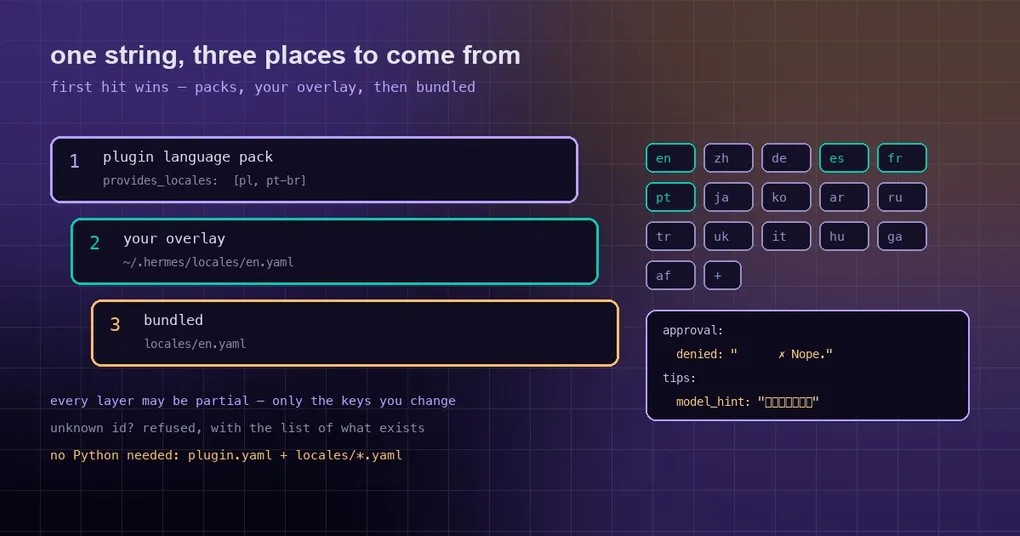
Half the people on your team read a terminal in English and the other half do not, so a few prompts get misread every week. One of them was a long English approval line before a dangerous command — skimmed, then answered with the wrong key. Another engineer tried to switch the interface to their own language with hermes config set display.language pl and got back ✗ Unknown language 'pl'. Hermes ships 17 UI languages, and Polish, Korean or Brazilian Portuguese are not among them, so no config value can conjure one up. A language pack fixes that: a plugin made of YAML files that swaps the static UI text of the CLI approval prompts, the messaging gateway replies, tool verbs, tips, the hermes --tui interface and the Desktop app — and none of it needs Python code.
Hermes ships 17 UI languages, but the list is pluggable
The bundled set is 17 languages, selected with display.language. Their catalogs live in locales/ as af, ar, de, en, es, fr, ga, hu, it, ja, ko, pt, ru, tr, uk, zh-hant and zh.
hermes config set display.language accepts any id that one of the layers can supply. An id nobody recognises is refused outright, with the available languages printed back:
$ hermes config set display.language pl
✗ Unknown language 'pl' for display.language. Available: en, af, ar, de, es, ...
  Install a language pack plugin (hermes plugins install <pack>) or drop <HERMES_HOME>/locales/<id>.yaml to add one.
The error message already names both escape hatches: install a language pack plugin, or drop in an overlay file of your own. One more thing that surprises people debugging “I changed it, why is nothing different” — HERMES_LANGUAGE in .env still overrides display.language.
This all rests on the v0.22.0 work: PR #126296 routed every user-facing string in the CLI, the messaging gateway, the TUI and the Desktop through one translation catalog, which is what gives a pack something to hook into. The v0.22.0 release page covers the release itself.
Install a pack in two commands
A language pack installs like any other plugin. If Hermes is not installed yet, start with the install guide. Then:
hermes plugins install hermes-lang-pt-br   # a catalog name, or a repo URL
hermes config set display.language pt-br
Two packs merged into the official catalog on October 14, 2026: hermes-lang-ko for Korean and hermes-lang-pt-br for Brazilian Portuguese. The docs walk through hermes plugins install https://github.com/teknium1/hermes-lang-pl if you want to see the shape of a pack in the wild. Discovery and installation work exactly like any other plugin, which the plugin catalog guide explains end to end.
Restart any running gateway or TUI after installing so it reloads the pack. The TUI and Desktop language switchers list bundled languages, your own overlay languages and every installed pack by their native name — the endonym, such as Polski — rather than by their code.
Where a UI string actually comes from
When Hermes looks up a string it walks these layers, top first, and takes the first hit:
- Plugin language packs — any installed plugin that declares
provides_locales(if two packs cover the same key, the one loaded last wins) - Your overlay —
<HERMES_HOME>/locales/<lang>.yaml, per profile, so a named profile uses~/.hermes/profiles/<name>/locales/ - Bundled — the
locales/<lang>.yamlcatalogs shipped with Hermes
If none of those three has the key, the same three layers are tried for English, and only then does the raw key show up on screen. Every layer may be partial: a pack only needs the keys it wants to change, not a full copy of the catalog.
Write a pack without writing Python
None of this needs Python code. A minimal pack looks like this:
hermes-lang-pl/
  plugin.yaml
  locales/
    pl.yaml            # core: approval.*, gateway.*, cli.*, display.*, slash.*, tips.*, ...
    pl.tui.yaml        # optional: hermes --tui strings
    pl.desktop.yaml    # optional: Desktop app strings
The manifest declares which language the pack provides:
name: hermes-lang-pl
version: 1.0.0
description: Polish language pack for Hermes
provides_locales:
  - id: pl            # lowercase BCP-47-style tag: pl, pt-br, zh-hant
    endonym: Polski   # shown in the language switchers
    rtl: false        # true for right-to-left scripts; flips the Desktop layout
provides_locales entries may also be plain ids (- pl), and the endonym then defaults to the id. Once that block exists, the plugin loader registers every locales/<lang>[.tui|.desktop].yaml in the pack automatically — there is nothing left to wire up.
Plugins that already have Python code can register their own catalogs instead: ctx.register_locale("pl", path_or_mapping, endonym="Polski", rtl=False, surface="core"), where surface is core, tui or desktop, or ctx.register_locale_dir(dir) to register a whole folder at once. Registration is undone when the plugin unloads, and it never changes display.language.
Validate it, and mind the placeholders
Run the validator before you ship:
hermes plugins validate ./hermes-lang-plIt checks that every declared id has a matching locales/<id>.yaml, that each file parses, and that every value is text — a number, list, true/false or empty value is an error, not a warning. Keys that do not exist in the English catalog for that surface only produce a warning with the list attached: they are harmless, but they do nothing. While writing, stay away from YAML reserved words as keys — on, off, yes and no.
Placeholders are the second trap. Core (Python-side) strings use named placeholders: if the English value says {count}, the translation must keep {count}. Drop it or misspell it and that key silently falls back to the untranslated string. TUI and Desktop entries whose English value takes arguments use positional placeholders instead, {0} and {1}.
Override a line without building a pack
To change one or two sentences, skip the plugin entirely and drop a partial file into your Hermes home:
# ~/.hermes/locales/en.yaml — only the keys you want to change
approval:
  denied: "      ✗ Nope."
The overlay applies to that profile only (a named profile reads ~/.hermes/profiles/<name>/locales/). Overlay files for a language Hermes does not bundle make that language selectable too. Edits are picked up on the next start, or the next display.language change.
What a language pack does not translate
Everything a pack touches is static UI text: CLI approval prompts, gateway replies, tool verbs, tips, the TUI and the Desktop app. Agent responses, tool output, logs and the names of slash commands are not translated at all. If you want the agent itself to answer in another language, say so in your prompt — that is a separate thing from the interface language.
When it still looks wrong
Unknown language ... for display.languagemeans the pack is not installed or not enabled (hermes plugins listwill tell you), or the id inprovides_localesdoes not match the file name — an id of pl needslocales/pl.yaml.- A string still showing in English means that key is not in the English catalog (the validator lists them), or the placeholder set differs from the English value.
- A language that appears in the list while the TUI or Desktop stays English means the pack has no
.tui.yaml/.desktop.yaml; those surfaces render English plus whatever the pack provides.
More configuration and usage write-ups are on the blog.