One Token, Whole Dashboard: Making the Deployment Token a First-Class Credential
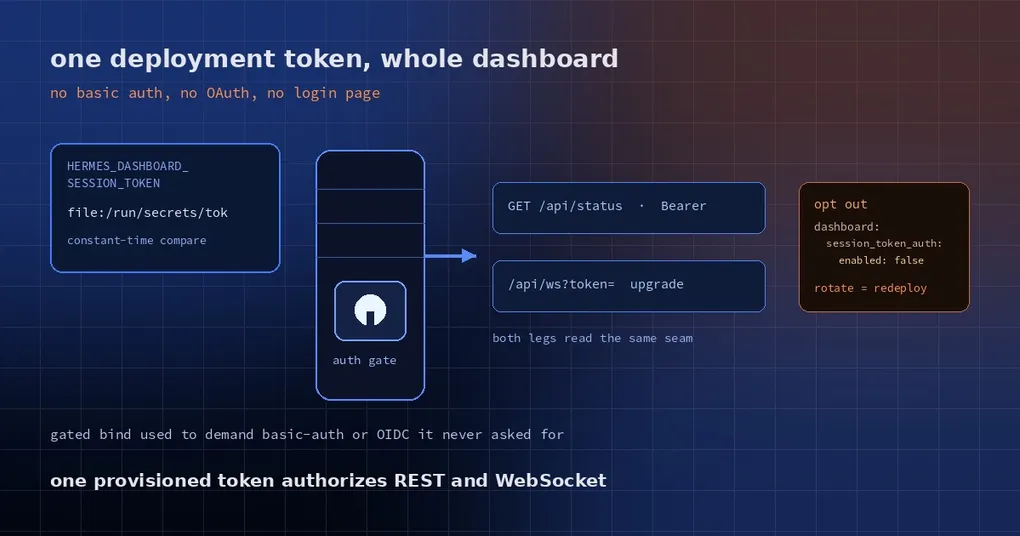
You move the Hermes web dashboard onto an internal server so your team can reach it in a browser, change the bind address from 127.0.0.1 to 0.0.0.0, and it refuses to start. The log says it needs an auth provider and will not bind. You do have a deployment token — injected from your secret manager — but nothing treats it as a credential.
The next half hour is familiar: you get pushed into configuring basic auth, the browser login box appears, credentials end up in .env, and the desktop app reports “HTTP reachable, but the WebSocket connection failed”. One step short, and nothing lines up.
Why it used to fail: a gate that fails closed
The dashboard’s auth gate tightened in June 2026: any bind to a non-loopback address requires a registered auth provider, and without one it refuses to bind — no open port rather than a careless one. That design is right.
The gap was in which providers counted. Only interactive ones did: basic auth, a Nous account, self-hosted OIDC. Yet the common shape in a deployment is a single shared token — decrypted by a secret manager into a file, handed to the service. The old code not only ignored it, it also nudged you into writing a set of basic-auth credentials into .env that the deployment never asked for.
Even with the token provisioned, both legs rejected it: a REST request carrying the bearer got 401 no_cookie, and the /api/ws upgrade got a bare 403. The desktop framed that as “reached the gateway over HTTP, but the live WebSocket failed” — confusing, because the HTTP check only touches the public /api/status and looks perfectly healthy.
The fix: the token is itself a provider
Hermes ships a bundled dashboard_auth/session_token provider. It stays out of the way: as soon as HERMES_DASHBOARD_SESSION_TOKEN is provisioned it registers itself, and with no token it does nothing at all.
Two ways to provision it:
- a literal value:
HERMES_DASHBOARD_SESSION_TOKEN=<token>; - a file path:
HERMES_DASHBOARD_SESSION_TOKEN=file:/run/secrets/hermes-dashboard-token.
The second form is what secret managers need. A path can sit in a systemd Environment= line, a launchd plist, or a Nix-rendered service environment; the secret itself cannot. Hermes’ Nix modules expose this as backend.sessionTokenFile and render it in the file: form. At startup the file is read (surrounding whitespace stripped, BOM tolerated); if it is unreadable or empty the process exits with an explicit error instead of running with an empty credential.
Verification uses a constant-time comparison, so response timing cannot be used to guess the token. Both legs a token-mode client uses — the REST Authorization: Bearer header and the /api/ws upgrade’s ?token= parameter — resolve through the same seam, so one provisioned token authorizes both. That is exactly the shape the desktop’s “Session token” field always promised.
One deliberate choice: there is no login page. /login renders a note explaining that this deployment authenticates with a token, instead of a button nobody can complete, and the automatic SSO redirect never offers this provider. Token mode is not a person signing in; it is a machine presenting a credential.
Deploying it
# 1. generate a 32-byte random token
openssl rand -base64 32 > /etc/hermes/dashboard-token
chmod 600 /etc/hermes/dashboard-token
chown hermes:hermes /etc/hermes/dashboard-token

# 2. hand the service a path, not the value
export HERMES_DASHBOARD_SESSION_TOKEN=file:/etc/hermes/dashboard-token

# 3. bind to a non-loopback address (the gate can be satisfied now)
hermes dashboard --host 0.0.0.0 --port 9119
On Nix you do not write the variable yourself: the modules take backend.sessionTokenFile, point at the decrypted secret, and render the file: environment entry — the store only ever sees the path.
Verifying that the door is actually closed
# gate state and registered providers
curl -s http://YOUR_HOST:9119/api/status | jq '.auth_required, .auth_providers'
# true
# ["session-token"]

# with the token: 200
curl -s -o /dev/null -w '%{http_code}\n' \
  -H "Authorization: Bearer $TOKEN" http://YOUR_HOST:9119/api/auth/me
# 200

# without the token: this is the part that matters
curl -s -o /dev/null -w '%{http_code}\n' http://YOUR_HOST:9119/api/auth/me
# 401
For the desktop’s remote gateway, paste the same token into the “Session token” field; it is used for both the HTTP probe and the WebSocket upgrade.
Troubleshooting table
| Symptom | Cause | Fix |
|---|---|---|
| Process exits at startup mentioning an unreadable or empty token file | Wrong file: path, wrong permissions, or an empty file |
cat the file as the account that runs the service |
auth_providers is empty in /api/status |
The variable never reached the service process | Check systemd Environment=, the plist, or the container env |
| “HTTP reachable, but the WebSocket fails” | The HTTP check hits a public route while /api/ws needs the token — or the token was rotated |
Paste the new token; rotation means redeploying the secret |
| You want basic auth or OIDC for the gate and the token only internally | The provider is on by default | Set dashboard.session_token_auth.enabled: false |
The opt-out, spelled out:
dashboard:
  session_token_auth:
    enabled: false
When not to use it
- A dashboard shared by several people. Nothing behind this token carries a user identity — whoever holds it is an administrator. If you need to know who changed what, use OIDC (Authentik, Keycloak, Zitadel, Authelia, Auth0, Okta and friends) or the Nous provider.
- Anything internet-facing. A long-lived bearer token is one leak away from full access, and rotation means updating every client. Prefer interactive login on public deployments.
- Local single-user setups. A loopback bind needs no provider at all; the desktop and the local SPA use the internal token. Do not add configuration you do not need.
One operational rule: treat the token as a password. Keep it in a secret manager, never in an image or a repository, and rotate by redeploying the secret rather than editing an environment variable — every client copy is invalidated at once, which surfaces as that puzzling “WebSocket fails” message.
For the background of the dashboard gate, read dashboard login hardening. If your symptom is desktop clients crossing tokens, see the session token collision write-up, and for auth shapes over a tunnel, OAuth over SSH. Flags and port defaults live on the hermes dashboard reference page.
Release status
The provider merged into main on 28 October 2026 (PR #146139, built on #146093’s file resolution and #146104’s Nix rendering). The current release, v0.22.5 (23 October 2026), does not include it yet.
One token, both legs, no login page — an internal deployment no longer has to invent a password system just to get past the gate.