A wedged cron job no longer means waiting for the timeout: hermes cron cancel stops the run in flight
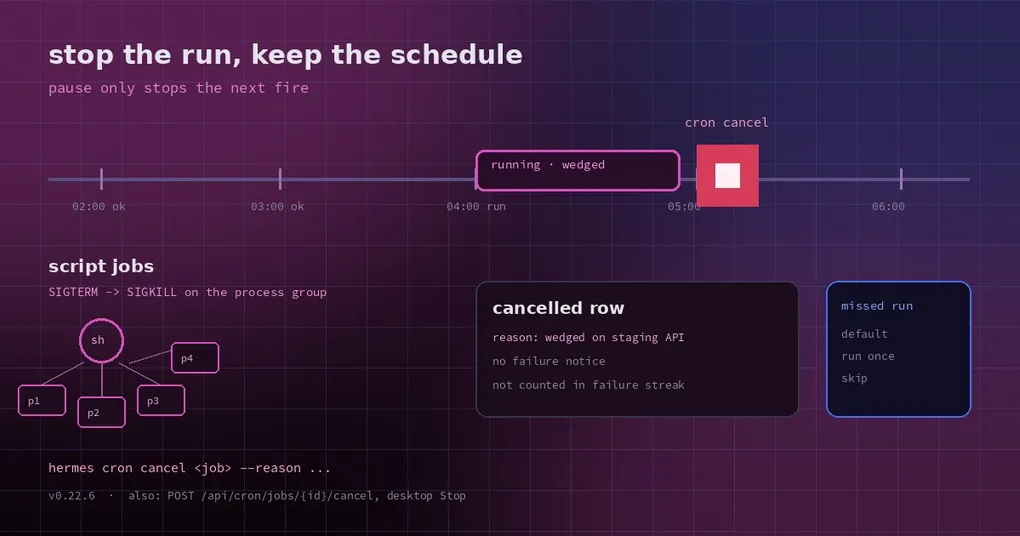
Three in the morning, your phone buzzes: an hourly collector is stuck on an upstream API that went dark. It is still running, still waiting for a timeout, still writing the same error line into the log. You open a terminal and run hermes cron pause — and discover it did not stop anything. It only means no new fire next hour. The current run is still there, burning tokens line by line.
That is the difference people trip over: pause governs scheduling, not the run already executing. Your options used to be “wait for the timeout” or “delete the job and recreate it”. v0.22.6 adds the third one: hermes cron cancel.
What cancel actually does
hermes cron cancel <job_id_or_name>
hermes cron cancel <job_id_or_name> --reason "wedged on the staging API"
The job reference takes a hex ID or a name (case-insensitive). Ambiguous names are refused with the candidate IDs listed, so you cannot stop the wrong job by accident.
The schedule is untouched: the job stays enabled and its next fire happens as planned. Only the current run changes.
How it stops depends on the job type:
- Script jobs (
--script, including no-agent mode): the whole process tree is terminated —SIGTERMto the script’s process group, escalating toSIGKILLafter a grace period, backgrounded grandchildren included. It is the same teardown a script timeout performs, so nothing is left running behind the job. - Agent jobs: the in-flight turn is interrupted at its next checkpoint.
Crucially, this is a request, not a kill: the cancel is recorded against that run’s execution ID and picked up at the run’s next cancel check (well under a second for a script). The run then books a cancelled row carrying your reason, so hermes cron runs <job_id> afterwards says “cancelled — wedged on the staging API” instead of leaving an unexplained timeout or a bare failure.
Two more details that matter in practice: a cancelled run sends no failure notice and does not count toward the job’s failure streak. Something you stopped on purpose should not keep hurting the job’s health signal.
Four doors, one stop
hermes cron cancel <job>(CLI)POST /api/cron/jobs/{id}/cancel(HTTP)- the agent’s own
cronjob_managetool withaction: "cancel" - the desktop app: a job with a run in flight shows Stop in its header; it reads Stopping… until the
cancelledrow lands, then a Run cancelled toast confirms it
Removing a job also stops its live run. hermes cron remove (and the dashboard/desktop delete, and the agent’s remove action) cancels an in-flight run, booked cancelled with the reason “job removed while running”. Previously it kept going and produced a result nobody would keep.
Cancel on a job with nothing running is a safe no-op that says so, and a cancel arriving after the run finished changes nothing.
One thing it cannot do: roll back
Be clear about this. Cancel cannot undo side effects the run already performed — files written, APIs called, messages sent all stay. It stops the run; it does not restore the world.
There is also a timing boundary: the interruption happens at the next checkpoint. If a tool call is stuck in an uninterruptible syscall, when it stops depends on when that call returns.
The other half: what happens to a missed fire
Once you stop a run, the next question arrives immediately — if the job came due while you were doing maintenance, does it catch up when the gateway returns?
By default, yes, once: after the gateway is back, a slot missed inside the restart gap fires exactly one time, and a long outage collapses into a single run rather than one run per missed slot. You can turn the global default off:
hermes config set cron.catch_up_missed falseSince v0.22.6 an individual job can override the global setting:
hermes cron create "0 7 * * 1-5" "Morning brief" --catch-up off   # a stale brief is useless: skip
hermes cron edit <job> --catch-up on                              # always run once when back
In the desktop job editor this is Missed runs with three choices: use the default, run once when back, skip them. The grace window defaults to half the job’s period, clamped between two minutes and two hours; --grace-minutes overrides it per job (0 means never catch up, up to 1440). A catch-up is visible, not silent: hermes cron list marks it ⚠ late or ⚠ catch-up after missed fire.
pause, cancel, and the global pause
Three commands get mixed up; the split is clean:
hermes cron pause <job>— keep the job, stop scheduling it; does not touch a running execution.hermes cron cancel <job>— stop the current run only; scheduling keeps going.hermes pause(nocron) — global emergency stop: no scheduled fire starts anywhere, but runs already in flight are never killed, and due work catches up afterhermes resume.
To build a reliable schedule end to end, see our complete cron automation guide. If your recurring problem is “the job should have fired and did not”, the cron doctor post walks the diagnostic path, and the grace-minutes post goes deeper on the catch-up window mentioned here.
Everything above ships in the v0.22.6 tag — upgrading is enough to use it.