Two Gmails, One Hermes: Connector Accounts Finally Get Names
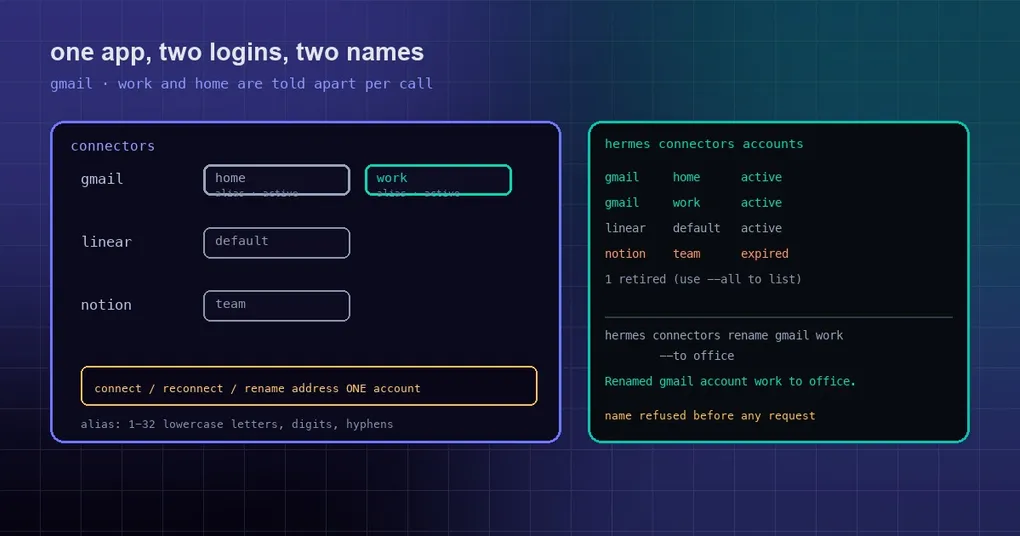
Nine in the morning: you ask Hermes in chat whether anything important landed in your inbox today. It opens the personal mailbox you made for a weekend toy project, and the client reply sitting in your work mail goes unseen. So you add “I meant the work one” — and the best it can do is answer “Gmail is connected”, because that is genuinely all it has.
The model was not being dense. Hermes used to know exactly one connected login per app, with no name on it and no second login to pick from.
One app, one account
Hermes reaches outside apps through connectors: the gateway hosts them as tools with names like connectors__gmail__SEND_EMAIL, which you find with tool_search and call with tool_call. In that model the old build assumed one account per app, and the consequences were concrete:
- A second Gmail login had no name the model could use, so it picked whichever account was newest;
reconnect gmailchecked the connector-wide “connected” flag. With one healthy account and one expired, it reported connected and repaired nothing;- An open connection card for Gmail was reused for any other Gmail connect request;
- Results never said which account a call ran under.
For one person on one machine that is merely annoying. Once the same gateway serves more than one person it turns into an access-control problem — the same wall the community hit in issue #15602, wiring one Hermes gateway to two people’s Gmail at the same time.
Accounts get a name: the alias
The new build gives each account a short name, called an alias in the wire format: 1 to 32 lowercase letters, digits or hyphens, starting with a letter or digit. An account without one is shown by the app’s own label.
The rule is simple: once an app has two active accounts, the gateway adds a connector_alias field to that connector tool’s schema, listing the names it can accept. The model passes one on the call:
tool_call  connectors__gmail__SEND_EMAIL
           {"connector_alias": "work", ...}
The result carries account back, and the live tool label renders as Gmail · send email (work). One glance tells you which identity sent the mail.
Alongside the name, a few other things changed:
manage_connectionstarget objects takealias(which account) andto(the new name), plus a newrenameaction. A call with an alias carries that one target; MCP targets refuse both fields;- connect with a name asks the gateway for that account: it adds a new one, or answers connected when an active account already holds the name;
- reconnect with a name reads that account’s own row instead of the connector-wide flag, so it repairs the broken one while the healthy one keeps working. If that row cannot be read, the tool reports the error instead of quietly minting a new account;
- status lists each connector’s accounts with alias, label, status and active.
The CLI: hermes connectors
A new command covers listing, connecting, renaming and removing:
hermes connectors list
hermes connectors accounts
hermes connectors accounts gmail --all
hermes connectors connect gmail --alias home
hermes connectors rename gmail work --to office
hermes connectors disconnect gmail --alias home --yes| Subcommand | What it does |
|---|---|
list (alias ls) |
Every connector and whether it is connected |
accounts [app] [--all] |
Connected accounts; retired rows are folded unless you pass --all |
connect <app> [--alias NAME] [--reconnect] [--force] |
Connect a new account; --reconnect repairs a broken one; --force signs a healthy one in again |
rename <app> <name-or-label> --to <new> |
Rename an account |
disconnect <app> [--alias NAME] [--yes] |
Remove an account; non-interactive stdin requires --yes |
Details worth knowing before you type them:
connectprints the login link and waits until the account settles or the deadline passes. Ctrl-C closes the open connect and exits 130, so the next connect of that app is not blocked;- A name that breaks the format, or that another live account of the same app already holds, is refused before any request goes out;
- With more than one account on an app, a command without
--aliaserrors out and lists the names you can choose from.
The /connectors overlay in the TUI
Type /connectors in the terminal UI and a floating overlay opens, one row per account showing app, name and status:
rrenames inline — Enter saves, Esc cancels;aadds an account: pick the app, type a name, open the link. The overlay waits until the account settles, the link expires, or the gateway refuses;creconnects the selected account. It never deletes anything, a healthy account answers “connected” at once, and an unnamed row asks you to name it first;xremoves the selected account after the TUI’s shared confirm prompt;- Tab shows or folds retired accounts, which cannot be reconnected while folded.
One conservative rule applies throughout: while any agent question or confirm is open, the overlay stops reading keys, so answering a prompt cannot delete an account by accident.
The desktop app
Under Capabilities → Connectors, each app now lists every account it has, with name, rename, add, reconnect and remove actions; removing goes through a confirmation. When the agent names a new account, the chat says which name it chose — for example “Hermes named this Gmail account work. Rename it anytime.” The agent picks the name; there is no name prompt to answer.
Caveats
- Nous Portal sign-in is required. Connectors are hosted tools, so
hermes logincomes first; without it the command tells you to sign in rather than failing with something cryptic. - Renaming waits on the Portal. Until the Portal ships the rename route,
renameanswers “This Nous Portal cannot rename connector accounts yet.” and the desktop editor shows that refusal and restores the old name. Everything else works. - Removing an account stays user-only. The CLI asks you to confirm, the desktop asks you to click. No automatic flow deletes an account for you.
- Status: this work (PRs #135097 / #135151 / #135173) merged to
mainon 2026-10-11. The current tagged release, v0.21.6 from October 8, does not contain it yet — it arrives with the next release. - Connectors only exist for signed-in Nous accounts, which is why
hermes connectors listcan answer “Connectors are not available. Sign in withhermes loginfirst.”
Wrapping up
“Use the work one” is now something the agent can actually act on: the account has a name, the model names it on the call, the result says which identity ran, and a repair touches only the broken account. Naming costs you one command and buys traceability on every outbound action — which matters far more than convenience when a machine holds both your work and your personal logins.
If the connector layer itself is new to you, start with how tool search works, then see where hosted tools come from in the official remote MCP catalog. Installing Hermes for the first time? The install guide is the place to begin.