Your Agent Was Clicking With a Stale Driver: cua-driver 0.21 to 0.52
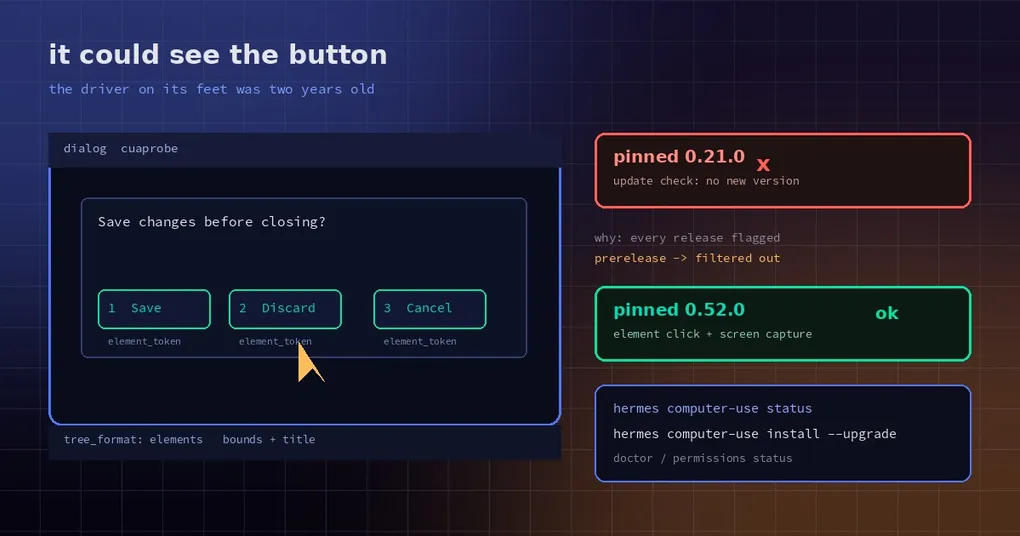
You ask Hermes to dismiss a dialog: “click the No button.” It captures the screen, says “I can see Yes and No” — and clicks somewhere else. You blame the model’s eyesight. The actual problem is under its feet: the desktop-control driver it drives, cua-driver, was still 0.21.0 while the world had moved to 0.52.
The stranger part is that it wasn’t refusing updates. Its update check never saw one.
An update check that always answered “nothing new”
cua-driver’s publisher, trycua, marks every cua-driver-rs-v* release on GitHub as a prerelease. Hermes filters prereleases out of its version lookup by default — sensible, since for most projects a prerelease means “don’t touch this yet.”
The result: upstream kept shipping, Hermes kept seeing an empty candidate list, and reported that no update existed. The 0.21.0 pin stayed nailed down for months.
The fix is narrow: the lookup now accepts prerelease-flagged releases from a publisher like trycua, while still excluding drafts, nightlies and sandbox tags. Everything else stays as it was — a candidate has to be at least three days old before it is adopted. That’s why the new pin is 0.52.0 and not 0.54.0; 0.53.x and 0.54.0 were less than 48 hours old. All six platform artifacts’ sha256 digests match the ones GitHub publishes.
New driver, changed tool contract
Swapping the binary is the easy half. In 0.52’s MCP tool list, click, double_click, scroll, type_text, set_value, press_key and hotkey have all dropped element_index and snapshot_id. They accept a new element token instead.
So if Hermes still sends element_index, the driver refuses it — roughly “I need an element_token, not a bare index.” A model that hits that refusal usually falls back to a pixel click, which looks like a recovery and isn’t: the dialog stays open, something else gets clicked, and you conclude the agent can see but not aim.
Two things changed with the pin:
- When the live schema only carries
element_token, Hermes sends only the token. - When it carries no token at all, Hermes refuses locally instead of sending a request that is guaranteed to be rejected — one round trip and one misclick saved.
Capture has to ask for elements, not markdown
The second silent regression is on the capture side. From 0.35 onward the driver’s default is a markdown description of the screen: pleasant to read, and completely free of element tokens. A model holding an unnumbered description can only say “I see the button.” It cannot click it.
Hermes now asks for tree_format: "elements" whenever the driver offers it, and gets back structured elements with bounds and tokens, plus the window title. On a real Qt dialog the old path returned elements and bounds; the new one also returns the window title, which is often the difference between “this is the dialog I meant” and “this is some other dialog.”
Full-screen capture came back at the same time. On KDE Wayland, capturing the whole screen (app="screen") used to fail outright with an X11 error ... GetImage; it now returns a normal 3840×2160 image. For tasks that start with “look at the whole desktop and decide,” that single line matters more than the version number.
Checking which driver you actually run
Driving a browser is a separate layer entirely — see the browser extension controller guide; the full upgrade flags live in the hermes update reference.
One command:
hermes computer-use statusIt reports whether cua-driver is on $PATH and which version is installed. If you see 0.21.0, you’re still on the old pin.
To move:
# Re-run the upstream installer and pull the latest release in place
hermes computer-use install --upgrade

# Or let the next Hermes update do it — it re-runs the installer at the end
hermes update
After upgrading, run hermes computer-use doctor to walk the platform checks; on macOS, hermes computer-use permissions status confirms the Accessibility and Screen Recording grants separately.
One exception you must know: if you set HERMES_CUA_DRIVER_CMD to point at your own binary, Hermes will never replace it. Updating is on you — either install a newer build at that path or unset the variable and hand control back.
A working install is left alone
The install path is deliberately conservative: a compatible 0.20.0-or-newer installation is kept as it is, and a plain hermes computer-use install won’t overwrite it. The installer only steps in when the version is too old or the installation is incomplete.
That’s also why this isn’t a risky every-launch operation. It’s explicit. You ask for the upgrade, you get the upgrade.
If you wrote computer-use prompts
Most prompts need no change — “click the No button” still works, because the model maps the description onto the captured elements itself.
What needs a second look are prompts that hard-code a number, like “click element 3.” The index is no longer the contract; the token is, and it can differ between captures. Referring to the thing by description and position is more stable than by number. Same story if you registered raw Cua MCP tools directly: escalate_session, get_session_state and set_config are gone in 0.52. Hermes never called them, but your own scripts may.
The lesson is bigger than a version bump
A dependency that never updates is harder to notice than one that breaks. Broken things throw errors. Stale things just keep performing mediocrely, and you blame the model: bad eyesight, bad aim, “it can’t see the button numbers.”
So when computer use starts acting strange, run hermes computer-use status before you rewrite a single prompt. Ten seconds on the version number beats half an hour of prompt tuning — and this time it was the actual cause.