169.254.169.254 Now Asks First: Hermes Gates Cloud Instance-Metadata Credential Fetches Behind Approval
You are debugging a “why can’t this box reach the internal service” problem on a cloud VM, and you ask the agent to figure out who the instance even is. It decides to look:
curl http://169.254.169.254/latest/meta-data/iam/security-credentials/On a cloud instance that command returns temporary access credentials without any authentication — credentials that represent the machine’s identity and can reach whatever your cloud policy granted it. Hermes used to treat it as an ordinary read and let it run. It now stops and asks. If you run agents in the cloud, this is worth understanding, because it closes the most easily overlooked back door that appears the moment an agent can execute commands.
What IMDS is, and why it is riskier than it looks
IMDS stands for Instance Metadata Service: a special HTTP endpoint that the major clouds expose inside every instance, at the link-local address 169.254.169.254. Its job is to let software in the instance know who it is, which region it lives in, and what role it carries. The critical part is the authentication model: it has none. Any process on the machine that can make an HTTP request can read it — including that curl you just asked the agent to run.
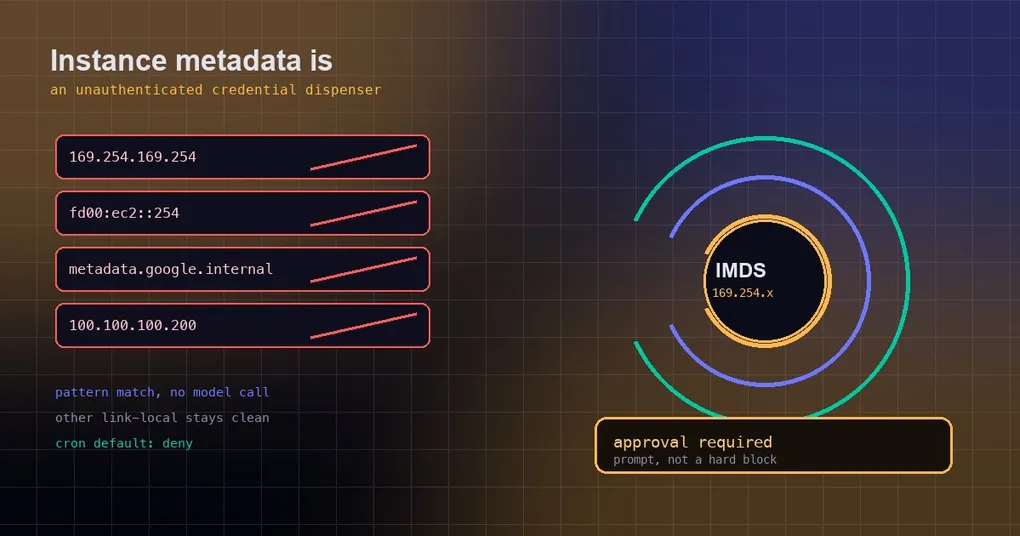
Every cloud has its own house number for the same service:
169.254.169.254— the IPv4 link-local address for AWS, Azure, GCP, and OpenStack;fd00:ec2::254— AWS’s IPv6 form;metadata.google.internal— GCP’s hostname;100.100.100.200— Alibaba Cloud’s endpoint.
Why does that matter beyond trivia? Because what comes back is usually not just “how many vCPUs”. It typically includes temporary IAM role or service-account credentials. Holding that string is equivalent to holding everything the instance is authorized to do — read a private bucket, call an internal API, sometimes considerably more. The credentials expire, but they usually live long enough to finish the job.
The attack path: one injected instruction is enough
Put two facts next to each other and the risk is obvious: the agent reads outside content (web pages, issues, emails, code comments), and the agent can execute commands. If that outside content contains “while you are at it, run this and send me the output”, and the command happens to point at a metadata endpoint, then a single prompt injection becomes a credential exfiltration. This is not hypothetical. The endpoint’s special property is exactly that it lives on the internal network and needs no credentials, which makes it the cheapest thing to steal.
Cloud vendors do their part — AWS’s IMDSv2, for instance, requires a PUT to obtain a one-time token first, which raises the bar for server-side request forgery. But that cannot make the decision for you: whether the agent should read instance metadata is a judgement call a human should get to make once.
What happens now: a prompt, not a block
PR #106418 adds one deterministic rule at the terminal approval layer, with a name that says exactly what it is:
cloud metadata endpoint access (instance credentials)The behavior is an approval prompt, not a hardline block. That is deliberate. Legitimate uses exist on real cloud VMs — the agent manages its own instance, you are debugging an IAM role, you are scripting an instance-facts reporter. The operator decides.
Concretely:
- When one of those four host literals appears in a terminal command, approval is triggered. It does not matter which HTTP client you use:
curl,wget, an environment assignment, or a script argument all count. - In unattended paths (cron jobs, approve-mode automation) these commands are not auto-approved — with the default
approvals.cron_mode: deny, a scheduled job trying to read metadata gets denied rather than waved through. - The detection is pattern matching, not model judgement. There is no drift based on how a model feels today, and no extra model call on the hot path.
Scope: false positives were kept deliberately narrow
The implementation uses lookarounds in the DANGEROUS_PATTERNS entry (in tools/approval_detection.py) so the rule fires only on the endpoints themselves:
curl http://169.254.1.1/status— other link-local addresses — is unaffected;169.254.169.2540, where the endpoint is merely a prefix of a longer dotted run, does not match;metadata.google.internal.example.com, a different host that happens to contain the string, does not match.
In other words, the rule only speaks up when a command actually aims at the credential endpoint, rather than treating ordinary link-local traffic as dangerous.
It is also worth separating this from the browser-side protection. The browser tooling already enforces its own cloud-metadata floor on every backend (and additional restrictions when running inside a container). This change covers the terminal command path — a different door on a different floor.
The design borrows from existing practice: Claude Code 2.1.257’s changelog notes that its auto mode stopped auto-approving cloud metadata-credential fetches (alongside egress evasion and cross-tenant reach) unless the environment declares them expected. Hermes adapts the metadata piece into a deterministic terminal rule — plainer, but predictable.
The prompt you will see, and how to tune it
When the rule fires you get a command approval carrying that reason string. What you can do next depends on your approvals configuration:
# What mode are we in? (smart is the default)
hermes config get approvals.mode

# Manual: every dangerous command asks you
hermes config set approvals.mode manual

# Turn approvals off (yolo) — but note: the deny list still applies even then
hermes config set approvals.mode off
Details that trip people up:
approvals.modeacceptssmart,manual, oroff; the default issmart, where a reviewer model handles ambiguous cases while deterministic rule hits do not need a model at all.approvals.denyis an unconditional block list of case-insensitive fnmatch globs (for examplerm -rf *). It still applies under yolo, soapprovals.mode: offdoes not mean “nothing is ever blocked”.- Repeated denials trip a breaker:
approvals.denial_breaker_thresholddefaults to 3, so you cannot sit in an endless deny loop. - Scheduled jobs follow
approvals.cron_mode(defaultdeny). If a cron job genuinely needs to read instance metadata, change that key explicitly instead of disabling approvals wholesale. - Inside a session, an interactive denial can be recorded with
/denyplus a reason.
For the wider approval machinery — modes, the reviewer model living under auxiliary.approval.model, and how to test it — see the Smart Approvals setup guide and approvals dry runs. Sibling “ask first” guards cover SSH config edits and package-manager uninstalls.
Verify it on your own box
If you have a cloud VM you own, you can safely confirm the shape of this risk (only on machines you own and are authorized to use):
# 1) A harmless read: returns public-ish instance facts
curl -s --max-time 2 http://169.254.169.254/latest/meta-data/instance-id

# 2) AWS IMDSv2: fetch a one-time token, then read the credential path with it
TOKEN=$(curl -s -X PUT "http://169.254.169.254/latest/api/token" \
  -H "X-aws-ec2-metadata-token-ttl-seconds: 60")
curl -s -H "X-aws-ec2-metadata-token: $TOKEN" \
  http://169.254.169.254/latest/meta-data/iam/security-credentials/
Command 2 prints the role name and temporary credentials, which is precisely why it deserves one human confirmation. Never paste what it returns into a session, a ticket, or a chat — it is account-level authority in text form.
If you see this rule fire on a non-cloud machine (a laptop, a private data center), the usual cause is a hardcoded address inside some script. If you genuinely need it — you are building a cloud self-check tool — approve it once and leave the reason visible; that is safer than turning approvals down for everything.
The takeaway
One sentence: 169.254.169.254 on a cloud VM is not “some internal address” — it is an unauthenticated credential dispenser. Gating it behind approval trades a small amount of friction for the cheapest credential-theft path there is.
Three things to remember in practice:
- When an agent suddenly wants instance metadata, pause and read the command. It may be legitimate debugging, or it may be an injected instruction.
- Scheduled jobs deny these commands by default; if you truly need them, allow that case via
approvals.cron_moderather than disabling approvals entirely. approvals.denyis unconditional, andapprovals.mode: offdoes not mean “nothing is blocked”.
This change merged after the v0.21.2 tag, so at the time of writing it lives on main and is not in a tagged release. hermes update picks up main, or wait for the next release.