No More Question Ping-Pong: Hermes Now Asks Up to 5 Questions at Once
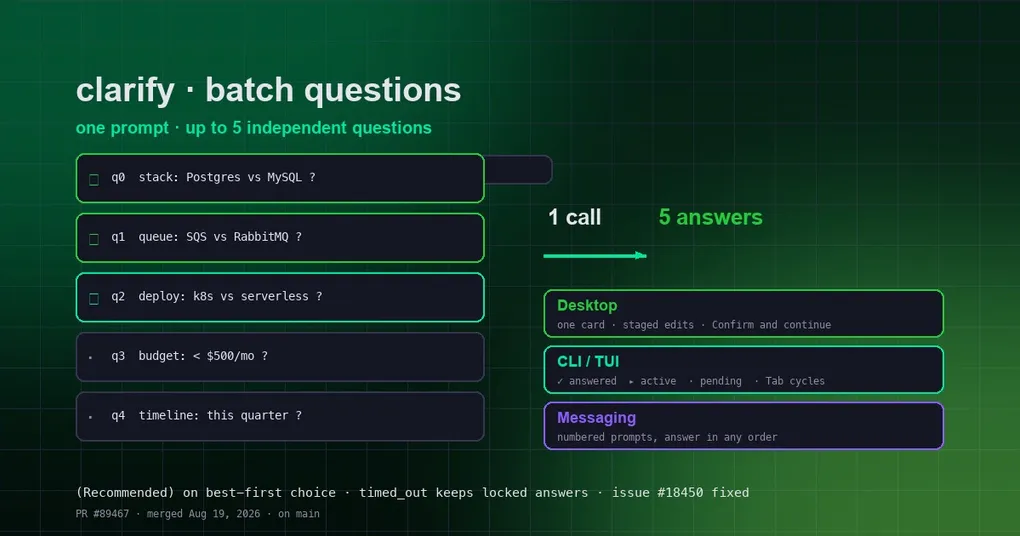
You ask Hermes to help plan a tech stack: database, message queue, deployment, budget, timeline… It settles one decision and pops a question. You answer. It settles another and pops another. Five questions, five interruptions, five minutes of ping-pong — even though the questions were independent and could have been asked in any order.
That friction is gone. Hermes’ clarify tool can now ask in batches: up to 5 independent questions in a single prompt, all answered in one screen, submitted once.
First, what clarify is
clarify is a built-in Hermes tool — think of it as “the act of asking the user a question.” Whenever the agent needs a decision, extra information, or a direction check, it calls this tool to prompt you. Before, it could only ask one question per call: even when it had five open questions, it had to ask, wait, ask, wait. Every extra round-trip meant one more interruption and one more pass of context spent.
Now clarify accepts an optional questions array: the agent can bundle 2–5 independent questions into a single call. This directly answers a real pain point from issue #18450 — previously the agent sometimes crammed multiple options into one composite question to save round-trips, and the choice combinations exploded exponentially. Now each question stands on its own.
On desktop: one card, one confirm
The desktop app renders the batch as a single card with every question laid out. You stage answers locally — pick choices or type responses, and everything stays editable until you’re done — then hit Confirm and continue, which submits the whole batch in one shot.
In the CLI and TUI: one status list
Classic CLI and TUI show the batch as a compact status list, so you can see at a glance what’s answered and what isn’t:
✓answered▸the active question·still pending
Enter locks the active answer and moves to the next unanswered question; Tab and Shift-Tab cycle through the questions (wrapping at the ends). A locked answer renders on its own indented line in a distinct color under its question — and revisiting a question restores your earlier selection, so corrections are one keystroke away.
What happens if you time out halfway
People walk away mid-question. In the old flow a timeout voided the whole round. Now the answers you already locked are kept: the tool result carries them with a timed_out flag, and unanswered entries stay blank. The agent can tell a deliberate skip from an absent user — and when it detects you’ve walked away, it aborts the remaining questions instead of pestering you one by one.
What’s that (Recommended) tag?
Notice the first choice in each list often carries a (Recommended) label. The agent orders choices best-first — the first option is the one it would pick itself — and every surface renders the same label. It’s purely presentational: the label is stripped from the answer the agent reads back, so it never leaks into the model’s reasoning.
What this means for your day-to-day
- Fewer interruptions: one prompt instead of five.
- Less context spent: every round-trip costs tokens; a batch costs one.
- Smoother big tasks: long jobs with multiple decision points (stack selection, plan review, config planning) no longer stall repeatedly.
Wrap-up
Batch clarify is one of those quiet upgrades you benefit from every day: it doesn’t extend Hermes’ capabilities, it just makes “confirming things with your agent” far less annoying. To try it, update Hermes and hand it a task that needs a few decisions from you — watch how it asks everything up front. The feature is merged on main and will ship with the next release.
If you like this “fewer interruptions” theme, you might enjoy our look at approval fatigue and how Hermes’ approval flow avoids constant poking, or our guide to keeping long-running tasks from stalling. New here? The install guide gets you up and running.