Give Hermes a time machine: search the web as it was with BackSearch
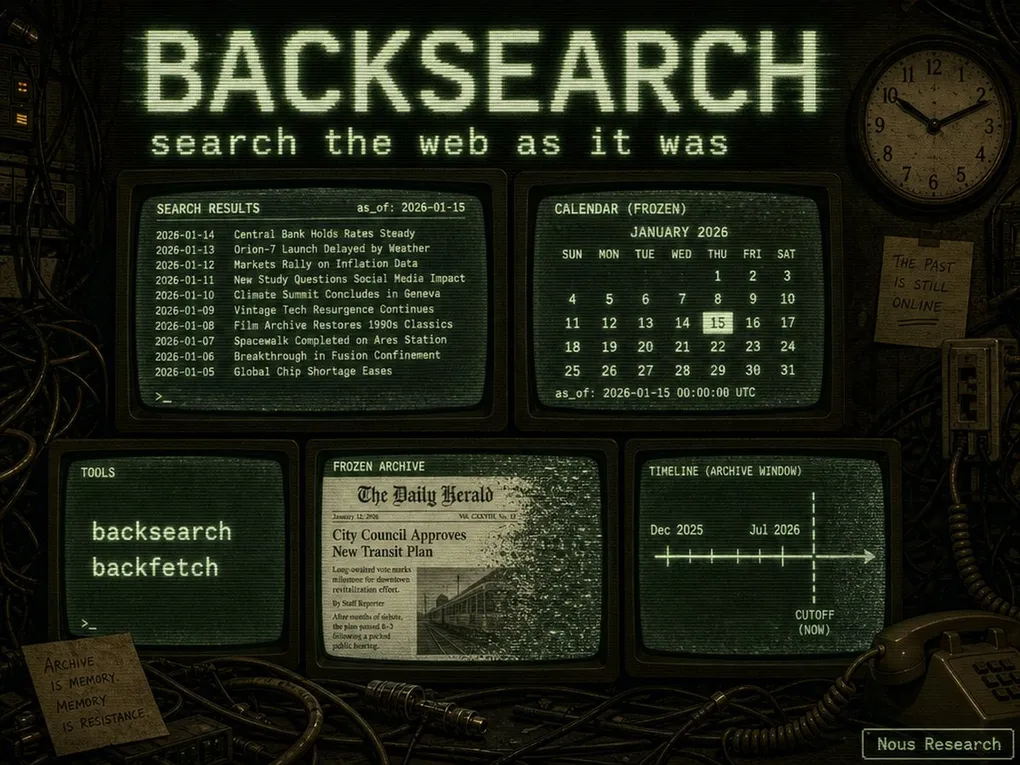
Picture this: you hand an LLM a forecasting challenge — “will this company ship the new product next month?” — and it answers with suspicious confidence. The problem? It searched the live web, which already knows the answer. Every “prediction” it makes is quietly contaminated by hindsight. Quant researchers hit the same wall: when you backtest a trading agent, the search results you feed it come from today, so your supposedly historical simulation is secretly peeking into the future.
This is the leakage problem, and it’s exactly what BackSearch was built to solve. It’s a frozen news archive: every request carries an as_of date, search only returns documents crawled on or before it, and fetch returns the article text as it was archived at that time. Same query + same as_of = same results, forever. On August 29, Nous Research’s Teknium announced the official standalone Hermes plugin for it — hermes-plugin-backsearch — giving Hermes agents a genuine time machine for web research.
Why a date filter isn’t enough
You might think a live search API with a date: parameter already does this. It doesn’t. Live APIs rank today’s index with hindsight — they know which articles mattered and hand you bytes of a page that may have been rewritten since the event resolved. BackSearch’s corpus, by contrast, never moves: search is constrained by crawl_date (when the archive actually captured a page), not by the article’s self-reported publish date. A page first archived after your cutoff is never returned, even if it claims an earlier publication date. That guarantee is what makes a backtest honest.
The official Hermes plugin
hermes-plugin-backsearch is an official plugin released under the NousResearch org (v1.0.0, MIT). It’s standalone, not bundled — it started life as PR #71207 in the main repo, then was extracted to its own repository per the project’s policy that third-party service integrations ship as plugins rather than core code.
The plugin registers two model tools, both gated on OPENREWARD_API_KEY. With no key configured they never reach the model’s tool schema, so the footprint is literally zero — you can install the plugin now and it costs nothing until you add a key:
| Tool | What it does |
|---|---|
backsearch |
Hybrid search over the frozen corpus as of a date (query, as_of, optional k, allowed_domains/blocked_domains) |
backfetch |
Fetch a page’s extracted text from the latest capture on or before the cutoff (url, as_of, optional prompt for a focused summary) |
Install
Three steps, straight from the official README:
# 1. Clone into the Hermes plugins directory
git clone https://github.com/NousResearch/hermes-plugin-backsearch.git ~/.hermes/plugins/backsearch

# 2. Enable the plugin
hermes plugins enable backsearch

# 3. Add the API key (get one at https://openreward.ai — it starts with or_)
echo 'OPENREWARD_API_KEY=or_...' >> ~/.hermes/.env
You can also install straight from GitHub with the CLI: hermes plugins install NousResearch/hermes-plugin-backsearch. New sessions pick the tools up automatically once the key is present — no restart dance. A quick note on honesty: this article is based on the official repository documentation (v1.0.0); we had not configured an OpenReward key on a test machine at the time of writing, so the behavior descriptions below reflect the documented semantics rather than a live session.
For a walkthrough of how Hermes discovers and manages plugins — including the hermes plugins commands used above — see the hermes plugins command reference. If you’re new to Hermes itself, start with the install guide.
Tool reference
backsearch
| Parameter | Meaning |
|---|---|
query |
The search query (hybrid — keyword + semantic) |
as_of |
Date in YYYY-MM-DD; only documents crawled on or before it are returned |
k |
Optional result count |
allowed_domains |
Optional whitelist — mutually exclusive with blocked_domains |
blocked_domains |
Optional blacklist — mutually exclusive with allowed_domains |
backfetch
| Parameter | Meaning |
|---|---|
url |
The page to fetch |
as_of |
Cutoff date; returns the latest capture on or before it |
prompt |
Optional — ask for a focused summary of a long article instead of raw text |
A few semantics worth knowing:
- 15K character cap on fetched text — pass a
promptto get a focused summary of a long article. - Soft 404: a fetch with no capture on or before the cutoff returns a recoverable “no capture” result and costs nothing.
- 402: an exhausted OpenReward balance returns an actionable error message.
- Archive window: the current preview covers news domains, December 2025 – July 2026. An
as_ofoutside the window returns an empty hit list — not an error. - Billing: per successful request against a prepaid OpenReward balance.
OPENREWARD_SEARCH_URLoverrides the base URL (https://search.openreward.ai) for testing and self-routing.
What you can actually do with it
- Forecasting backtests — replay the same agent across different
as_ofdates and measure exactly when its prediction flips. That’s the demo Teknium sketched on launch day: freeze the web, replay the agent, watch the moment it stops guessing and starts knowing. - Quant research loops — backtest strategy ideas against a corpus that can’t move under you.
- RL environments — evaluate agents on historical snapshots without post-cutoff leakage into the reward signal.
- Reproducible benchmarks — same query, same date, same results forever: a benchmark that can be re-run years later and still mean the same thing.
- Fact-checking “as of” claims — verify what was actually known (or not known) on a specific date.
Searching the web is already one of Hermes’s default superpowers — our guide to the five free search channels covers the everyday options. BackSearch is a different animal: it trades live freshness for historical determinism, which is precisely what evaluation and forecasting workflows need.
Limits worth knowing
The preview archive is deliberately narrow: news domains, December 2025 – July 2026. If your as_of falls outside that window, you get an empty result set rather than an error — so plan around the window. The service bills per successful request against a prepaid OpenReward balance (soft 404s are free), and the plugin does nothing at all until you configure the key. It’s a young, purpose-built tool for a young, purpose-built niche — and the plugin’s MIT license makes it easy to inspect exactly what it does before you install it.
The Hermes plugin ecosystem is growing fast — browse the ecosystem hub to see what else is out there.