Your Agent Wrote to Your Real crontab at 2am: Sandboxing HOME and cron
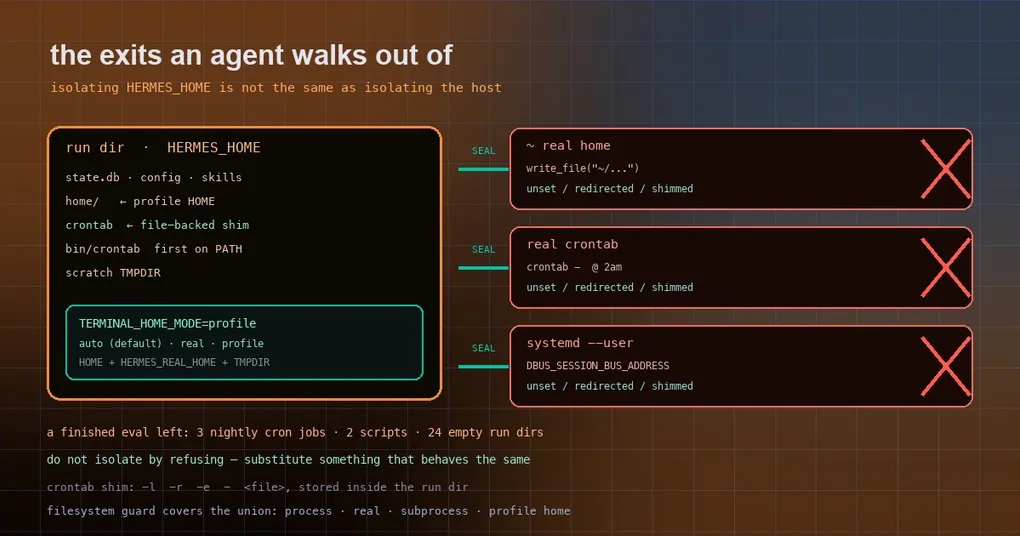
You hand an agent a perfectly ordinary eval task: “write a backup.sh and schedule it to run nightly at 2am.” The next day you look at the machine and crontab -l lists three jobs you never wrote, ~/.hermes/scripts/ holds two scripts, and the directories they point at were deleted long ago — so every night at 2am they fail, quietly, for months.
What broke was not the agent’s competence but an overly narrow reading of the word “sandbox.” The harness isolated HERMES_HOME, assumed Hermes’ own state was contained, and left the agent’s terminal children running as the operator’s user — writing to the real ~, scheduling in the real crontab, and touching the real systemd user manager.
The three exits that leaked
Everything Hermes owns lives under HERMES_HOME: the session database, config, skills, memory. Pointing HERMES_HOME at a temporary directory really does guarantee “clean when the run ends.”
Commands executed in the terminal are a different matter. When the agent runs bash -c '...', that child inherits the host environment:
| Exit | Consequence |
|---|---|
HOME pointing at the real home |
write_file("~/.hermes/scripts/x.sh"), appending to ~/.bashrc, touching ~/.ssh/... — all hit the real machine |
The system crontab command |
crontab - writes the operator’s actual schedule |
DBUS_SESSION_BUS_ADDRESS / XDG_RUNTIME_DIR |
systemctl --user reaches the real user manager and registers real user services |
Put those together and you get the absurd outcome: a finished eval run that keeps firing scheduled jobs forever. The fix PR (#132314) documents the scene on a dev box: three nightly cron jobs, two scripts in the real ~/.hermes/scripts/, and 24 empty /tmp/ab-* run directories.
The product already had the contract: TERMINAL_HOME_MODE
The interesting part of the fix is that it does not invent an isolation layer — it uses one Hermes already ships. TERMINAL_HOME_MODE decides whose HOME terminal children receive:
| Value | Meaning |
|---|---|
auto (default) |
Real HOME on hosts; {HERMES_HOME}/home inside containers |
real |
Always the real HOME |
profile |
Always pin HOME to {HERMES_HOME}/home |
(isolated and profile_home are accepted as aliases and normalize to profile.)
The source is worth reading for the precedence alone: get_subprocess_home() implements those decisions, and apply_subprocess_home_env() is where the work happens — it rewrites HOME to the profile home, records the real home in HERMES_REAL_HOME, and re-points the temp-directory variables at a scratch dir under HERMES_HOME. One environment variable, and both the “write a file” path and the “write a temp file” path land inside the profile.
There is a companion detail on the write-guard side: when deciding whether a path is a protected home, the guard takes the union of the process home, the real home, the subprocess home and the profile home. Otherwise you would get the perverse case where HOME is pinned to the profile but an absolute path write into the real home goes unguarded.
What the eval sandbox actually does
With the contract understood, the roughly 40 lines of sandbox code read plainly. Before any agent code runs, it does four things:
# evals/core_tool_deferral/sandbox.py (excerpt)
os.environ["HOME"] = home                      # 1. the process's own ~ points at the profile home
os.environ["TERMINAL_HOME_MODE"] = "profile"   # 2. terminal children follow
os.environ["PATH"] = bin_dir + os.pathsep + os.environ.get("PATH", "")  # 3. crontab shim first
for var in ("DBUS_SESSION_BUS_ADDRESS", "XDG_RUNTIME_DIR"):
    os.environ.pop(var, None)                  # 4. disconnect the systemd user bus
The crontab in step 3 is a ~10-line shell script that implements the real CLI surface — -l, -r, -e, reading from stdin or a file — while storing everything in a plain file inside the run directory. The agent gets identical feedback (crontab -l shows the jobs it scheduled) and the operator’s real schedule is not touched by a single byte. That is the most copyable idea here: do not isolate by refusing; isolate by substituting something that behaves the same.
Step 1 looks redundant and is not. Rewriting the terminal child’s HOME is not enough, because the write_file tool handed to the model expands ~ in-process — so the process’s own HOME has to move too, or write_file("~/.hermes/scripts/x.sh") still lands on the real machine.
As for those 24 /tmp/ab-* directories: no code change was needed. Hermes now exports TMPDIR pointing at its own scratch directory for every process, so a plain mkdtemp() already lands where it should; the leftovers predate that change.
What this means for your setup
If you run a single agent on your own laptop, you will likely never touch TERMINAL_HOME_MODE — auto keeping the real HOME on hosts is exactly what you want, since your scripts are meant to write into your own home directory.
Three scenarios genuinely need the setting:
- Evals and batch runs. You ask the agent to write a script and schedule it, and dozens of runs must not share machine state.
TERMINAL_HOME_MODE=profile(plus a crontab shim and the user-bus disconnect) is the floor, not the ceiling. - Multi-tenant or shared machines. Another profile’s agent writing into your home directory is not hypothetical. Beyond this variable, put the terminal on an isolated backend (Docker, SSH) so the agent cannot reach the operator’s filesystem at all.
- Unattended cron jobs. A gateway-launched job that touches
crontabwrites the real schedule too. Contain itsHOMEandPATHfirst.
A practical self-check: give the agent a read-only task — “list the current scheduled jobs” — and look at whether it reads your actual table or an empty run directory. That tells you more about your sandbox than any document will.
When you can get it
The sandbox fix merged to the main branch on October 3, 2026. The latest release is v0.21.5 (tag v2026.9.24), so the change itself is on main only — while the TERMINAL_HOME_MODE contract already exists in released versions and is usable today.
To go further, the sandbox and media delivery write-up covers the other side of the boundary; the worktree dirty-tree data loss post is the trap you hit when the agent touches your repository; and the terminal backend plugin guide shows how to move the terminal onto another backend entirely.
The short version
The lesson generalizes well beyond this fix: count exits, not directories. HERMES_HOME is Hermes’ own state; the home directory, crontab, the user bus and the temp directory are four operating-system exits, and missing one is enough to leak. If you write eval harnesses or run multi-tenant setups, TERMINAL_HOME_MODE=profile plus a behaviour-compatible crontab shim is the highest-value pair of changes you can make.