127.0.0.1 is not a security boundary: Hermes now teaches its A2A port to refuse browsers
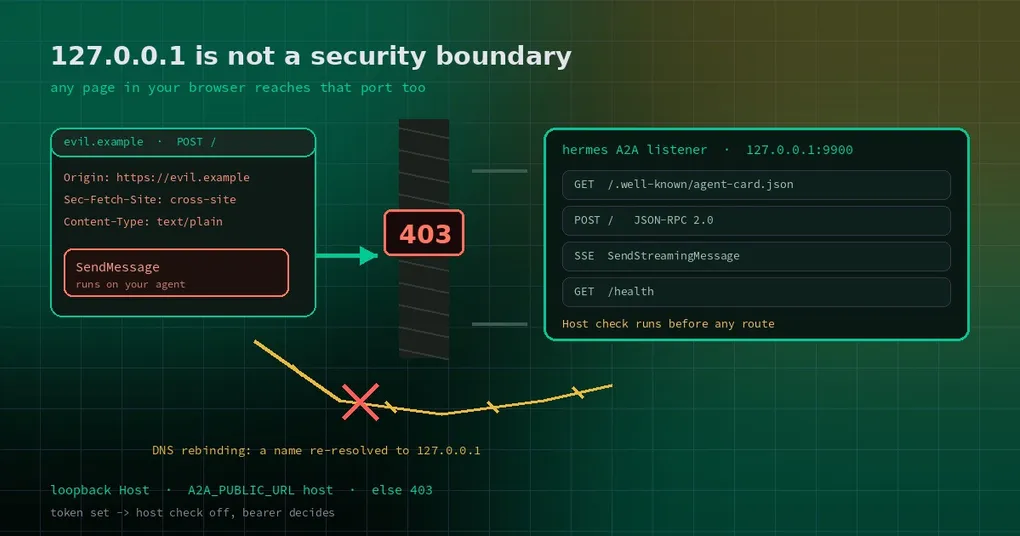
You followed the docs, turned A2A on, bound it to 127.0.0.1 on port 9900, and skipped the token — because “only this machine can reach it” already sounds safe. The next day you open some unfamiliar page in your browser and a script on it sends a request to http://127.0.0.1:9900/. You assume the browser will stop it. It will not: from the browser’s point of view, that page and that request are two ports on the same machine, and the request is perfectly allowed to leave.
The question was never “who can connect to this port”. It was “who can make your browser send this request for them”. A PR merged on October 27 (#145310) closes that hole: in no-token mode the A2A listener now refuses browser-originated POSTs and validates Host on every route.
What the default mode actually trusts
Hermes’s A2A platform works in both directions: your agent can call other A2A agents (an outbound toolset, off by default), and other agents can send tasks to your Hermes (the inbound listener). The inbound side starts like this:
gateway:
  platforms:
    a2a:
      enabled: true
      extra:
        port: 9900
With neither A2A_BEARER_TOKEN nor A2A_PEER_TOKENS set, the model is “no token ⇒ localhost only”: the server binds 127.0.0.1, and widening the bind requires a token and an explicit A2A_HOST. In a world of CLI processes and agents, that reasoning holds — trusting other processes on your own machine is reasonable.
It missed one class of process: the browser. A browser is not “a local program you trust”. It is a sandbox that loads the entire internet, and any page on it can post to 127.0.0.1:9900 as long as the request is a “simple request” — no preflight, no permission prompt.
Door one: refuse browser-originated POSTs
The check lives in plugins/platforms/a2a/security.py under a name that says what it does: browser_post_refusal(). In no-token mode, three shapes of request get a 403:
- an
Originheader is present — real agent clients and SDKs do not send it, browsers always do; Sec-Fetch-Siteis anything other thannoneorsame-origin— the browser labels which site the request came from;Content-Typeis notapplication/json(or a+jsontype) — a page can only skip the preflight with a handful of simple media types, and A2A speaks JSON-RPC, which is JSON by definition.
The third one is the cleverest cut, because it does not rely on the browser being honest about where the request came from. It requires the request to look like A2A. A page that wants to send JSON has to trigger a preflight, and the preflight is refused. Hermes’s own A2A client already sends application/json and none of those browser headers, so agent-to-agent calls are untouched.
Door two: the Host must be a loopback name
The second door guards a different attack: DNS rebinding. In plain terms: an attacker controls a hostname, first resolving it to their own server so you load a page from it, then setting a very short DNS TTL. A little later the page requests the same hostname again — and this time it resolves to 127.0.0.1. The browser still considers it the same site, so the same-origin policy no longer protects you, and the script can read whatever your local service returns.
The fix checks Host inside A2ARequestHandler.parse_request(), before any route runs: only loopback literals (localhost, 127.x.x.x, [::1], localhost.) and the A2A_PUBLIC_URL host are accepted. Everything else gets a 403 — not even /health or the Agent Card.
Why allow A2A_PUBLIC_URL? Because real deployments often sit behind a reverse proxy that forwards the hostname it received. A2A_PUBLIC_URL is you declaring “this service is called this out there”, so it is trusted — and the docs add the obvious caveat: only set it to a name you control.
Token-authenticated listeners are deliberately unaffected: once a token exists, the token decides who gets in. That is a division of labour, not an oversight.
Checking your own instance
Once you are on a build that contains the change, try three things from another machine or another process. First, a normal Agent Card fetch should succeed:
curl -s http://your-host:9900/.well-known/agent-card.json | head -20Second, a forged foreign Host should return 403:
curl -s -o /dev/null -w '%{http_code}\n' \
  -H 'Host: evil.example' \
  http://127.0.0.1:9900/.well-known/agent-card.json
Third, a POST carrying Origin should also return 403:
curl -s -o /dev/null -w '%{http_code}\n' \
  -X POST http://127.0.0.1:9900/ \
  -H 'Origin: https://evil.example' \
  -H 'Content-Type: application/json' \
  -d '{"jsonrpc":"2.0","id":1,"method":"SendMessage","params":{}}'
If the browser console shows a CORS error instead of a 403, the browser stopped it first — also fine, just a different layer.
Three things people get wrong
One: no token does not mean no permission model. Besides these two doors, A2A already carries a A2A_TRUSTED_PEERS allow-list, per-identity rate limiting (A2A_RATE_LIMIT, 60 requests per minute per identity by default), prompt-injection filtering on inbound text, credential redaction on outbound replies, and an audit log at ~/.hermes/a2a_audit.jsonl. One detail worth knowing: bind to a non-loopback address without setting A2A_TRUSTED_PEERS and every dispatch is refused with a 403. That is fail-closed behaviour, not a bug.
Two: for cross-machine work, use tokens. Do both things, in this order: set A2A_PEER_TOKENS (alice:tok1,bob:tok2, one credential per peer — far easier to debug than a shared secret), and only then set A2A_HOST. The bind address is not a permission; the token is. The same reasoning shows up in the dashboard login hardening work.
Three: do not improvise the public URL. A wrong A2A_PUBLIC_URL advertises a card pointing at an address peers cannot reach, and the symptom is “the other side keeps timing out”, not an error message. The full command and config surface is in the gateway command reference; if this is your first install, walk through the install guide before the A2A section.
Can you use it yet
The change merged to main on October 27. v0.22.5 shipped on October 23, so even the canary tags from that day do not contain it — you can check the timeline on the v0.22.5 release page. Wait for the next release, or track main.
One rule of thumb to keep, more useful than any config snippet: if a port is reachable from a web page in your browser, it is not “local only” — it is reachable by the whole internet, through your browser. Design local service security for that premise.