Hermex
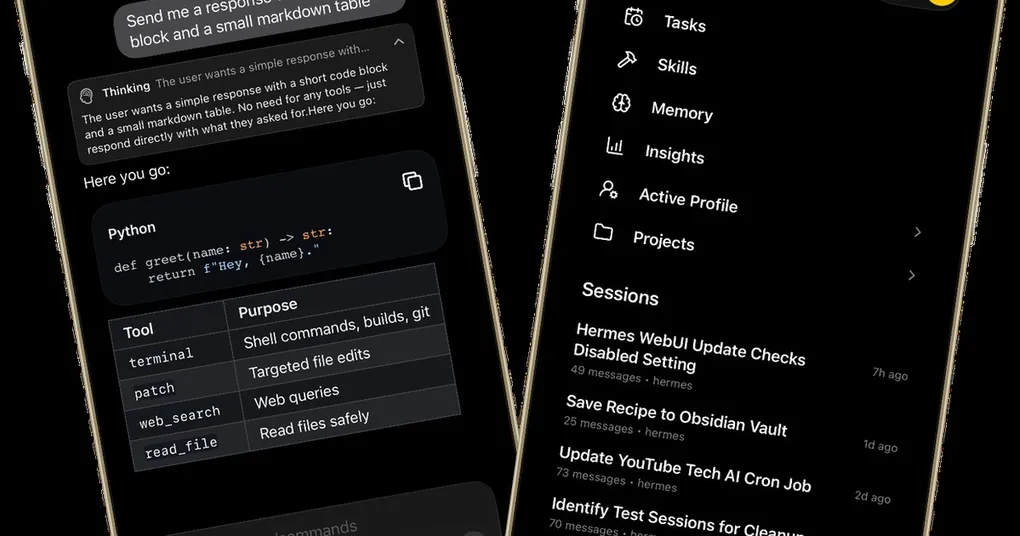
A native iOS client (SwiftUI, not a WebView) for self-hosted Hermes Agent: streaming chat, tool-call visualization, session management, Cron/Skills/Memory viewers, file uploads, and offline cache — backed by hermes-webui. Free with no IAPs, iOS 18+.
What Is It
Hermex is a native iOS client (SwiftUI, 1127★, by uzairansaruzi) that acts as a mobile cockpit for a self-hosted Hermes Agent. It is not a WebView wrapper — it talks to the upstream hermes-webui server (MIT) over HTTPS. Free on the App Store (id6767006319), no IAPs, no ads, no analytics: the app only talks to your server.
Requirements: iOS 18+, iPhone; you first deploy hermes-webui and expose it over Tailscale or a Cloudflare Tunnel with HTTPS.
Hermes Integration
- Talks to
nesquena/hermes-webui(default port 8787, SSE streaming, HMAC-signed cookie auth); - Production access via Cloudflare Tunnel (recommended) or Tailscale; the Tailscale
100.64.0.0/10range is allowed to use plain HTTP; - In the app, enter the server URL + password (
HERMES_WEBUI_PASSWORD) and connect.
Features (v1)
- Native streaming chat (SSE) with visible thinking / tool-call details
- Model, reasoning-effort, profile, and workspace switching
- Session management (create/rename/delete/pin/archive/move) and Projects
- Cron tasks (read-only), Skills browse/search, workspace file browser with syntax highlighting
- Memory and usage-insights read-only dashboards; SwiftData offline cache of recent sessions
Usage Tips
- Get
hermes-webuirunning before installing the app; HTTPS is a production requirement; - Remote-access priority: Tailscale > Cloudflare Tunnel > bare port (never expose the latter to the public internet);
- Great for “out and about, reply to a few messages, glance at task progress” use.
Who It’s For
iPhone users, self-hosting Hermes enthusiasts, and anyone who wants a native mobile experience rather than a browser tab.
← Back to Ecosystem