Hermes Workspace
A native web workspace for Hermes Agent — chat, terminal, memory browser, skills manager, and agent inspector in one polished interface.
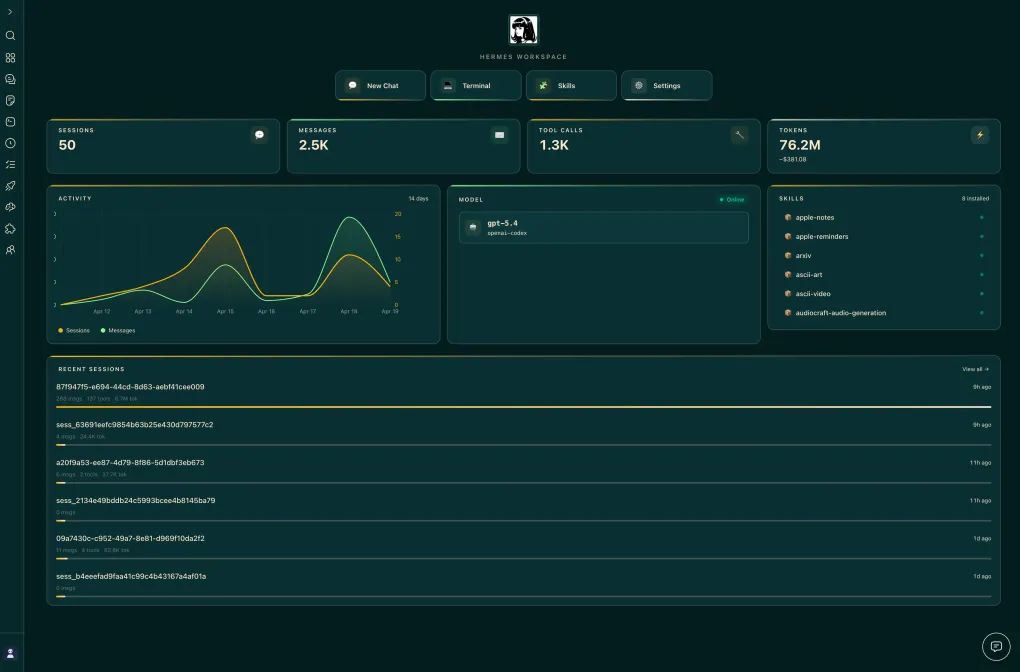
What Is It
Hermes Workspace is a community-built web workspace designed specifically for Hermes Agent. While the core agent lives in the terminal and messaging platforms, Hermes Workspace gives you a visual control room: a chat interface, an embedded terminal, a memory browser, a skills manager, and an agent inspector — all in a single React/TypeScript application.
It started as a Nous Research hackathon project and has grown into one of the most-starred community projects in the Hermes ecosystem, with 6,000+ stars and 1,000+ forks.
Key Features
| Feature | What it does |
|---|---|
| Chat | Talk to your agent through a modern chat UI instead of the raw CLI |
| Terminal | Run commands directly in the browser against your Hermes host |
| Memory browser | Inspect what your agent remembers — sessions, facts, and stored context |
| Skills manager | View, enable, and organize the skills in your Hermes library |
| Inspector | Observe the agent loop, tool calls, and internal state while it works |
The project is MIT licensed and self-hosted, so your data stays on your machine — consistent with Hermes’ privacy-first philosophy.
Getting Started
The project ships with setup documentation in its README. The typical flow is:
# 1. Clone the repository
git clone https://github.com/outsourc-e/hermes-workspace.git
cd hermes-workspace

# 2. Install dependencies and start the workspace
npm install
npm run dev
Then point the workspace at your running Hermes instance. From there you get a browser-based control panel for everything your agent is doing.
Why It Matters for Hermes Users
The biggest friction point for new Hermes users is that everything happens in a terminal or through messaging apps. Hermes Workspace closes that gap with a friendly, visual layer that makes the agent’s memory and skills tangible. If you want to show Hermes to a non-terminal person — or simply prefer a GUI for day-to-day operation — this is the first project to install.
Links
- Repository: github.com/outsourc-e/hermes-workspace
- Website: hermes-workspace.com