Hermex: Control Your Hermes Agent from Your iPhone
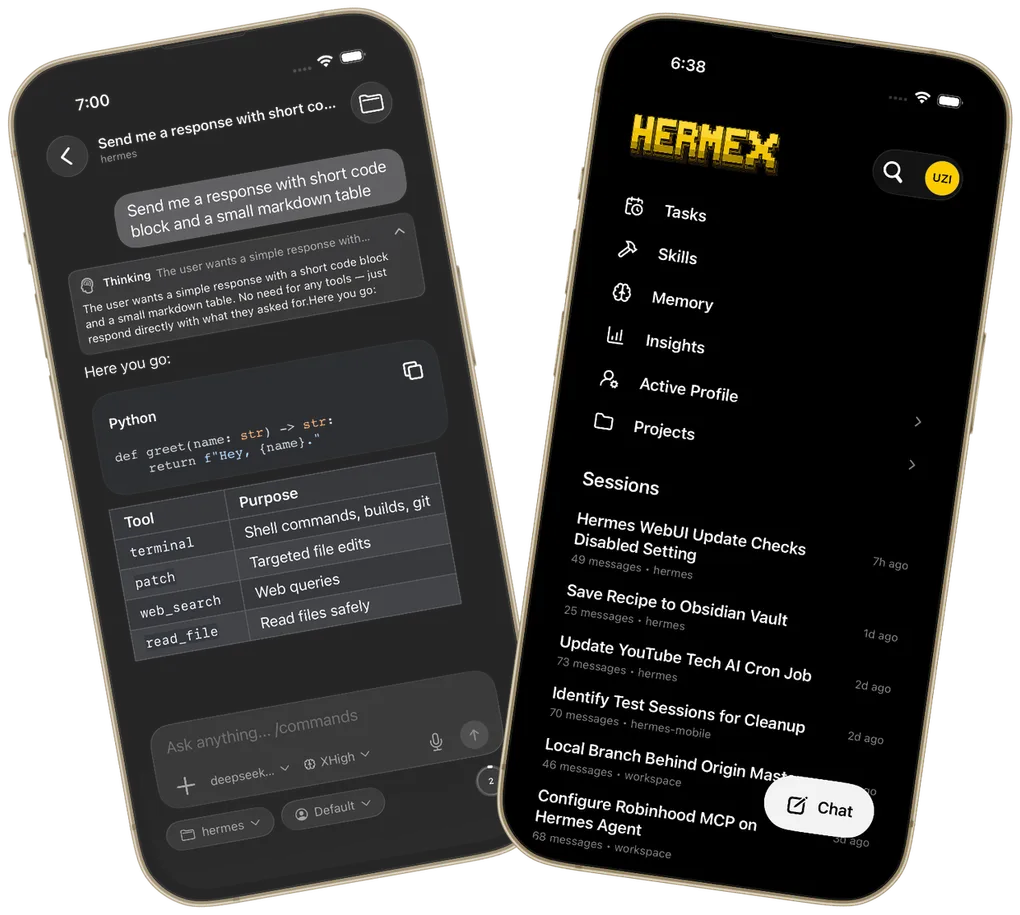
The self-hosted Hermes Agent experience has historically been chained to a desktop browser. You either sat at your Mac or opened a web panel remotely. It worked, but mobile always felt like a second-class experience: tiny input boxes, heavy reloads, interactions that seemed squeezed in from a desktop UI.
Hermex aims to change that. It is a native iPhone remote control for Hermes Agent, written in Swift and SwiftUI, that brings the self-hosted AI management experience to your phone.
It Is Not a Web Wrapper
The biggest — and most easily overlooked — selling point of Hermex is that it is a native app, not a WebView shell around hermes-webui packaged to look native.
That means:
- Streaming chat responses use native SSE rendering, not web polling
- The interface is redesigned for iOS 18 with a glass-forward aesthetic
- Login credentials live in the iOS Keychain, managed at the system level
- Session list, Tasks, Skills, and file browser are independent native views
- Read-only offline cache of recent sessions works without a network
In short, Hermex is not “a web page crammed into an app.” It is “Hermes capabilities rebuilt for mobile.”
Requires a Self-Hosted Hermes Server
Hermex does not host or run AI itself. It is a pure client. You need to run the Hermes WebUI service on a computer, NAS, or server you control (the upstream is typically nesquena/hermes-webui).
A typical setup looks like this:
Your iPhone
    ↓ HTTPS
Cloudflare Tunnel (or Tailscale)
    ↓ HTTP
hermes-webui running on 127.0.0.1:8787
    ↓ local calls
Hermes Agent + toolchain
The phone is only the control plane; compute and data stay on your own machine. This “phone as cockpit, computer as engine” pattern keeps the privacy benefits of self-hosting while adding mobile convenience.
Core Features
1. Native Chat + Visible Reasoning Chain
Hermex supports sending messages, attachments, and images, and viewing Agent output streamed in real time. More importantly, it preserves thinking and tool-call details — you can see what Hermes is reasoning, which tools it called, and why it chose that path.
For users used to the reasoning view in Claude or Cursor, this transparency feels familiar.
2. Model and Profile Switching
If your server is configured with multiple models or providers, Hermex lets you switch directly in the app:
- Switch models
- Switch reasoning effort
- Switch agent profiles
- Switch workspaces
No need to go back to the server to edit environment variables — just tap a few times on your phone.
3. Session Management
Create, rename, delete, pin, archive, and move sessions into projects. The Projects feature lets you organize conversations by work dimension instead of dumping them all into one list.
4. Tasks: Check Cron Jobs on the Go
Hermes Tasks are scheduled or recurring tasks. Hermex provides a read-only panel to review:
- Which tasks are running
- Next execution time
- Historical run status
When you’re out, a quick glance confirms your automation pipeline is still healthy.
5. Skills: Browse Installed Agent Skills
Hermes Skills are capability plugins. Hermex lets you view which skills are installed on the server, quickly search and browse them. While you cannot install them directly from the app yet, it is already handy for mobile inventory and sharing lists.
6. Workspace File Browser
Agents generate and modify files as they work. Hermex includes a file browser that lets you:
- Browse the working directory structure
- Open text files
- View code with syntax highlighting (Splash for Swift, Highlightr for everything else)
No need to SSH back into the machine or open a desktop editor — you can review results on the subway.
7. Memory & Insights: Read-Only Dashboards
- Memory: view knowledge the agent has remembered
- Insights: view token consumption, usage statistics, and other analytics
For anyone who wants to observe long-term agent behavior and optimize costs, these are the two most useful mobile panels.
Deployment: Three Connection Modes
Hermex supports three connection paths, ranked by recommended security level:
| Method | Use case | Security note |
|---|---|---|
| Cloudflare Tunnel | Recommended, public domain with real TLS | Set a strong HERMES_WEBUI_PASSWORD |
| Tailscale | No public exposure, direct virtual LAN | Best for users already on Tailscale |
| Local simulator | Development testing, server and app on the same Mac | Only for http://localhost:8787 |
Setup Steps (Cloudflare Tunnel)
- Start
hermes-webuion macOS/Linux/Windows:
export HERMES_WEBUI_PASSWORD="your-strong-password"
python server.py- Use Cloudflare Tunnel to expose local
http://127.0.0.1:8787to a public domain. - Download Hermex on your iPhone, enter the server URL and password, and connect.
Tech Stack: Why Native Swift
Hermex’s README and project spec are clear about the stack:
- UI framework: SwiftUI, iOS 18+
- Networking: native
URLSession - SSE streaming:
LDSwiftEventSource - Markdown rendering:
swift-markdown-ui - Syntax highlighting:
Splash+Highlightr - Local cache: SwiftData
- Credential storage: Keychain
This keeps the app lightweight and avoids heavy third-party UI libraries, matching the “small team, high control” ethos.
Relationship to Upstream
Hermex is an independent community client, not affiliated with Hermes or the hermes-webui project. It talks to the server via upstream HTTP + SSE APIs and actively verifies endpoint behavior.
The project spec states:
“Do not invent endpoints — verify them against the running server.” “The wire format is the source of truth.”
That pragmatic attitude is commendable: don’t invent interfaces, don’t fork the upstream, just do what a client should do.
Who Should Use Hermex
Hermex is not for everyone. It is best for:
- Users who already run a self-hosted Hermes Agent
- People who want to check or intervene on an agent while away from their desk
- Mobile users who demand native experience and refuse to use a browser workaround
- Technical managers who need agents to keep running while they monitor status from their phone
If you have not self-hosted Hermes yet, Hermex will not host it for you. It is more like an extension that moves existing capabilities from the desktop to your pocket.
Key Takeaways
- Hermex is a native iOS client for Hermes Agent, not a web wrapper.
- You bring your own
hermes-webuiserver; it connects via Cloudflare Tunnel or Tailscale. - Core features: native chat, reasoning view, model/profile switching, session management, Tasks, Skills, workspace file browser, Memory and Insights dashboards.
- Credentials are stored in Keychain; read-only offline cache is supported; requires iOS 18+.
- Best for users already running Hermes who need a mobile control surface.
References: