Wire Up Hermes Webhooks: Let Your Business Systems Push Alerts to Telegram, Discord, and Slack
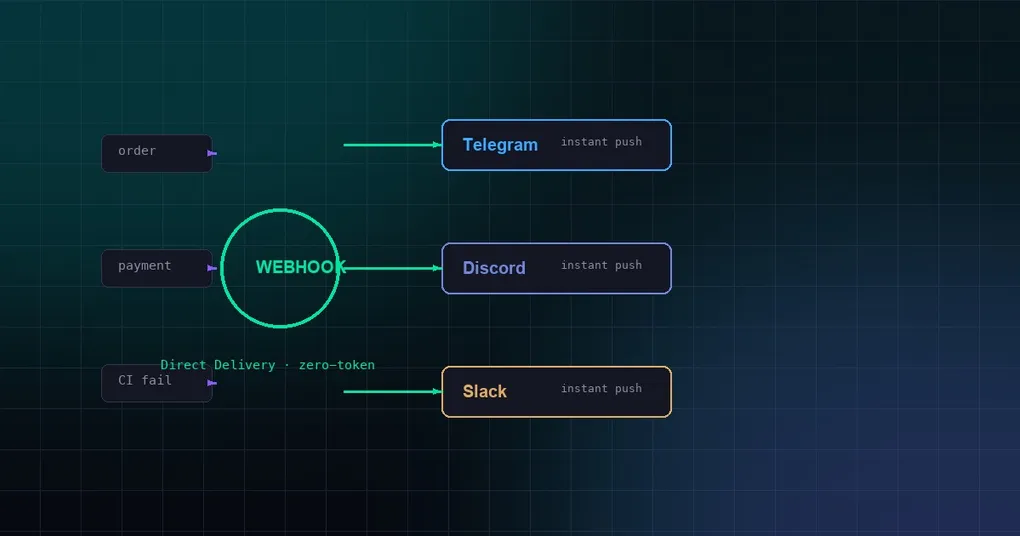
Most business systems eventually need the same automation: when an order status changes, a payment succeeds, a monitor fires, or a CI pipeline finishes, post a message to a team channel. The quickest first version is usually a script that polls a database or API and then drops the message into Telegram, Discord, Slack, or another chat platform.
Polling works, but it has real long-term costs:
- Latency and API quota. Scanning every minute means most requests return nothing; moving to second-level polling multiplies API pressure and cost.
- Coupling. The business system ends up hard-coded with message templates and chat-platform tokens. Switching channels or groups requires a code change.
- Extensibility. The same alert might need to go to Telegram, Slack, or be summarized by an AI first. Polling scripts grow complex quickly.
Hermes Agent ships with a webhook platform — an HTTP event receiver. Your business system POSTs an event, Hermes validates the signature, renders a template, and pushes the message to whatever chat platform you configured. If the event is a pure notification that does not need AI reasoning, you can enable Direct Delivery mode: no LLM call, no agent loop, sub-second delivery, and zero token cost.
This post is a practical guide to wiring business systems to Hermes webhooks: enabling the platform, configuring routes, three complete real-world scenarios, and security hardening.
Two modes: Agent processing vs. Direct Delivery
Hermes webhooks support two delivery paths. Picking the right one matters.
| Mode | Calls LLM? | Best for | Latency | Cost |
|---|---|---|---|---|
| Agent processing | Yes | Events that need understanding, summarization, or a decision before replying/forwarding | Seconds | Token cost |
| Direct Delivery | No | Pure notifications: orders, payments, alerts, CI status | Sub-second | Zero LLM cost |
Direct Delivery is the focus here. The flow is simple:
- The business system signs and POSTs a JSON payload to
https://your-server:8644/webhooks/<route-name>. - Hermes validates the HMAC signature to confirm the sender is trusted.
- A template renders the JSON fields into a readable message.
- The message is delivered directly to Telegram, Discord, Slack, Feishu, etc., and Hermes returns
200 OK.
No LLM is involved, so speed, cost, and reliability are closer to a traditional message gateway — but configuration and extensibility stay as flexible as the rest of Hermes.
Step 1: Enable the webhook platform
You can enable webhooks via environment variables for a quick start or via config.yaml for long-term deployments.
Environment variables (fastest)
Add these lines to ~/.hermes/.env:
WEBHOOK_ENABLED=true
WEBHOOK_PORT=8644        # default
WEBHOOK_SECRET=your-global-secret
Restart the gateway:
hermes gateway restartConfirm the server is listening:
curl http://localhost:8644/healthA response of {"status": "ok", "platform": "webhook"} means it is up.
Config file (recommended for production)
Declare the platforms.webhook block in ~/.hermes/config.yaml:
platforms:
  webhook:
    enabled: true
    extra:
      port: 8644
      secret: "your-global-secret"
After restarting the gateway, Hermes listens on port 8644. If the server is on the public internet, make sure the firewall allows that port. If it is behind NAT or has no public IP, expose it with a Cloudflare Tunnel or ngrok.
Step 2: Configure a business notification route
Routes live under platforms.webhook.extra.routes. Each route has a name, event filter, secret, message template, and delivery target. Below is a complete e-commerce order notification example that pushes new orders to Telegram.
platforms:
  webhook:
    enabled: true
    extra:
      port: 8644
      secret: "global-fallback-secret"
      routes:
        order-notify:
          events: ["order.created"]
          secret: "shopify-webhook-secret"
          prompt: |
            🛒 New order #{order.id}
            Amount: {order.total_price} {order.currency}
            Customer: {order.customer.email}
            Item: {order.line_items[0].title}
          deliver: "telegram"
          deliver_only: true
          deliver_extra:
            chat_id: "-1001234567890"
Key points:
eventsis optional. If your business system sends an event type viaX-Webhook-Eventorevent_type, you can restrict the route toorder.created.secretis used for HMAC signature validation. If the route has no secret, it falls back to the globalsecret.deliver_only: trueenables Direct Delivery and skips the LLM.promptis a template. Use dot notation like{order.total_price}to access JSON fields.{__raw__}dumps the whole payload.deliver_extra.chat_idtargets a specific group. If omitted, Hermes delivers to the platform’s configured home channel (which requires that platform to be enabled and connected).
Step 3: Send events from your business system
Your business system POSTs to the correct URL. For the example above:
POST https://your-server:8644/webhooks/order-notifyUse Generic V2 signing: concatenate timestamp.body, compute HMAC-SHA256, and send it in the X-Webhook-Signature-V2 header along with X-Webhook-Timestamp. The timestamp window is ±300 seconds, which blocks replay attacks.
import hmac
import hashlib
import time
import json
import requests

secret = b"shopify-webhook-secret"
body = json.dumps({
    "event_type": "order.created",
    "order": {
        "id": 10086,
        "total_price": "199.00",
        "currency": "USD",
        "customer": {"email": "[email protected]"},
        "line_items": [{"title": "Hermes sticker pack"}]
    }
}).encode()

timestamp = str(int(time.time()))
signature = hmac.new(secret, f"{timestamp}.{body.decode()}".encode(), hashlib.sha256).hexdigest()

requests.post(
    "https://your-server:8644/webhooks/order-notify",
    data=body,
    headers={
        "Content-Type": "application/json",
        "X-Webhook-Signature-V2": signature,
        "X-Webhook-Timestamp": timestamp,
    }
)
GitHub and GitLab signatures are also auto-detected. For custom business systems, prefer Generic V2.
Step 4: Test the route
You do not need to wait for the business system to go live. Test locally first:
hermes webhook test order-notify \
  --payload '{"event_type":"order.created","order":{"id":10086,"total_price":"199.00","currency":"USD","customer":{"email":"[email protected]"},"line_items":[{"title":"Hermes sticker pack"}]}}'
hermes webhook test simulates a POST so you can verify template rendering and delivery. If the message does not arrive, check gateway.log or run hermes gateway run in the foreground to see whether the signature failed, the event was filtered, or the delivery target is not connected.
Scenario 1: E-commerce order notifications → Telegram
The order-notify example above is already complete. A few details worth highlighting:
- Telegram group
chat_idvalues are usually negative and start with-100. - To target a specific forum topic, add
message_thread_id: "42"indeliver_extra. {order.line_items[0].title}only shows the first item. To list everything, either preprocess the payload in the business system or use agent mode with{__raw__}and let the LLM summarize.
Scenario 2: Payment success → Discord
Payment systems like Stripe already emit webhooks. Map Stripe’s success event to a Discord message:
routes:
  payment-success:
    events: ["payment_intent.succeeded"]
    secret: "stripe-webhook-secret"
    prompt: |
      💰 Payment received: {amount} {currency}
      Order: {metadata.order_id}
      Customer: {receipt_email}
    deliver: "discord"
    deliver_only: true
    deliver_extra:
      chat_id: "123456789012345678"
Stripe sends type rather than event_type. If Hermes does not recognize the event header, either wrap the payload in your business system or leave events empty and use filters:
routes:
  payment-success:
    secret: "stripe-webhook-secret"
    filters:
      - field: "type"
        equals: "payment_intent.succeeded"
    prompt: "..."
    deliver: "discord"
    deliver_only: true
Scenario 3: Monitoring alerts → Slack
Grafana, Datadog, or any custom monitor can POST alerts. Push only critical alerts to Slack:
routes:
  critical-alert:
    events: ["alert"]
    secret: "monitoring-webhook-secret"
    filters:
      - field: "severity"
        equals: "critical"
    prompt: |
      🚨 Critical alert
      Service: {service}
      Metric: {metric}
      Current value: {current_value}
      Threshold: {threshold}
    deliver: "slack"
    deliver_only: true
    deliver_extra:
      chat_id: "your-slack-channel-id"
Slack must be enabled and connected in the gateway. If you only use Slack for webhook notifications, you do not need it as your primary chat platform; just configure platforms.slack with a home channel or specify the chat_id in deliver_extra.
Advanced: filter and transform payloads with scripts
If the business system’s JSON is messy or you only want to notify under specific conditions, write a preprocessing script. Scripts must live under ~/.hermes/scripts/; relative paths resolve there.
# ~/.hermes/scripts/alert-filter.py
import json
import sys

payload = json.load(sys.stdin)
if payload.get("severity") != "critical":
    print("[SILENT]")
    raise SystemExit(0)

payload["body"] = f"{payload['service']} critical: {payload['metric']}"
print(json.dumps(payload))
Reference it in the route:
routes:
  critical-alert:
    events: ["alert"]
    secret: "monitoring-webhook-secret"
    script: "alert-filter.py"
    prompt: "{body}"
    deliver: "slack"
    deliver_only: true
JSON stdout replaces the payload; plain text stdout is injected as script_output; empty output or [SILENT] causes Hermes to ignore the webhook.
Security: do not rely on HMAC alone
HMAC proves the sender is trusted, not that the payload contents are safe. PR titles, issue bodies, order notes, and alert messages are authored by third parties and could carry injected instructions. So:
- Isolate the runtime. If the webhook is exposed to the internet, run the gateway with a Docker or SSH terminal backend; do not expose the host directly to events.
- Direct Delivery is inherently safer. Because it skips the LLM, there is no prompt-injection risk that could trigger agent actions.
- Scope the toolset. If a route must enter agent mode, disable dangerous tools like
terminalandfilefor that route. - Keep approvals on. If the webhook-triggered agent needs to run commands, leave approvals enabled so injected instructions cannot execute unattended.
- Template narrowly. Avoid abusing
{__raw__}; only include the fields you need inprompt.
Hermes also ships with guardrails: 30 requests per minute per route by default, a 1 MB body-size limit, and a 1-hour idempotency cache. These defaults are enough for most notifications, but you can tune them in extra:
extra:
  rate_limit: 60
  max_body_bytes: 2097152
Troubleshooting checklist
| Symptom | Likely cause | What to check |
|---|---|---|
| Business system POST fails | Port/firewall not open | curl http://your-server:8644/health |
| 401 Unauthorized | Signature mismatch | Check secret and HMAC algorithm; read gateway logs |
| 200 OK but no message | Event type mismatch | Check the events list and the event_type field |
| Duplicate messages | Retries + idempotency miss | Ensure the sender sends X-Request-ID or X-GitHub-Delivery |
| Template variables not expanded | Wrong field names | Iterate with hermes webhook test |
Dynamic subscriptions vs. config-file routes
Besides static routes in config.yaml, you can create subscriptions dynamically via CLI:
hermes webhook subscribe order-notify \
  --events "order.created" \
  --prompt "New order #{order.id}, amount {order.total_price} {order.currency}" \
  --deliver telegram \
  --deliver-chat-id "-1001234567890" \
  --deliver-only \
  --description "E-commerce order notifications"
Dynamic subscriptions are stored in ~/.hermes/webhook_subscriptions.json and hot-loaded by the gateway — no restart required. Static routes with the same name take precedence. For the full command reference, see our hermes webhook command page.
Summary
Hermes’s webhook platform is not a chatbot; it is an event-driven message router. For business systems, its main value is:
- Turning polling into push, saving API quota and cutting latency.
- Centralizing message templates and delivery targets in Hermes, so changing a chat platform or group does not require a business-system deploy.
- Direct Delivery mode for zero-token, sub-second notifications.
If you already run Hermes for daily tasks, adding a webhook endpoint is almost free: the same gateway is already running, it just listens on one more port. Your business systems can start speaking proactively, and you decide what they say and where they say it.
New to Hermes? Start with the install guide. For the full webhook command reference, see hermes webhook command page. If you are interested in event-driven automation, also read our cron script-only guide and yolo mode explainer.