The 420-second wall: why long Hermes commands died before their own timeout
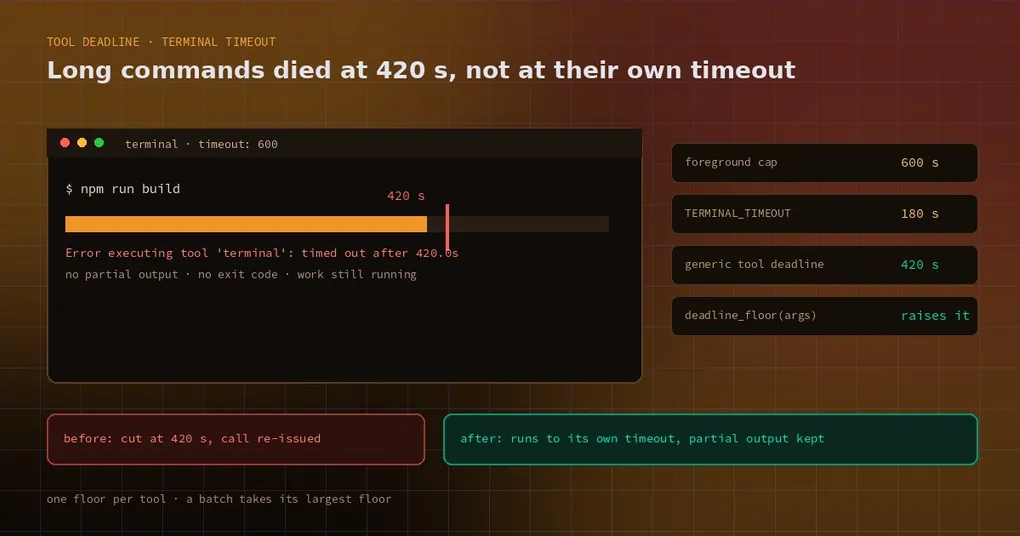
It is 11pm and the test suite finally matters. You ask the agent to run it, explicitly pass timeout: 600 because you know it takes eight minutes, and go make tea. You come back to an error that says the call timed out after 420 seconds — no partial output, no exit code, nothing to tell you which test hung. So the agent helpfully runs the same command again, from the top, and you lose another seven minutes.
If that number, 420, looks arbitrary to you, that is because it is: it was a generic safety deadline for every tool call, and it had no idea that terminal had been explicitly told to allow ten minutes.
Two deadlines, and the wrong one wins
Hermes bounds every tool call with a generic deadline so one wedged tool cannot hang a session forever. That deadline is 420 seconds (_DEFAULT_CONCURRENT_TOOL_TIMEOUT_S in agent/tool_executor.py), and it can be tuned with timeouts.tools.sequential_call or timeouts.tools.concurrent_batch in config.yaml.
Then terminal has its own timeout, which is a different thing entirely:
- The tool schema advertises a 600-second foreground cap (
FOREGROUND_MAX_TIMEOUT, overridable throughTERMINAL_MAX_FOREGROUND_TIMEOUT), and tells the model to set it high for long tasks, promising the call returns instantly when the command finishes. - With no explicit
timeout, it falls back toTERMINAL_TIMEOUT, default 180 seconds.
For years those two numbers coexisted peacefully for short commands and collided for long ones. A call with timeout: 600 is supposed to block for up to ten minutes. The generic guard fires at seven. The generic guard is applied outside the tool, so it wins — and it wins ugly: the executor returns Error executing tool 'terminal': timed out after 420.0s, discarding the partial output and the exit code, because the tool itself never got to return anything.
The model’s reaction is predictable and expensive: it re-issues the same call. On one maintainer’s install, 153 terminal calls across 128 sessions died exactly this way, all of them with requested timeouts between 400 and 600 seconds, and 116 of those were inside subagents — where nobody is watching the screen to notice the loop.
The fix: tools declare how long they block
PR #137243 (a salvage of #117907, fixing #117906) adds one small concept to the tool registry:
ToolEntry.deadline_floor(args) -> seconds | NoneA tool can now declare, per call, how long it legitimately blocks the worker. Both executors — sequential and concurrent — take that floor and raise the generic deadline to floor + 5 seconds. The floor can only lengthen a deadline. It never shortens one, and it never introduces a deadline where the configuration says 0 or “disabled”. That asymmetry is deliberate: a tool being honest about its runtime must never be able to remove a safety bound.
terminal declares, for a foreground call, timeout if you passed one, otherwise TERMINAL_TIMEOUT. Two cases declare nothing, on purpose:
- Background spawns return immediately, so there is nothing to wait for.
- Over-cap foreground timeouts are promoted to background by the execution planner, so they also return at once.
process_manage declares its wait window, and the number comes from tools/process_registry_wait.py — the same module ProcessRegistry.wait uses, so the advertised floor and the actual wait cannot drift apart. And a parallel tool batch takes the largest floor among its members, because the batch is only done when its slowest legitimate call is done.
What it looks like in practice
Before and after, on a real agent with the generic deadlines scaled down to six seconds so the failure is visible in seconds instead of minutes:
| Call | Before | After |
|---|---|---|
foreground sleep 9; echo SEQ-DONE, timeout: 15 |
timed out after 6.0s, no output |
SEQ-DONE, exit 0 |
| parallel batch of two 9 s commands | both timed out after 6.0s |
both returned their output, exit 0 |
process_manage wait on a 9 s background job |
timed out after 6.0s |
exited, output BG-DONE |
The real-world version of that table is the eight-minute test suite finishing, with its output, instead of a 420-second error and a retry.
What the fix does not change
A few things stay exactly as they were, and knowing them saves you a wrong diagnosis:
- The generic deadline is still 420 seconds for every tool that does not declare a floor. This is not “timeouts are now infinite”.
- The 600-second foreground cap still applies. Ask for 900 and the call is promoted to background instead of blocking the worker for fifteen minutes.
timeouts.tools.sequential_callstill wins over the default. If you deliberately set it lower than a tool’s declared runtime, the tool’s floor raises the generic deadline but your configured value is still resolved first — check that value before blaming the terminal tool for stopping early.- A command that genuinely hangs still dies. It dies at its own timeout now, with whatever partial output it produced, which is the outcome you want.
The user-facing documentation gained one row in website/docs/user-guide/configuration.md, on TERMINAL_TIMEOUT: a foreground command runs to this window even when it exceeds the generic per-tool deadline, so the tool’s own timeout fires and returns partial output.
How to set long-running commands up properly
If you routinely run builds, test suites or data jobs that take minutes, three settings matter and they are easy to confuse:
1. The call’s own timeout. Pass it explicitly when you know the job is slow:
terminal(command="npm run test:e2e", timeout=540)Anything above the 600-second foreground cap is promoted to a background process, which is usually the better shape for a ten-minute job anyway.
2. The default for calls that omit it. TERMINAL_TIMEOUT (default 180) is what a plain terminal call gets. If your projects routinely need four minutes, this is the knob to raise, not the per-tool generic deadline.
3. The generic deadline, only if you have a reason. timeouts.tools.sequential_call bounds every non-declaring tool. Raising it weakens the guard for all of them, so prefer the first two knobs.
For work that outlives a single turn, a background process with notify=true is still the right pattern — the agent returns immediately, and the completion notice arrives as a new turn. That path was never broken by the 420-second wall, because a background spawn does not block. Our posts on background work and failure notices and raising the iteration ceiling cover the surrounding mechanics.
Release status
This is on main only, merged November 15, 2026 — it is not in v0.23.1 (tagged November 9). If you run a stable release, a long foreground call can still be cut at 420 seconds; the practical workaround is to run long jobs in the background (background: true plus notify) rather than raising timeout, because the background path never blocked on the generic deadline in the first place.
Update (2026-11-17): these changes shipped in v0.23.2 (November 16) —
hermes updatebrings them in. The “not in v0.23.1” wording above is a snapshot from publication time.
One number is worth repeating, because it explains why this got fixed now rather than later: 153 wasted calls across 128 sessions on a single install, each one costing a full re-run plus the tokens to decide to re-run it. That is not an edge case. It is what happens when two deadlines disagree and the quieter one loses.
If you have ever seen timed out after 420.0s and assumed your command was the problem, check the requested timeout first — and check whether the tool you were calling is one that declares its blocking time.