Five screens became one question: `hermes setup` now starts free, and installs nothing you declined
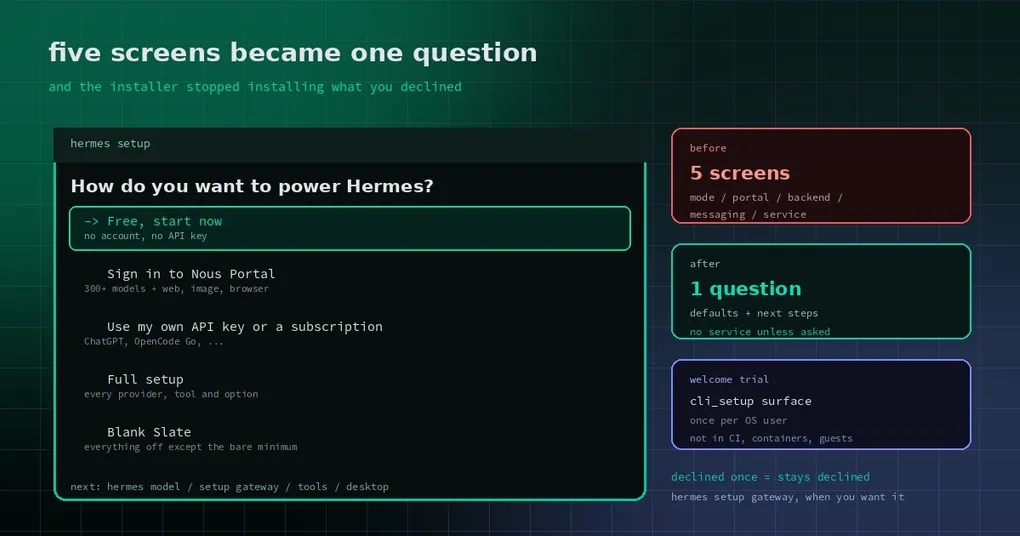
A friend tells you Hermes is worth twenty minutes, so you paste the install line into a terminal and wait. What comes back is not a demo, not a first prompt, and not even a clear “you’re done” — it is a queue of five questions: which setup mode, whether to sign in to Nous Portal, which terminal backend, which chat platforms to connect, and whether to install a background service. You came to see what the thing does, not to make five architectural decisions on a machine you might wipe tomorrow. That first-run wall is what PR #157746 took apart: a fresh hermes setup now asks one question, can start you on a free trial with no account, and skips every service you did not ask for.
If you have not installed it yet, the install line is on the install page.
Five screens before you could see anything
The old first run was a real wizard, and every screen was there for a defensible reason. The setup mode screen asked whether you wanted Quick, Full, or Blank Slate. Then came Nous Portal sign-in, because a hosted account is the shortest path to working models. Then the terminal backend, because Hermes runs commands somewhere — your local machine, a container, a remote host — and it has to know where. Then messaging platforms, because a lot of people meet Hermes first as a bot in Telegram or Slack. Then a final question about installing the gateway service.
That last one deserves a plain description, because it is the screen that caused the most surprise. A gateway is a background process that stays running after your terminal closes, which is what lets Hermes receive messages from Telegram, Discord, Slack or WhatsApp and reply to them. If you have not connected any messaging platform, a gateway has nothing to do: it is a resident process with no traffic, plus an autostart entry that keeps it that way across reboots.
Doing all five screens once is annoying. Doing them on an install you only meant to poke at is worse, and there was a sharper problem underneath: the installer could go ahead and install that background service even after you had answered No. That bug is #157677, and it is the reason this redesign exists at all.
Now it is one question
A fresh install now opens on a single prompt — How do you want to power Hermes? — followed, on installs that have never answered the shared-metrics consent question, by that one consent question. Nothing else. No mode screen, no backend screen, no platform screen.
The menu is four rows, in this order:
| Menu row | When it appears |
|---|---|
Keep my imported model |
only when an earlier agent import already brought in a model that can be used; the row shows that model’s name |
Free, start now — no account, no API key |
only when the free trial is claimable on this install |
Sign in to Nous Portal — 300+ models + web, image, browser tools |
always |
Use my own API key or a subscription (ChatGPT, OpenCode Go, …) |
always; opens the hermes model picker |
The fourth row is worth a word of explanation. A subscription in this context means an existing plan you already pay for — ChatGPT, OpenCode Go, and similar — used as the source of model calls instead of a metered API key. Hermes routes through it rather than billing you per token at a provider.
Picking any of the first four ends setup. There is no second screen after it: Hermes applies the recommended defaults — the terminal runs locally, no messaging platforms are connected, no services are installed — and prints where to go next. Roughly:
$ hermes setup
How do you want to power Hermes?
> Free, start now — no account, no API key
  Sign in to Nous Portal
  Use my own API key or a subscription
  Full setup
  Blank Slate
Those last two lines are the old escape hatches, kept and unchanged. Full setup — walk through every provider, tool & option yourself is the wizard you remember, and Blank Slate — everything off except the bare minimum is still the fastest way to a deliberately empty install. They behave exactly as they did before; they are just no longer the only door.
What “free, start now” actually gets you
The free option is a welcome trial: a starting allowance on hosted models, attached to the install so you can talk to the agent before you own an API key or have signed in anywhere. The claim surface added here is called cli_setup, and it is deliberately narrow.
It only appears during a genuine human setup: stdin has to be interactive, the process must not be inside a container, must not be running in CI, and must not have been launched by the dashboard or the desktop app (those set HERMES_NONINTERACTIVE). The remaining checks are shared with the desktop app’s trial — guest accounts disabled, no identity already present, no provider already configured, and the trial not already used on this machine.
That last check is why profiles matter here. A profile is a separate configuration home, so you can keep, say, a work setup and a experiments setup side by side without them overwriting each other. Because the trial is gated per identity and per machine, a second profile for the same OS user will not see the free row — it will see the Portal sign-in and bring-your-own-key options instead. That is intended, not a bug.
One thing that is not checked: stdout. Piping the installer through tee to keep a log still counts as an interactive setup, so install.sh | tee setup.log keeps the free row.
And the limits are honest: it is a welcome trial, not an unlimited free plan. When it is exhausted or unavailable, the menu falls back to signing in to Nous Portal — a Nous account that carries 300+ models plus web, image and browser tools on the hosted side — or to your own key or subscription. Either way you are not stuck; you are just out of the free lane.
The installer stops deciding for you
The second half of this change is quieter and, in the long run, more valuable. It is the fix for #157677: the installer no longer installs a gateway you did not ask for.
If you connect no messaging platform during setup, the gateway step does not offer to start a service anymore. It installs nothing, and points you at hermes setup gateway for the day you actually want Telegram or Slack. And if you are asked and you decline, the decline is final — no service, no autostart entry, no process waiting in the background of a machine you were evaluating.
The practical effect is that a test install now stays a test install. You can run hermes setup, try a prompt, decide it is not for you, and uninstall without first discovering a daemon you never agreed to.
Where the one answer leaves you
The closing screen is a short list of next steps, not another questionnaire:
hermes model— change the model or the provider behind ithermes setup gateway— connect Telegram, Discord, Slack or WhatsApp when you want ithermes tools— turn individual toolsets on or offhermes desktop— open the desktop apphermes setup— the full wizard, whenever you want the long version
Every item is also a standalone command, so none of this requires remembering a hidden flag. The hermes-setup reference lists the sections and options, and the hermes-model reference covers what the picker actually changes.
Already configured? The wizard is still there
Nothing was removed for people who already have a working setup. On an existing install, a bare hermes setup still runs the full reconfigure wizard, showing your current value for each item with Enter keeping it. hermes setup --quick narrows that to items that are actually missing or unset, and you can jump straight into one section instead of walking the whole thing:
hermes setup model
hermes setup terminal
hermes setup gateway
hermes setup tools
hermes setup agent
The one-question flow is what a new install sees. Existing installs keep the conversation they already know.
This landed on origin/main on 2026-11-19 and ships in v0.23.3, released 2026-11-20. If you have been putting off a first look because the setup looked like paperwork, the paperwork is now one line long — and the defaults it applies are all reversible from the five commands above.