Three Agents in a Room, Only Yours Keeps Talking: Per-Room Silence in Hermes
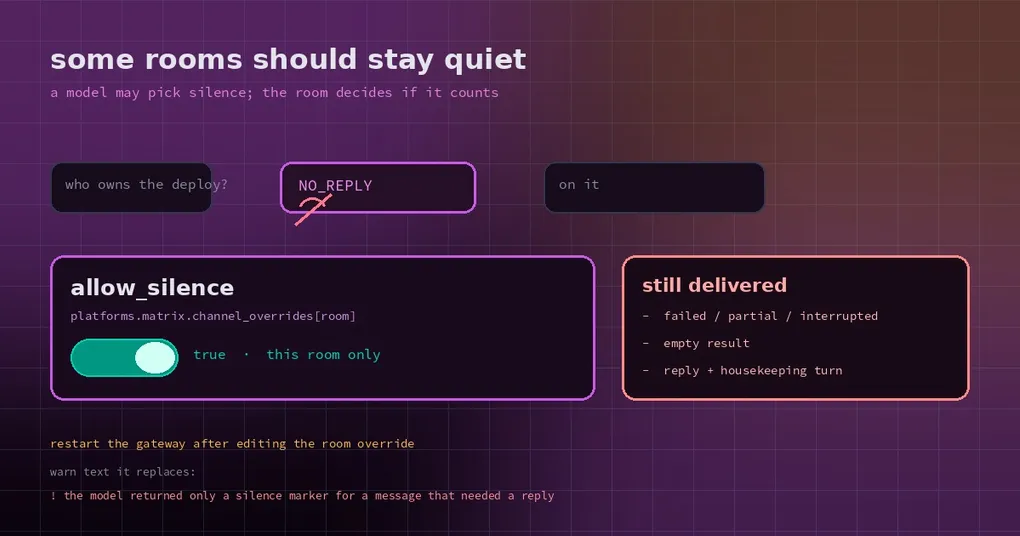
Picture a room with you, two colleagues and three agents that each own a slice of the work. A colleague asks who is watching the deploy. One agent decides the question is not its business and answers with a bare NO_REPLY, exactly as agreed. You expect silence. A few seconds later, Hermes posts this into the room:
⚠️ The model returned only a silence marker for a message that needed a reply. Try again or rephrase.
The message is not wrong — it is a responsible backstop. The problem is what it does to the room: it turns an internal hand-off into a system error everyone can see. In a multi-agent room that misfire repeats until nobody wants to use the room.
Silence is a model capability; permission is a room policy
Two different things get mixed up here. First, the model can choose not to speak. Hermes recognizes a few silence markers — NO_REPLY, [SILENT] — meaning “received, nothing needed from me this turn”. Second, whether that silence is acceptable to show. That is a policy question. It should not be decided unilaterally by the model, and it should not be one global answer either.
Historically, silence was only honored in narrow cases: internal notifications, scheduled heartbeats, and messages the adapter already knows were not addressed to the bot. Everything else — someone mentioning the bot, a direct question in a forum channel — got treated as a fault if the model answered with a marker alone. The gateway then filled the gap with the warning above.
That default is right. Ask your agent in a DM to run the tests and get a blank screen back: you cannot tell whether it is working, dead, or confused. The warning at least says “it tried and produced nothing”.
In a group, the default causes collateral damage. Mixed human/agent rooms generate a constant stream of “seen it, no reply needed”. So Hermes added a room-level switch.
One key, one room
The setting lives in the config.yaml of the profile serving that room, on the existing channel_overrides block:
platforms:
  matrix:
    channel_overrides:
      "!exampleTeamRoom:example.org":
        allow_silence: true
Three things to hold on to:
- It is a room override, not a profile-wide setting. Other rooms keep the old behavior.
- Omitted,
null, orfalseall mean “keep the current reply policy” — a human asks, the model stays quiet, and you still get the warning. - The existing exemptions survive regardless: internal notifications, scheduled heartbeats and messages known to be unaddressed stay silent even in a room that says
allow_silence: false.
Restart the gateway after editing the file so every profile serving that route picks up the new value.
One trap in the lookup order
Room overrides resolve exactly like model overrides: exact channel id first, then thread id, then the parent channel or forum id. First match wins.
The trap is that “first match wins” includes an entry that only sets something else. Configure model on a single thread and that thread entry matches first — and since it says nothing about allow_silence, the parent room’s allow_silence: true never applies. The thread quietly reverts to “must speak”. The fix is unglamorous: repeat allow_silence in the thread entry.
It is the same mechanism as per-chat model overrides; both keys can live in one entry. Just do not write half of it.
Silence does not mean nothing happened
This is the part people misread. Enabling allow_silence does not mean “agents in this room may vanish”. It only governs final delivery:
- It does not undo tool calls. A command that ran, ran.
- It does not retract progress messages already sent. Mid-turn updates still go out.
- It does not nudge the model toward silence. It permits silence; it never encourages it.
More importantly, empty, failed, partial and interrupted results never earn the right to disappear. A model cannot hide a broken run behind a marker. The health check is explicit: only a completed turn with no failure, partial or interruption flag counts on the room’s permission.
There is a subtle corollary. If the model wrote a real answer, also called housekeeping-only tools (memory, todo list, skill management, session search), and then ended the turn on a bare marker, that answer is delivered — in opted-in rooms too. That is not “nothing to say”; that is “said it, then fumbled the ending”.
Crash recovery follows the same principle: a suppression decision is only honored if it was saved against that exact final reply. Crash before that point and the human-question safeguard returns.
Four fixes that shipped alongside it
This was not one commit that appeared alone. A handful of repairs made the switch trustworthy:
- Read top-level platform blocks and fail safe. Overrides may live directly under
platforms.<name>; the loader now reads both shapes and, when it cannot resolve a room, falls back to the default policy instead of loosening it. - A failed silence receipt is not an error. If writing the “this turn chose silence” record fails, the turn should not turn into a failure — it is only a note.
- The primary profile reads the gateway’s own config. The profile the gateway itself serves resolves from its own configuration, not from the launch snapshot.
- Telegram group markers survive better. A set of fixes keeps silence markers intact for replies to channels, anonymous-admin posts, replies to unknown authors, and uncaptioned voice notes or audio files in groups, instead of reading them as “should have replied but didn’t”.
The first three are about not reading the policy wrong; the fourth is about not losing the marker. None of them show up in a launch post, and all of them decide whether the switch works in your hands.
When to turn it on, when not to
Turn it on in multi-agent rooms, mixed human/agent project channels, and high-volume operations rooms — anywhere “silence is the correct answer” is routine.
Leave it off in DMs, support intake, and any channel where a user question must get a response. There the ⚠️ warning is not noise; it is the only signal that something broke. Turning it off mutes the alarm.
If you are unsure, enable it for one room and watch for a week. Worst case you lose that room’s backstop, not the gateway.
To understand why a room went quiet at the connection level rather than the policy level, silent disconnects and heartbeats covers the other half — different layer, same symptom.