A profile that exported fine and could never be imported back
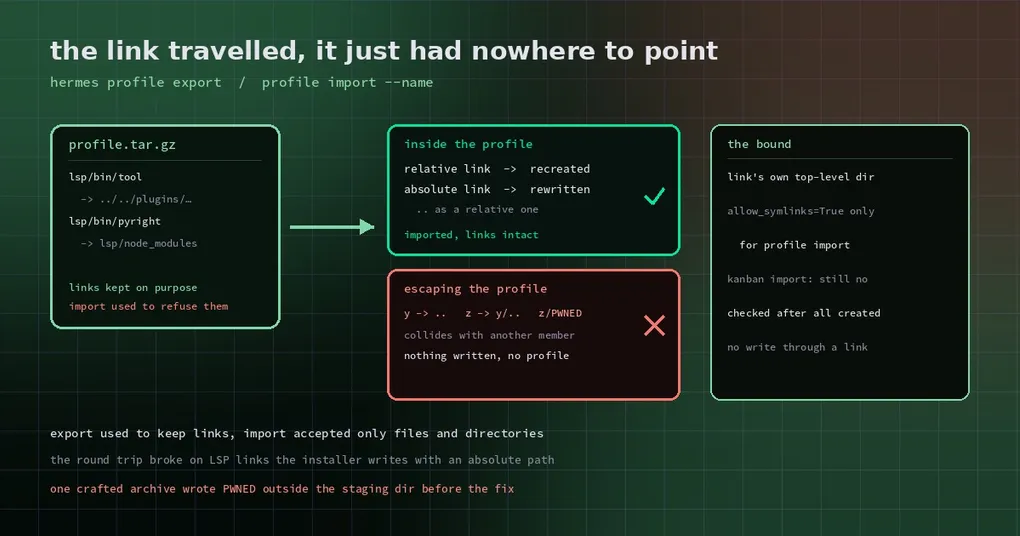
Moving to a new machine is routine: hermes profile export ops, copy the tarball over, hermes profile import ops.tar.gz --name ops. You expect it to finish in two seconds. Instead it stops on a line that explains nothing:
Error: Unsupported archive member type: ops/lsp/bin/toollsp/bin/tool is a symlink. Why does your profile contain a symlink? Because the LSP installer writes one: it puts language servers under lsp/node_modules and drops a link into lsp/bin pointing at them. That is entirely normal, and export bundled it faithfully. The problem was on the other side — the extractor accepted only regular files and directories.
A round trip that disagrees with itself
The root cause is that two halves of the same feature never agreed on what an archive may contain:
- Export deliberately keeps symlinks. It should not duplicate the
lsp/node_modulestree, and it must not quietly turn a link into a copy; - Import’s extractor accepted only regular files and directories, and raised
Unsupported archive member typeon anything else, failing the whole import.
So a profile with links could not be migrated — and a profile with links is the common case: if you ever used LSP in it, it has one.
What the fix does
First, links inside the profile are recreated. Import rebuilds them against the target recorded in the archive, so a relative link like lsp/bin/tool -> ../../plugins/eng/engine.py still points at ../../plugins/eng/engine.py after the trip and keeps working.
Second, the installer’s absolute links are rewritten as relative ones at export time. The LSP installer writes an absolute path (<profile>/lsp/node_modules/.bin/pyright-langserver), which is guaranteed to be wrong on the next machine. Export now stores it as ../node_modules/.bin/pyright-langserver, which holds true inside the new home.
Third, a link that reaches outside the profile still fails the import. That is intentional, and it is the more important half — see below.
The PR’s before/after table is worth reading literally (real hermes profile export, then hermes profile import, with a scratch HOME and HERMES_HOME):
| Archive content | Before | After |
|---|---|---|
| relative link only | Unsupported archive member type |
imported, link intact |
| the installer’s absolute link | Unsupported archive member type |
imported, link now relative |
crafted y -> .., z -> y/.., file z/PWNED |
refused (links were not accepted at all) | Archive symlink collides with another member: evil/z, nothing written, no profile created |
The security half matters more than the feature half
Symlinks are the classic “extract and escape” trick — a close relative of zip-slip. Put a link pointing at .. in the archive, add a file “inside” that link’s directory, and an extractor that writes paths naively will drop the file outside the destination. A real attack does not need PWNED; appending a line to ~/.ssh/authorized_keys or overwriting a script that will be executed is enough.
The fix makes several deliberate choices here:
- Files and directories are created first, links last. No member is ever written through a link, which removes the write-through path at the source.
- A link may not be created through another link. So
zcannot land viay. - Every link is checked on its resolved path after all links exist. That is what catches a target that only escapes through another link, including one that appears later in the archive.
- The bound is the link’s own top-level directory, not the staging directory. A link at
lsp/bin/xmay not jump to a sibling of the profile root. - The symlink-permitting extractor is used only on the profile-import path (
safe_extract_targzwithallow_symlinks=True). Kanban board import still refuses links, and its existing test is unchanged.
One detail worth knowing: before this fix, an earlier extractor version run against a crafted archive (y -> ../.., z -> y/../../..) really did write PWNED outside the staging directory. So this is not only “import works now” — it also closes an actual write-outside-the-box hole.
How to use it
The commands are unchanged:
# package (default target: profile-exports/<name>-<timestamp>.tar.gz)
hermes profile export ops

# import on the other machine (--name is inferred from the archive if omitted)
hermes profile import ops.tar.gz --name ops
If you gave up on a migration because of that error, retry it now. If you get Archive symlink collides with another member, the archive contains a link pointing outside the profile — that refusal is deliberate, not a bug. Look at whether the link really needs to leave the profile (pointing at a script in a repo, for example); the usual fix is to move the target inside the profile, or to drop the link.
Release status
The fix merged on November 25, 2026 (PR #159575, original work in #150724), fixing issue #149830. It is not in v0.23.4 — that tag shipped on November 24 — so today it lives on main:
Update (2026-11-28): these changes shipped in v0.23.5 (November 28) —
hermes updatebrings them in. The “not in v0.23.4 / onmainonly” wording above is a snapshot from publication time.
hermes update --channel mainIf your install follows stable tags, wait for the next one. For a one-off migration, waiting is usually fine.
Other profile operations — recovery after an incomplete delete, identity migration after a rename — are in the command reference; hermes profile list and hermes profile show <name> are the fastest way to see how many profiles you have and what state they are in.
If you run several profiles behind one gateway, the profile allowlist guide covers which of them the gateway is allowed to serve.