When Hermes stops to ask you something, your plugin now knows what it is
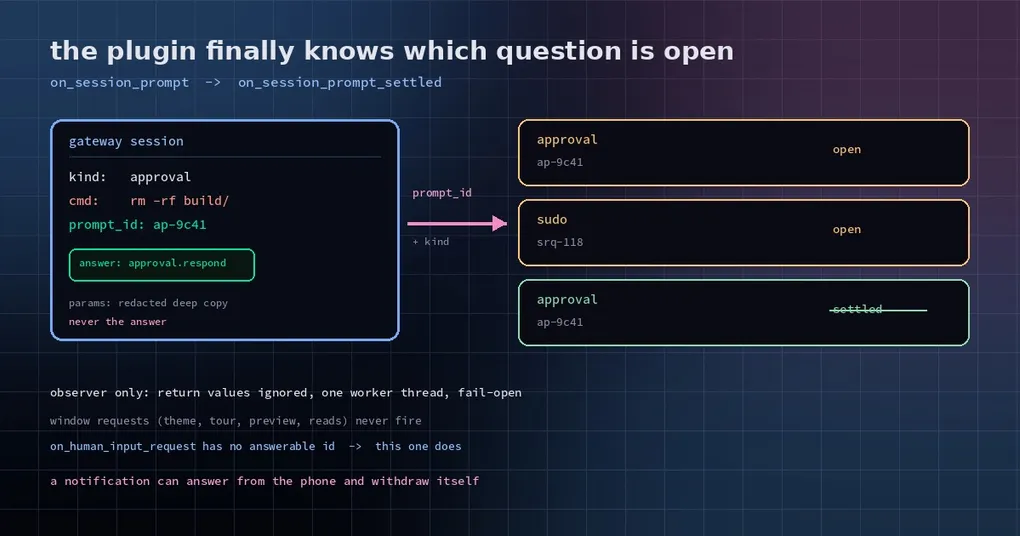
You installed a notification plugin for Hermes with one simple idea: when it needs a human, ping me. So you take your coffee into a meeting, your phone buzzes with “a request is waiting for you”, and you tap through — only to find it wanted to run rm -rf build/ and needed your approval. You could have approved it from the notification. But the notification did not know what was being asked, or what to answer with.
That is the gap this change closes. Hermes did have a “a human is needed” signal before, but it existed at the tool level: it carries no answerable id, it fires once for a whole multi-question clarify, and it never fires for passwords or password-manager prompts. For anyone building notifications, that is knowing someone is knocking without knowing who, why, or how to open the door.
Two hooks: opened, and settled
The release adds two observer hooks, fired by the gateway’s session owner:
| Hook | When it fires | What it carries |
|---|---|---|
on_session_prompt |
The owner opens a person-answered prompt for a session’s viewers, after it is registered somewhere an answer can find it | session_id, kind, prompt_id, execution_generation, params |
on_session_prompt_settled |
That prompt stops being open — answered, timed out, interrupted, withdrawn, or its turn ended | the same identifiers plus reason |
The important field is the third one, prompt_id: it is the id that actually answers that prompt. With it in hand, a plugin can call approval.respond itself, or send the matching response frame, and let someone settle the question from their phone.
kind maps to the prompt like this:
approval— a dangerous-command approval, published as anapproval.requestevent and answered throughapproval.respondwithprompt_id;clarify— a clarify question card, published asclarify.requestand answered throughclarify.respond;sudo,secret,vault.unlock_prompt,vault.code,vault.save_login— a masked sudo password, a skill secret, a password-manager unlock, a one-time code, a save-login prompt. These are server-to-client request frames, answered with a response frame carrying the frame’ssrq-id.
What the callback looks like
The signature is ordinary keyword arguments, and plugins should take **kwargs so future fields stay backward-compatible:
def my_callback(session_id: str, kind: str, prompt_id: str,
                execution_generation: int | None, params: dict, **kwargs):
    ...
For approval and clarify events, execution_generation is the turn’s generation; for request frames it is None. params is a deep copy of the prompt as the viewers received it — the event payload or the frame’s params, so it looks like the request the client saw.
on_session_prompt_settled adds reason: for a request frame it is the cancellation reason (resolved, timeout, interrupted); for an approval or clarify event it is settled. It carries no params, and never the answer.
A minimal notification plugin
The shape the docs suggest is enough: key the open prompts by prompt_id, and drop them when they settle.
def register(ctx):
    waiting = {}

    def on_prompt(session_id, kind, prompt_id, params, **kwargs):
        waiting[prompt_id] = (session_id, kind)
        notify(                    # your own delivery
            kind=kind,
            session=session_id,
            text=summarize(params),
            answer_with=prompt_id,  # what the phone sends back on "approve"
        )

    def on_settled(prompt_id, **kwargs):
        waiting.pop(prompt_id, None)
        withdraw(prompt_id)         # let the notification disappear

    ctx.register_hook("on_session_prompt", on_prompt)
    ctx.register_hook("on_session_prompt_settled", on_settled)
The pair only works together. With the opened hook alone, your phone accumulates questions that no longer exist — the approval timed out, someone answered it on the desktop, or the turn was interrupted — and the notification stays up. settled is the withdraw instruction.
When it does not fire
The surface is an explicit allowlist, not “every request”. Window requests — theme changes, tours, previews, window and terminal reads — never fire, because a client answers those on its own. Neither does a prompt that was never opened because no viewer was attached, nor a request with replay=False, nor the tool-level input signal that never became a gateway prompt.
That boundary matters if you are writing an audit plugin that counts how often a person was interrupted: the allowlist keeps window chatter out of your numbers.
Three safety decisions
First, every string inside params is force-redacted, and the redaction runs in the scope of the profile that owns the session — so values registered in that profile’s vault are scrubbed too. This does not depend on security.redact_secrets; it is unconditional.
Second, the answer is never passed on. What the person types — the password, the approval reason, the clarify text — is invisible to the plugin. It learns that a prompt exists and what its id is.
Third, it is an observer: return values are ignored, a raising callback is logged at debug, and the prompt is unaffected. Calls do not run on the hot path either. Every callback runs in order on one background worker, never on the agent thread or the event loop and never under a session lock. A slow plugin delays only its own later calls; it cannot stall the question you are being asked.
One more rule on a multi-profile gateway: only the plugins of the profile that owns the session are called. Someone else’s plugin does not see your approval.
How this differs from on_human_input_request
The two are easy to confuse, and the line between them is clean:
on_human_input_request |
on_session_prompt |
|
|---|---|---|
| Surface | Any, including messaging platforms and in-process CLI prompts | Gateway sessions only |
| Answerable id | None | prompt_id |
| Multi-question clarify | Fires once | Fires once per prompt |
| Password and password-manager prompts | Never | Yes |
| Usable to answer | No | Yes |
So: count human interruptions with the first, settle a question from a notification with the second.
Checking whether your version has it
A plugin can probe instead of assuming, so it does not error on an older install:
import importlib.util

if importlib.util.find_spec("gateway.session_prompt_hooks") is not None:
    ctx.register_hook("on_session_prompt", on_prompt)
    ctx.register_hook("on_session_prompt_settled", on_settled)
The module arrived with PR #153223 and is part of the v0.23.4 tag, so hermes update is enough to get it. The hook list and per-field notes live in the repo’s hooks documentation, and the observer contract — which hooks may change behaviour and which only report — is in the same docs tree.
If your plugin already exists to tell gateway users that Hermes needs them, these two hooks are probably the most worthwhile change in months: it upgrades “it needs you” into “it is asking you this, and here is the button”.
If you want the machinery around the prompt — approval modes, deny rules and the unattended path — the unattended approvals guide covers the configuration, and the gateway command reference covers the session side that mints these prompts.