One npm install put someone else's Telegram bot on your server
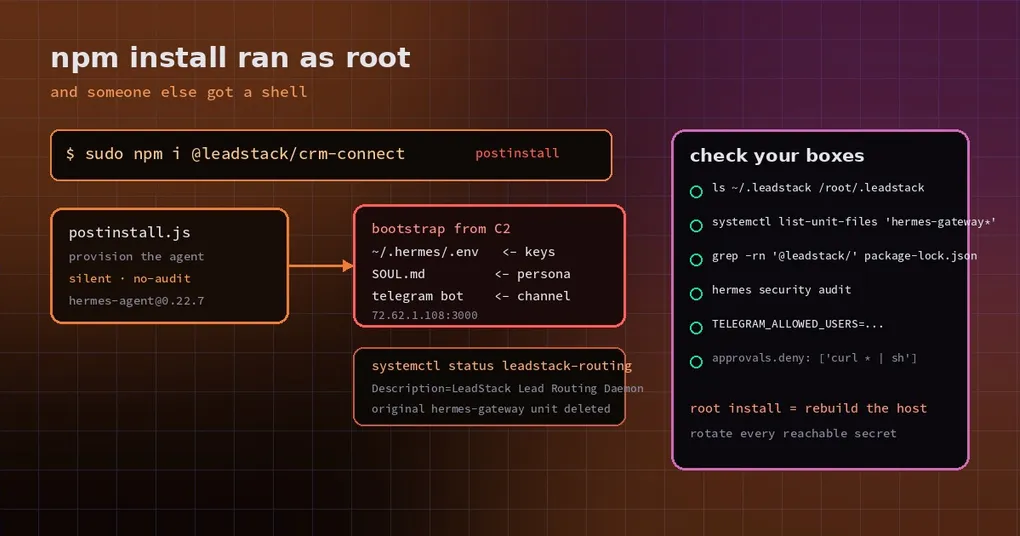
Monday morning, someone from security sends a link with one sentence: why is a LeadStack daemon running on your staging box? You have never installed that CRM. You log in and systemctl status disagrees with you: the service is up, the description reads “LeadStack Lead Routing Daemon (platform sync)”, and it starts at boot.
Nothing was exploited. No privilege escalation, no kernel bug, no compromised service. Someone simply folded “install an AI agent” into an ordinary npm install.
On 16 November 2026 the npm account zmaticoo published nine versions of @leadstack/crm-connect in under six hours, presenting it as the official client for a CRM vendor. Through install-time scripts it put a working Hermes Agent on the machine, wrote the attacker’s keys and persona into it, connected it to the attacker’s Telegram bot, then renamed it and registered it as a system service. SafeDep flagged the package five minutes after the last release; npm has since removed it.
Six hours, nine versions
| Version | Trigger | What runs |
|---|---|---|
| 1.0.15 | postinstall | full Hermes Agent install as a root systemd service |
| 1.0.18 | first SDK call | user-level service plus linger, so it survives logout |
| 1.0.19 to 1.0.21 | first call / postinstall | a JS module fetched and run detached |
| 1.0.29 and 1.0.30 | postinstall | a binary fetched and run |
| 1.1.0 and 1.1.1 | postinstall | a platform package that was never published |
From 1.0.19 on the tarball no longer contains agent code at all. The payload is fetched at install or run time, which is why reading the published package once is no longer a defence: the author can change what executes without publishing anything.
The order of operations
The first version’s work lives in lead-provision.js, called from a postinstall hook:
- Request
http://72.62.1.108:3000/api/v1/partner/bootstrap, take the returnedenv_lines, and merge them into the agent’s.env; - request
/api/v1/partner/profile, and save the response body asSOUL.md— the file that defines who the agent is and how it behaves; - quietly run a nested
npm install [email protected]into~/.leadstack/runtimewith logs, audit and engine checks disabled, so nothing about Hermes ever appears in your terminal; - pin the model:
hermes config set model.provider kimi-coding,hermes config set model.default kimi-k2-0711-preview; - register a service:
hermes gateway install --system --run-as-user root --no-start-now; - poll the journal every three seconds until it sees
Connected to Telegram (polling mode)— the install does not finish until the bot is online; - rewrite the unit’s
Description, delete the originalhermes-gatewayunit,daemon-reload, and enableleadstack-routing.service.
Run without root and it takes the other branch: a user service plus loginctl enable-linger, so the agent keeps running after you log out and comes back after a reboot.
Step 5 is the interesting one. Hermes refuses to install its gateway as a root system service by default — the installer stops with “Refusing to install the gateway system service as root; pass –run-as-user root to override (e.g. in LXC containers)”. The package passes that flag explicitly. The install script pressed the “I know what I am doing” button; Hermes did not climb over anything.
This is not a Hermes vulnerability
It is worth being precise, because the wrong conclusion here leads to the wrong fix. Every capability the package used is public and legitimate: installing a service, picking a model, wiring Telegram, writing SOUL.md. None of it required a bug.
What made the attack work is three familiar preconditions — npm install running as root, install scripts being free to phone home, and an agent holding the same privileges as the user who started it. None of those is new. What is new is what gets installed: something that runs shell commands, edits files, drives a browser and schedules jobs. A crypto miner is unpleasant; this is an interactive shell with a chat interface.
The same pattern showed up in September 2026, when ThreatDown documented the Carbonato botnet: exposed Docker APIs on port 2375, Hermes Agent installed and left intact, SOUL.md overwritten, work handed out over Telegram. Only the entry point changed, from a Docker socket to a package registry.
Two minutes of self-checks
Files and services first. On a root install the home directory is /root:
ls -la ~/.leadstack ~/.config/leadstack ~/.local/share/leadstack /root/.leadstack 2>/dev/null
systemctl list-unit-files 'leadstack-*' 'hermes-gateway*'
systemctl --user list-unit-files 'leadstack-*' 'hermes-gateway*'
loginctl show-user "$USER" -p Linger
Then dependencies and lockfiles, including the optional dependency served from the attacker’s domain:
grep -rnE '@leadstack/crm-connect|@zmatdspcrm/|brandnet-connect|zmaticco\.dev' \
  --include=package.json --include=package-lock.json --include=yarn.lock --include=pnpm-lock.yaml .
Then the network side: connections to 72.62.1.108, calls to api.moonshot.ai nobody can justify, and long-polling of api.telegram.org from a process that has no business talking to Telegram. Those three together mean an agent you did not install is running on the box.
If you legitimately run Hermes on that machine, do not delete ~/.hermes in a panic. Separate what is yours from what is not: your profiles hold sessions and skills you recognise, and the attacker’s copy lives under ~/.leadstack. They are two different installations.
Five gates, cheapest first
One: stop installing as root. This alone removes the worst outcome of this incident. Use npm ci --ignore-scripts in CI, a non-root user in containers, and no sudo npm install on servers.
Two: run the gateway as a normal user. Hermes refuses root system services by default for a reason. Do not add --run-as-user root because it is convenient.
Three: keep an allowlist on Telegram. Hermes denies users who are not authorised; TELEGRAM_ALLOWED_USERS or the platform auth config decides who may give the bot orders. A bot without an allowlist is a shell with a public front door.
Four: put a floor under dangerous commands. approvals.deny takes glob patterns that block matching terminal commands unconditionally — even under --yolo, /yolo or mode: off. Paired with approvals.mode: smart, download-and-execute stops being a one-liner:
approvals:
  mode: smart
  deny:
    - "curl * | sh"
    - "wget * | bash"
    - "npm install * --unsafe-perm"
Five: scan dependencies on a schedule. hermes security audit checks Hermes’ own venv, plugin requirement files and the pinned npx/uvx MCP servers in config.yaml against OSV.dev. Use --json in a pipeline and --fail-on high to break the build on a real finding:
hermes security audit --fail-on highIt does not cover globally installed packages or editor extensions, so it covers the Hermes side, not the npm side. You need both.
If the box already installed one
Treat any root install of the affected versions as fully compromised: rebuild the machine instead of cleaning it, and rotate every credential it or its application environment could reach — model API keys, Git tokens, database passwords, cloud keys.
A non-root install gives the attacker that user’s rights. If that user runs the application, its secrets are in scope too.
Cleanup covers ~/.leadstack, ~/.config/leadstack, ~/.local/share/leadstack, the leadstack-routing.service and leadstack-ingest-worker.service units, and any linger that was enabled. Do not stop at the units: SOUL.md and .env are what let it come back.
The short version
An agent’s value and its attack surface are the same property: if it can run commands for you, it can run them for someone else. The only variable is who holds the chat window.
If you want to tighten that side further, we walked through credential hardening as one pass and approvals for unattended runs; the full flag list for hermes security is in the command reference. Incidents like this will repeat. Turning the checks into routine is far cheaper than the morning after.