Your Memory Plugin Fell Back Silently: Hermes Left Forwarding Addresses for Moved Modules
You spend an evening wiring up Honcho: endpoint, key, memory.provider set. It works in testing — it remembers your project conventions, it recalls the deploy script you named last week. Two weeks later, in a fresh session, you ask “what was that deploy script called?” and get a blank stare. You assume the model has a bad memory. In fact it wasn’t using Honcho at all. The plugin never loaded, and the agent was on built-in memory the whole time.
The nasty part: nothing errored. It just quietly fell back.
Plugins are pinned to snapshots; Hermes internals keep moving
Hermes’ plugin catalog is built for reproducibility. Every entry is pinned to a reviewed commit. hermes plugins install openviking doesn’t install “the latest” — it installs that reviewed SHA, e.g. OpenViking 2.1.2 at e855796c.
That’s the right call for supply-chain safety: nobody can swap code underneath you. But it has one consequence — plugin code is frozen while Hermes’ own internals are not.
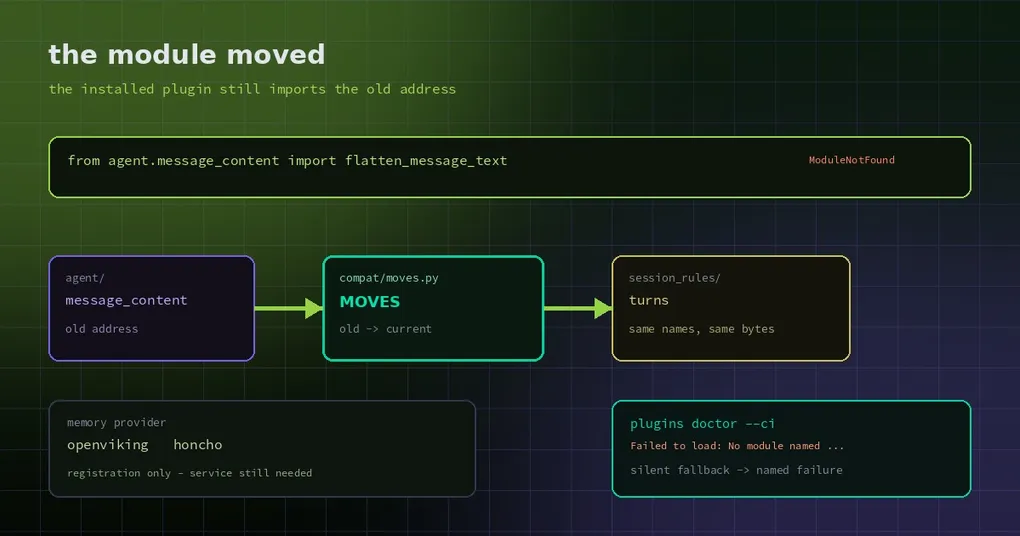
The recent storage refactor moved a handful of small helper modules. The text helpers in agent.message_content, for example, were folded into session_rules.turns. For Hermes itself that was a clean refactor: every internal caller was updated. But the plugin already installed on your machine still has, around line 12:
from agent.message_content import flatten_message_textSo the import raises ModuleNotFoundError, and the plugin never registers.
Why the failure was silent
The loader used to catch a plugin package’s __init__.py exception, return None, and leave nothing but a DEBUG line. The log line you did see was actively misleading:
WARNING plugins.memory: Memory provider 'openviking' loaded but no provider instance found“Loaded” made everyone assume things were fine. It really meant “installed, but nothing is running.” With no provider instance, Hermes does what it’s designed to do: falls back to built-in memory. No external memory is better than an agent that won’t start.
Except nobody was told it happened — including you.
Forwarding addresses: the old imports still resolve
The fix is a small, boring compatibility layer. Hermes now keeps a moves table (hermes_agent/compat/moves.py) from old module name to current one:
MOVES: dict[str, str] = {
    "tools.plugin_guard": "hermes_cli.plugins_install_scan",
    "agent.message_content": "session_rules.turns",
}
When a plugin imports the old name, the request is redirected to the new module. It is not a copy of the old code — it points at the same implementation, so the two can’t drift apart.
Two constraints make the table trustworthy:
- A target only qualifies if it defines every name the old module published, unchanged. Byte-for-byte equivalence, not “close enough.”
- A key is added when a catalog-pinned plugin actually imports it. No speculative aliases; each row corresponds to a real client that cannot be republished on demand.
There’s also a case the table can’t express: agent/skill_commands.py still exists as a module, but one function in it moved out (extract_user_instruction_from_skill_message). The table works at module granularity, so the old module simply re-exports that one function.
Failures now name the import
Today the same fault reads:
WARNING plugins.memory: Failed to load memory provider 'openviking': No module named 'agent.message_content'That is the difference between “go guess” and “you already know.” The loader also drops the failed package from sys.modules before re-raising instead of returning None. Dropping it matters: a half-initialized module left in memory means later imports receive a broken object, and the next traceback points somewhere useless.
A three-minute self-check
For how memory providers and checkpoints fit together, see the memory checkpoint gate; the full plugin command surface is in the plugins reference.
No code changes needed. In order:
# 1. Which provider is selected? Empty means built-in only.
hermes config get memory.provider

# 2. What is installed, and is it enabled?
hermes plugins list

# 3. Validate through the real load path (--ci exits 1 on errors)
hermes plugins doctor openviking --ci
doctor runs the actual manifest parser, loader and registration path — it isn’t just checking that files exist. When it prints OK: runtime discovery, manifest parsing, import, and registration passed, the chain is genuinely intact.
There’s a simpler signal too: the plugins.memory line at startup. It used to say “loaded but no provider instance found.” Now it either says nothing or tells you exactly which import broke.
Registration is not availability
Keep two layers apart: the plugin loads and the memory backend works are different questions.
A passing doctor means Hermes recognized the plugin and registered it as a provider. OpenViking still needs a running OpenViking service. With no service, the plugin loads and then reports “selected but reports unavailable” — the problem is neither Hermes nor the import, but the endpoint and the process.
Honcho is the same shape: pinned 1.2.0 at 894b8832, it hit agent.message_content and then a second moved name, TITLE_SOURCE_DERIVED. Both are covered now.
When you still have to fix it yourself
The compatibility table covers “Hermes moved a module, the plugin still uses the old address.” It does not cover:
- A name that never existed (a typo, or reaching into another plugin’s private module).
- A dependency that won’t install — read the Python environment error, and
hermes pm doctorfor dependency state. - A plugin so old that Hermes’ plugin interface itself changed.
For the first and third, the log now includes the exception text verbatim, so you can patch or file an issue with something concrete. The second is an environment problem, not a loader problem.
The takeaway
No new feature, no new config key. Two infrastructure decisions instead: keep a permanent forwarding address for modules that move, and stop swallowing load failures.
For you, the value is simpler than either: you no longer have to wonder whether the model’s memory is bad. When memory misbehaves, check memory.provider and run plugins doctor — the answer is usually right there.