MCP tools now carry a price tag: declare what each call costs, cap what a chat may spend
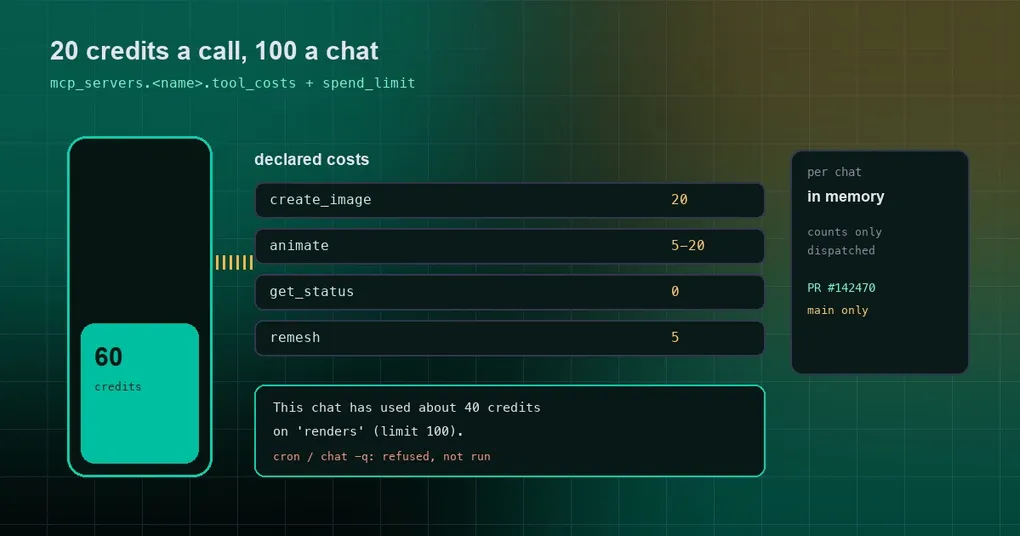
You find out at the end of the month: some MCP tool ran forty-odd times and every call billed real credits. Looking back at the transcript, it behaved exactly like a free file reader — same JSON in, same one-line “done” out. Nothing in the conversation told you which calls were spending money.
That is the awkward spot the MCP ecosystem is in right now. Image, video and 3D generation and paid APIs all ship as MCP servers, and an agent sees them the same way it sees read_file. PR #142470, merged on October 21, 2026, adds the two missing pieces: a declared cost per tool and a budget per chat.
Three new keys
Inside an mcp_servers entry in config.yaml:
mcp_servers:
  renders:
    command: "render-mcp"
    trust: untrusted
    tool_costs:
      create_image: 20                                    # about 20 credits per call
      animate: {credits: [5, 20], note: "per animation"}   # a range, with a short note
      get_status: 0                                        # free; same as leaving it out
    spend_limit: 100     # per chat; 0 or absent = no limit
    cost_unit: credits   # label in prompts (default: credits)
tool_costs accepts three shapes:
- a non-negative number for a fixed cost;
- a
[min, max]range, which fits tools priced by resolution or duration; - an object with
creditsholding a number or a range, plus anotefor one plain-language line.
spend_limit is a per-chat ceiling; 0 or absent means no limit. cost_unit only changes the wording in prompts and totals (default credits), so a service billed in “runs” or “points” can say so.
The approval prompt turns into a bill
Before declarations, an trust: untrusted server asked “allow create_image?” before a write-capable call. With a declared cost, the same prompt reads:
Costs about 20 credits.A range renders as Costs 5-20 credits (per animation). Once the chat has spent something on that server, a second line appears:
This chat has used about 40 credits on 'renders' (limit 100).The value here is that approval stops being only a safety question and becomes a budget question. You are no longer approving an action; you are approving another 20 credits.
Where the running total is kept
These rules matter more than the config, because they decide whether you trust the number:
- Totals are kept per chat and per server; nothing carries over between chats.
- Only calls that were actually dispatched count. Declined or blocked calls add nothing.
- Charges use the declared estimate, and the top of a range — the design errs toward asking earlier.
- A call whose server dies before receiving it still counts, for the same reason.
- The tally lives in memory: it is a budget for one conversation, not the vendor’s invoice. Restarting Hermes resets every total.
- The total follows the conversation through context compression and
/branch. In the CLI,/newopens a new total (same for a new Desktop chat); on messaging platforms the total belongs to the chat, so it survives/new. Each cron run gets its own total.
What happens when the budget is exceeded
This is the part worth memorizing:
- It asks even on a
trust: fullserver. Such a server normally runs costed tools without a prompt; once a call would crossspend_limit, it stops and asks. - It asks every time. Choosing “allow for this session” does not silence later costed calls in that chat.
- Where nobody can answer, it refuses without dispatching. Cron jobs,
hermes chat -q, and a gateway with no approver all land here. The model gets a tool error naming the spend and the limit and telling it not to retry — not a silent failure. - Below the limit, nothing changes.
trust: fullstays unprompted, and tools annotatedreadOnlyHint: trueare not woken up unless the budget requires it.
In other words, spend_limit is not a throttle. It is a gate that says “past this line, a human has to nod”.
Portable packages can declare it too
A portable plugin package carries the same table for its server inside plugin.json:
"extensions": {
  "com.nousresearch.hermes": {
    "servers": {
      "meshy": {
        "trust": "untrusted",
        "costs": { "meshy_remesh": 5, "meshy_animate": { "credits": [5, 20], "note": "per animation" } },
        "spend_limit": 100,
        "cost_unit": "credits"
      }
    }
  }
}
That solves a real asymmetry: the plugin author knows exactly what a tool costs, and the user usually does not. The package’s costs / spend_limit / cost_unit translate into the native keys.
Five pitfalls
- A malformed cost table skips the whole server, rather than being ignored. Any of the three keys in the wrong shape keeps that server from loading and the error names the key. Deliberate: a typo must not silently drop your budget.
tool_costskeys must be the server’s own tool names, not Hermes’ display prefixmcp_<server>_. A wrong key does not fail — it prints a warning at connect time, which is easy to miss.- Inheritance on a same-name override: if you add your own
mcp_serversentry for the same server (say, to raise it totrust: full), the package’s cost keys still apply unless your entry sets them.spend_limit: 0turns the package’s limit off;tool_costs: {}drops its costs. - It is a budget, not an invoice. Vendor billing can disagree with the declaration, and totals reset on restart. Do not treat it as accounting.
hermes plugins validatelistsserver costs: <name>. Check that line before you install, rather than reconstructing spend from a transcript afterwards.
Can you use it today?
The feature is on main and not in the shipped v0.22.4 — the v0.22.3-to-v0.22.4 compare range holds 14 commits and this feature is not one of them. Production installs wait for the next release; source checkouts tracking main can try it now.
The design credit goes to a community project, Adolanium/hermes-tripo, which implemented “every credit, asked for” and “a limit per chat” with a native pre_tool_call hook. Portable packages cannot ship hooks, so this landed as a core feature driven by declared data — which also means official plugins such as the Meshy one can use it.
If you are still deciding which servers deserve trust: full, our MCP catalog security guide covers trust tiers. Cost declarations and trust tiers answer different questions; they work best together.