A server that never starts should not cost you 1,152 npm runs a day
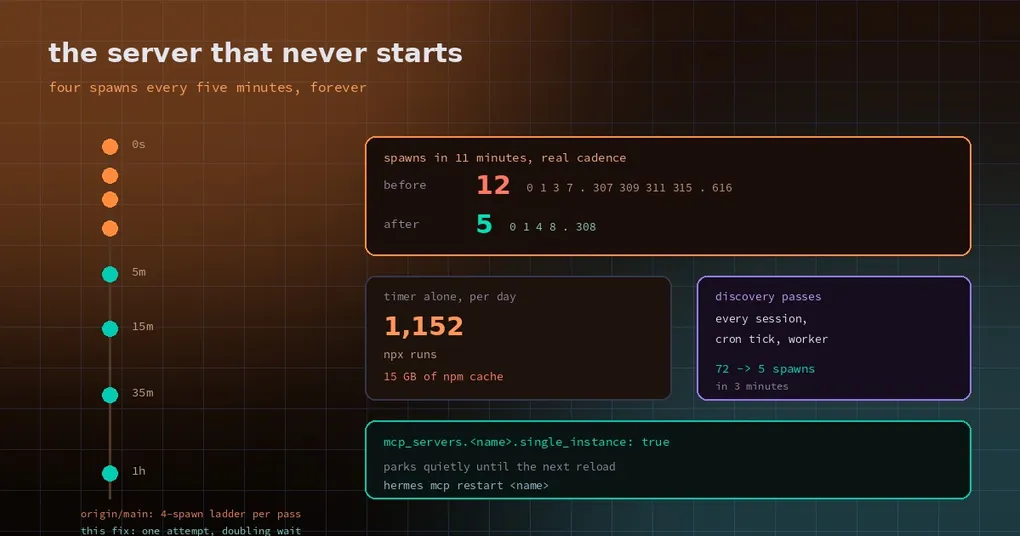
Monday morning, df -h says the disk is full. You go looking for the usual suspects — rotated logs, a runaway container, the model cache — and find none of them. What you do find is ~/.npm/_cacache sitting on fifteen gigabytes, almost all of it the same small package, written a few thousand times. That package belongs to an MCP server you added three weeks ago and never once got working. Hermes has been trying to start it the whole time, four times every five minutes, and nothing in the logs made it look unusual.
The symptom: a retry loop with no off-ramp
An MCP server is a separate process Hermes launches so the agent can reach an outside tool or data source through a standard protocol — a ticket tracker, a design file store, an internal search index. You describe how to start it in config, and for most people that command is something like npx some-package mcp. npx is npm’s one-shot runner: it fetches the package into the npm cache and executes it, without a permanent global install.
Which is exactly why a broken server is expensive. When the command cannot work — npm refuses to install the package, the binary exits on a missing dependency, the registry times out — every single attempt still writes to ~/.npm/_cacache before it fails. A server that never starts still pays rent on your disk, every five minutes, indefinitely.
That was the old behaviour: four connection attempts at the top of each five-minute window, then four more, then four more. Not a retry policy so much as a metronome. For one reporter in hermes-official-plugins#401 the cache grew about 15 GB a day until the filesystem gave out.
Why it never stopped on its own
Two mechanisms were feeding the loop, and only one of them was the timer.
The first is the initial connection ladder: when Hermes brings a server up, it does not try once, it tries a short ladder of four attempts — immediately, then a second later, then three, then seven, which is what a healthy-but-slow server needs. On failure the server gets “parked”, meaning Hermes stops treating it as a live connection but leaves the config entry in place. The bug was in what parking did to the counter: _park_initial_failure in tools/mcp_tool_server_run.py reset the failure count to zero when the server was revived, so the next tick ran the full four-attempt ladder from scratch instead of a single probe. Servers that had connected at least once before were already handled correctly by _park_and_rearm; servers that had never connected were not.
The second is discovery. Tool discovery is not on the timer — it runs whenever something asks what tools are available: a new agent session opens, a cron job fires, a managed worker starts. Each of those calls discover_mcp_tools(), and on the old code every parked server was woken on the spot, so a busy day of sessions reset the ladder far more often than once every five minutes. The five-minute cadence was the floor, not the ceiling.
The numbers in the PR make this concrete. Running the same broken server against origin/main at the real 300-second cadence for eleven minutes produced twelve spawns (at 0, 1, 3, 7 · 307, 309, 311, 315 · 616, 617, 618, 622). Compressing the cadence to 60 seconds produced 40 spawns in the same wall-clock time. And in a second A/B — same failing server, discovery re-run every five seconds for three minutes — main spawned it 72 times.
Stack that up on timers alone and you get 4 × 288 = 1,152 npx runs a day, forever, for a server that has never produced a single tool.
The new ladder: 5, 10, 20, 40, then hourly
The fix keeps the useful part of the ladder and throws away the infinite reset.
A parked server is now probed once per wake-up, not four times. After each failed probe the wait grows: five minutes, ten, twenty, forty, and then one hour as the cap. The ladder never restarts from the bottom just because time passed.
Discovery was fixed in the matching place. _select_new_servers in tools/mcp_tool_discovery.py now gives a parked server one free wake per park streak — the first discovery pass after parking can still try it, which keeps the fast path for a server that was merely slow to start. Once that revive fails, the decision belongs to the parked backoff (_park_quiet and _parked_probe_failures in the same module), and subsequent discovery passes leave it alone.
Same two A/Bs, after the patch: 5 spawns in the eleven-minute run (at 0, 1, 4, 8 · 308) instead of 12, 7 spawns at the compressed cadence instead of 40, and 5 spawns in the discovery-storm test instead of 72.
Day one after upgrading looks like this: the initial four attempts, then roughly 28 hourly probes. Day two: about 24. The curve flattens instead of repeating 1,152 times a day.
Servers you mark single_instance get the quieter treatment still — more on that below.
What single_instance changes, and how to check your own setup
single_instance is a real key under mcp_servers.<name> in the Hermes config. It tells Hermes that this server must have exactly one live copy — useful for anything that holds a lock, a socket, or a database handle, where a second instance would fight the first. A server marked that way which fails to come up is left parked and quiet: no probe storm, no repeated spawn, and it stays that way until you explicitly reload or restart things. You will see it in the server list as parked rather than crashed.
A minimal entry looks like this:
mcp_servers:
  rea:
    command: npx
    args: ["-y", "[email protected]", "mcp"]
    single_instance: true
The keys worth knowing: command is the executable, args is the argument list, enabled turns the entry on or off without deleting it, and single_instance as above. If a server is optional and currently broken, setting enabled: false is still the cheapest fix — a disabled server costs nothing at all.
To see what Hermes thinks is going on, use hermes mcp to list your servers and their state, and hermes doctor for the wider health pass; both will show a server that keeps failing to start instead of quietly hiding it. If you have several servers configured and want to understand how they share one discovery pass, our write-up on multiplex fan-out covers that path.
Two things are worth checking if your disk has been filling up:
- Search the npm cache for one package repeated thousands of times:
ls ~/.npm/_cacache/content-v2/sha512 | wc -lgives you a rough size, anddu -sh ~/.npm/_cacachethe total. - Look at the Hermes logs for a server name appearing on a fixed five-minute beat. Repetition on an exact interval is the signature — a server that fails sometimes does not produce that pattern.
If a server you do want is failing, the underlying error is usually in npm’s own output, and the discovery/permission side of MCP servers is covered in the trust gate piece. Once a server does connect, its retry behaviour stops mattering; the whole problem was the ones that never get there.
Upgrade
The change landed on origin/main on 2026-11-19 and shipped in v0.23.3, the patch tag from 2026-11-20. If you are on v0.23.2 or earlier, hermes update picks it up; a clean install is covered on the install page. After upgrading, a broken server is still broken — the fix only stops it from being expensive. The next step is reading its actual error and either repairing the command or setting enabled: false until you get to it.