A fresh Mac kept asking for Xcode tools every time Hermes started
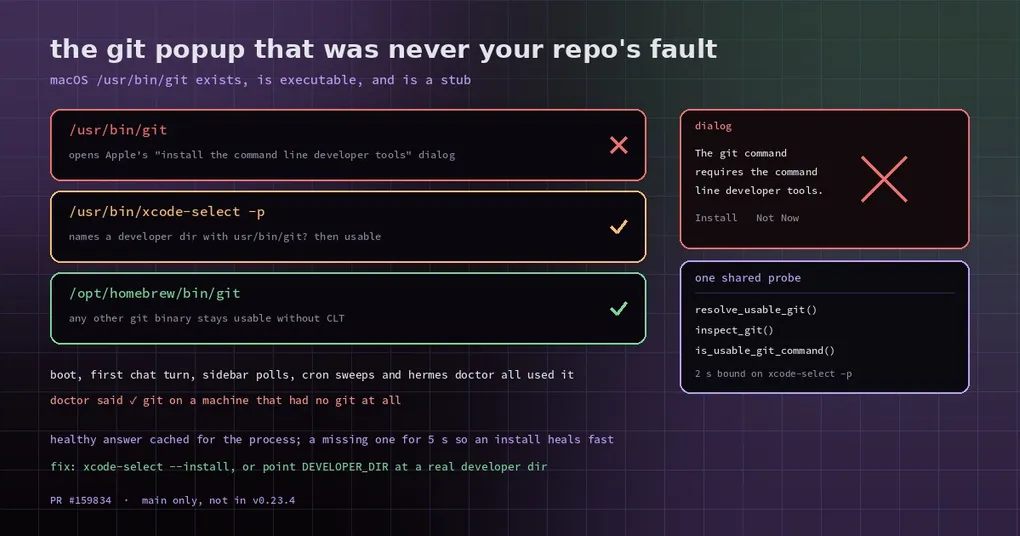
A new Mac, a fresh Hermes install, and the first launch brings up a familiar window: “The git command requires the command line developer tools.” You were not running git. You wanted to ask the agent a question. You click Not Now, the sidebar refreshes a while later, and it appears again. Then the part that really makes no sense: hermes doctor shows a green tick next to git, while typing git --version in a terminal opens the very same dialog.
That combination — popup, false green, popup — is not your repository and not the installer. It comes from an old piece of macOS design.
/usr/bin/git exists, and it is not git
On macOS, /usr/bin/git is there from day one and it is executable. Without the Xcode Command Line Tools (CLT) installed it is a stub: the only thing spawning it does is open Apple’s installer dialog.
That explains the contradictions:
which gitreturns a path, so “is git installed” always passes;- actually running it shows a modal dialog — and when a background process triggers it, the user has no idea what caused it;
- its exit behaviour tells a caller nothing useful, so “the probe failed” gets read either as “git is missing” or, worse, “git is fine”.
If you use Homebrew, Nix, or a self-built git, the real binary lives at /opt/homebrew/bin/git or /nix/store/.../bin/git. Those have nothing to do with CLT and work without it.
Where Hermes was touching it
Hermes looks at git for legitimate reasons: is this directory a repository, what changed, what does a checkpoint cover, what state is the install checkout in. Those probes sit in boot bootstrap, the first chat turn, sidebar polls, cron sweeps, the plugin catalog, completions, @diff context references, checkpoints, the dashboard and remote-Desktop repository views, and hermes doctor.
Each call site used to spawn on its own, so on a machine without CLT, boot, chat and a sidebar refresh could each produce a dialog. And hermes doctor used the same unreliable check, which is how it reported ✓ git on a machine with no working git.
PR #159834 (36 files) does one unglamorous but decisive thing: it routes every caller through a single shared probe.
One probe, four answers
The new module is hermes_platform/resolver/git.py, exposing four functions:
| Function | What it is for |
|---|---|
inspect_git |
One full inspection: executable path plus status (usable / missing / clt_stub) |
resolve_usable_git |
The path of a git you can actually run, or None |
is_usable_git_executable |
Whether one specific path is usable |
is_usable_git_command |
Whether a command such as git status would hit the stub |
The expensive question is asked about exactly one thing: /usr/bin/git on macOS. Every other platform and every other path is treated as usable with no extra work.
For the stub, the probe asks two things:
- Does
DEVELOPER_DIRname a directory that containsusr/bin/git? If it points at the Xcode app itself,Contents/Developeris checked too — an empty developer directory left behind by a macOS upgrade is a common trap. - If not, it runs
/usr/bin/xcode-select -pwith a two-second bound and looks forusr/bin/gitunder whatever directory comes back.
Answers are cached: a usable result for the life of the process (no repeated spawns), an unusable one for five seconds — so installing CLT mid-session heals quickly instead of requiring a restart.
What you see now
The change is mostly about not lying:
- background probes treat the stub as absent git — no spawn, no dialog;
hermes doctorstops printing a false green tick and warns with a hint instead;- features that need git (diff, checkpoints, completions, repository views) quietly lose that part rather than interrupting you with a modal.
Worth being explicit: it does not install git for you. It stops “there is no git” from interrupting you repeatedly, and it makes the diagnosis honest.
Fixing it properly
Three routes, depending on what you need:
# 1) Command Line Tools only (a few hundred MB, enough for git)
xcode-select --install

# 2) Full Xcode installed but the developer directory points elsewhere
sudo xcode-select -s /Applications/Xcode.app/Contents/Developer

# 3) Homebrew git, which never needed CLT
brew install git
After that the warning in hermes doctor disappears. If you run Hermes in a container, in CI, or on a deliberately minimal image, you can also do nothing — new builds will simply stop bothering you about it.
One more angle: git inside Hermes is not only “read the status”. It runs subprocesses, so git configuration is also an attack surface. The git config RCE write-up covers where that boundary sits; the install guide has the dependency list, and the hermes doctor reference shows what the check covers.
Availability
This merged to main on November 26, 2026, after v0.23.4 (November 24), so it is not in that tag. Until you upgrade, the cheapest workaround is to install CLT or point DEVELOPER_DIR at a real developer directory.
Update (2026-11-28): these changes shipped in v0.23.5 (November 28) —
hermes updatebrings them in. The “not in v0.23.4 / onmainonly” wording above is a snapshot from publication time.