Start Working Before You Paste an API Key: How the Hermes Free Tier Works and When to Sign In
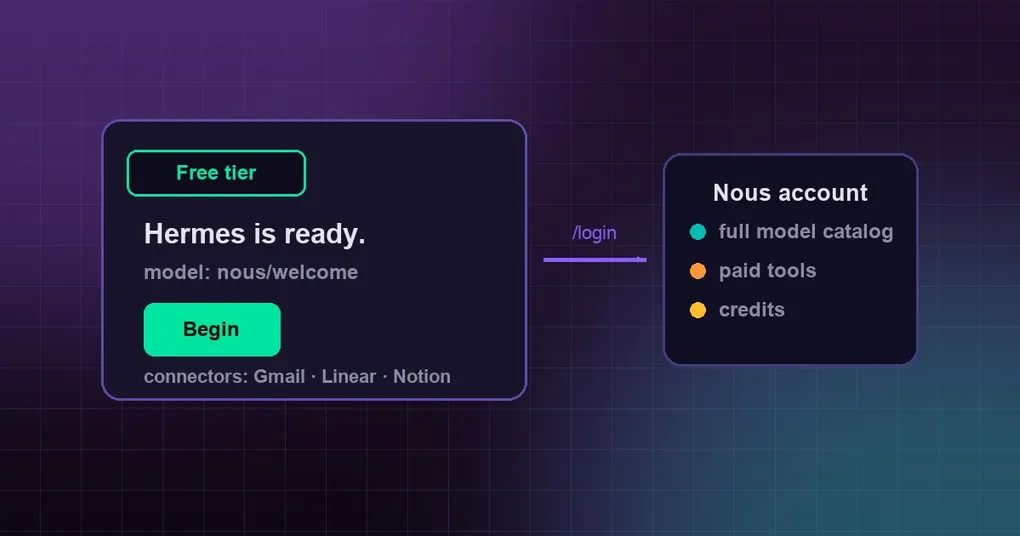
You install Hermes on a new machine, or you just want a feel for it before buying an API key anywhere. The old sequence was: run hermes setup, sign up at some provider console, copy the key, paste it in — fifteen minutes of setup before you had said a single thing to the agent.
That step is now optional. Hermes sets up a free Nous identity at startup, so you can talk to it on a default model straight away, and sign in later when you actually want the full catalog and the paid tools.
What happens with nothing configured
On first start Hermes spends a few seconds setting up the free tier, shown as “Setting up free inference…”. After that:
- inference runs on a single model called
nous/welcome; - the banner and
hermes auth statusreadNous · free tier · nous/welcome; hermes modellists a Nous · free tier row with that one model.
No wizard appears and nothing is forced. hermes setup is still there whenever you want to configure a provider of your own.
One caveat: the free tier is still rolling out. Until it is on for everyone, none of this happens unless the process was started with HERMES_GUEST_ONBOARDING=1 in its environment — and note that the variable only accepts 1; true does not count. With it unset, a fresh install behaves exactly as before: the first-run provider picker.
What the free tier gives you, and what it does not
| Free tier | After signing in | |
|---|---|---|
| Inference | nous/welcome (one model) |
Full Nous Portal model catalog |
| Connectors (Gmail, Linear, Notion, …) | Yes | Yes |
| Paid tools (web search, image generation, TTS, cloud browser) | No | Yes, billed to your subscription |
| Credits or a balance | None | Yes |
“Connectors” are the third-party accounts you link on the Nous portal so the agent can act inside them. They work on the free tier without any sign-in — which is a large part of why the free tier exists.
Background work runs on the same model too: conversation compaction, chat titles, image understanding, and similar housekeeping all go through nous/welcome.
The free tier is the last resort, never a preference. Any provider you configure wins:
| You have | Inference runs on | Connectors |
|---|---|---|
| Nothing | Nous free tier (nous/welcome) |
Free tier |
An API key in .env (OpenRouter, OpenAI, Anthropic, …) |
Your key | Free tier |
model.provider set in config.yaml |
That provider | Free tier |
| A Nous Portal sign-in | Nous Portal | Your account |
An install that already has a provider still sets the free tier up once at start, so connectors have something to authenticate with; your provider keeps doing inference, and a one-time notice tells you so.
Two details that cause easy confusion. If model.default in config.yaml names something else while the free tier is doing inference, Hermes uses nous/welcome anyway and says so in one line. And if you ask for a model the free tier cannot serve, it does not switch silently — it points you somewhere:
gpt-5 needs a Nous account or an API key. Use /login to sign in, or /model to pick another provider.Calling a paid tool says This needs a Nous account. Use /login to sign in. inside a chat, and names hermes auth upgrade in the terminal. The turn itself continues without it.
When you should sign in
Wherever the free tier is present — including installs that run inference on their own key — there are two ways in.
From a chat. Send /login in a direct message (Telegram, Discord, Slack and others; on Slack use /hermes login, and it also works in a CLI chat session). It has to be a paired direct message: elsewhere Hermes replies Sign in from a direct message with Hermes. You get three messages — the consent link, the sign-in code on its own line, then a waiting notice that starts with Do not share this code. You can keep chatting while Hermes waits, and the result is pushed into the same DM. Running /login again replaces the previous code.
From a terminal.
hermes auth upgradeIt prints a URL and a short code and opens the browser unless you pass --no-browser or you are in an SSH session. After you confirm in the browser, the terminal says Signed in as [email protected]. If your default model was nous/welcome, a second line names the model your account now uses.
Inference moves to your account’s catalog, paid tools unlock, and hermes auth status stops showing the free-tier line. A default model you chose yourself is left alone.
Two things worth knowing in advance:
- One account per install.
/loginbinds the whole installation to the account that approves the code: its inference, its connectors, every chat it serves. On a gateway where several people can DM the bot, setallow_admin_fromfor the platform so only an operator can run it. hermes auth add nous --type oauthalso signs you in, but it replaces the free tier outright and does not carry your connectors over. Use/login, orhermes auth upgrade, when you have connectors you want to keep.
The four places the desktop shows it
The desktop app runs on the same free tier, surfaced in four spots:
| Where | What you see |
|---|---|
| First launch | A ready screen: “Hermes is ready.” with the default model nous/welcome, a Free tier badge and Begin; “Sign in with a Nous account instead” and “Other providers” sit underneath. It shows once. |
| First launch with your own API key already present | A one-time strip above the composer: “Free Nous inference and connectors are now available.” with a model picker, sign-in and dismiss |
| Status bar | A Nous · free tier · nous/welcome chip with a Sign in badge, hideable from the bar’s right-click menu |
| Settings › Billing | “You’re on the Nous free tier” with one sign-in button; the summary reads Plan “Free tier”, Model nous/welcome, Connectors “Included” — no balance and nothing to pay |
The CLI and the desktop read the same local state, so the one-time notices are shared: seeing one on the CLI means you will not see it again on the desktop for that identity, and the other way round.
Turning it off
hermes config set nous.guest falsenous.guest is a normal config.yaml setting (default true), not an environment variable. With it off: no free inference, no sign-in-free connectors, no free-tier row in hermes model, and a fresh install is offered hermes setup instead. A signed-in Nous account, your own API keys and every other provider work exactly as before.
One privacy note worth being explicit about: the free tier needs an identity for authentication and rate limiting, so the first time one is needed Hermes creates an anonymous identity on the Nous portal and stores the credential in your Hermes directory, shared across the profiles under it. It holds no email address, no name and no other personal data, and it expires after 14 days without use — Hermes transparently creates a new one. Signing in moves your linked connectors into your account; setting nous.guest to false means no identity is created or used at all.
What the errors mean
| Symptom | What it means | What to do |
|---|---|---|
First command says It looks like Hermes isn't configured yet and offers hermes setup |
The free tier could not be set up within a few seconds: offline, not open on the portal, or rate limited | Come back online and retry, or run hermes setup and add a provider. Nothing is left half-configured |
Nous free tier is not open on this portal. |
The portal Hermes points at is not offering the free tier (for example, after setting HERMES_PORTAL_BASE_URL) |
Sign in with an account, unset the override, or add your own key |
Nous free tier is rate limited; try again shortly. |
The portal is throttling new free-tier setups | Wait a few minutes, or add your own key |
This needs a Nous account. |
You called a paid tool while on the free tier | /login in a chat, hermes auth upgrade in a terminal, or configure that tool with your own key in hermes tools |
The picker shows only nous/welcome under Nous |
Expected on the free tier | Sign in for the full catalog, or add another provider’s key |
| The free tier stopped working after two weeks away | The anonymous identity expired and gets replaced at the next start | Nothing — just start Hermes again. Connectors linked before the gap need linking again unless you had signed in |
The short version
The free tier knows what it is: a way to get moving, not a long-term plan. For someone trying Hermes for the first time it removes every step between installing and having a working conversation. For someone who already has a provider it quietly solves connector authentication. And when you need the bigger catalog or web-connected tools, a one-minute sign-in picks up where it left off.
To start from scratch, see the install guide. The full command surface for accounts is in the hermes auth reference, model and provider switching is in hermes model, and recent platform and model changes are in the release notes.