Hermes Agent Cron Upgrade: monitor-mode, notepad, and preflight validation
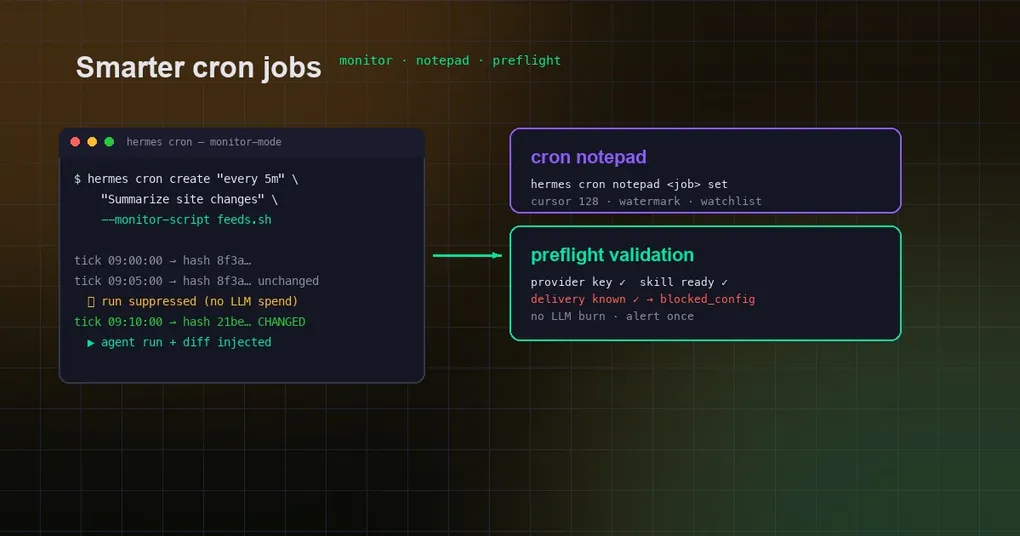
Scheduled tasks are one of Hermes Agent’s most practical automation features: grab the Hacker News front page at 9am, check the build every 30 minutes, summarize your feed every hour. But the more jobs you run, the more obvious the problems become — most ticks burn tokens on pure repetition, a misconfigured job wastes a whole LLM call before failing, and passing state between runs (“where did I stop last time?”) means bolting on external files.
The batch that landed on main in early August 2026 gives cron three critical pieces of equipment:
- monitor-mode — a cheap script or URL runs first each tick; if its output hash is unchanged, the entire agent run is suppressed at zero LLM cost;
- notepad — a durable per-job key/value scratchpad that survives across scheduled runs (cursors, watermarks, watchlists);
- preflight — validates the job’s configuration before any agent machinery is built; a broken job is marked
blocked_config, warns once, and never spends a token.
Plus a usage_audit.jsonl logger that honestly records every cron run’s token spend. This post covers all four, with real CLI examples and config keys.
1. monitor-mode: sniff first, run only when something changed
Why it exists
The canonical monitoring job looks like: “every 5 minutes, check whether the feed has new items, and summarize them if it does.” Without monitor-mode, Hermes builds the full agent and calls the LLM on every tick — so you pay for a “nothing happened” result every time the feed is quiet.
monitor-mode pulls change detection out of the agent: each tick, a cheap script (or a bounded GET request) fetches the monitor source’s output, which is hashed as exact bytes:
- Hash unchanged → the whole agent run is suppressed, recorded as a silent
no_changetick (no LLM spend, no delivery); - Hash changed → a
MONITOR CHANGE DETECTEDblock (a capped unified diff + the new output) is injected into the prompt and the agent runs normally; - The first tick always runs (establishes the baseline);
- A failing monitor source is treated as a config error — the job never silently skips.
Usage
Create from the CLI:
# Monitor source = a script (resolved relative to ~/.hermes/scripts/, or absolute path)
hermes cron create "every 5m" \
  "Summarize any new items on the page" \
  --monitor-script feed_watch.sh

# Monitor source = a URL (one bounded GET per tick)
hermes cron create "every 5m" \
  "Summarize changes on the status page" \
  --monitor-url https://status.example.com/api/health

# Update an existing job
hermes cron edit <job_id> --monitor-script feeds.sh
From chat, via the cronjob tool:
cronjob(
    action="create",
    schedule="every 5m",
    prompt="Summarize any new items on the page",
    monitor_script="feed_watch.sh",
)
Three constraints (enforced at create time, in source)
monitor_scriptandmonitor_urlare mutually exclusive — one monitor source per job;- monitor mode is incompatible with
no_agent=True— the whole point is to suppress or wake the agent; plain script jobs should use regularscriptmode; - the monitor script should emit stable output (no timestamps), or every hash differs and the job fires every tick.
--monitor-script follows the same resolution rules as script: relative paths resolve under ~/.hermes/scripts/, .sh/.bash run via bash, anything else runs as Python. The implementation lives in create_job and the scheduler’s hash-suppression path in cron/jobs.py.
2. notepad: durable state across runs, no external files
Why it exists
Stateful jobs have a classic pain point: job A ingests data at 2am, job B processes “only what’s new” at 8am — where does the “last seen” cursor live? Historically you’d write it to a local file and handle concurrency and cleanup yourself. notepad makes this a first-class citizen: a durable key/value scratchpad per job, stored in its own SQLite database (~/.hermes/cron/notepad.db). Each run, the scheduler renders a non-empty notepad into the job prompt — the agent sees the state left by previous runs and updates it via the CLI during the run.
Usage
# List the job's notepad (default action)
hermes cron notepad <job_id>

# Read one key
hermes cron notepad <job_id> get cursor

# Write one key
hermes cron notepad <job_id> set cursor 128

# Delete one key
hermes cron notepad <job_id> delete cursor
A natural fit next to monitor-mode: after a detected change, the job writes “processed up to item N” into its notepad, so the next tick knows exactly where to continue. Capacity caps — an oversized write fails loudly instead of truncating silently:
- 16 KB per value;
- keys up to 128 characters;
- 64 KB total per job.
The read path injects notepad content into the job prompt at the same seam as context_from output; the write path is the running agent calling hermes cron notepad ... set. Implementation details are in cron/notepad.py, which follows the same connection/pragma pattern as cron/executions.py.
3. preflight: a broken job warns once and never spends a token
Why it exists
The most common way cron jobs break isn’t bad code — it’s the environment drifting: a provider API key expired, an attached skill is missing an env var, delivery credentials went stale. The old behavior: the tick runs, the agent is built, the LLM is called, and only then does it fail — money spent, and the error is often opaque.
preflight validates the job’s configuration before any agent machinery is constructed (per source and the official cron.md docs):
- the provider API key resolves (skipped when a
fallback_providerschain is configured, since the fallback path may rescue a missing primary key); - attached skills are ready (no missing required environment variables, commands, or credential files);
- delivery platform targets are known and have gateway credentials (
local/origintargets are never checked).
On failure:
- the job’s
last_statusbecomesblocked_config; - exactly one alert is delivered (a
preflight_alerteddedup marker — no per-tick bombardment), cleared on recovery so a future break alerts again; - zero LLM calls — a misconfigured job never spends tokens.
On by default via cron.preflight: true. To restore the old behavior:
# config.yaml
cron:
  preflight: false

# or on the command line
hermes config set cron.preflight false
All checks fail open — a preflight problem itself never blocks a run, so a healthy job isn’t accidentally killed.
4. usage_audit: a token ledger for cron
The same batch also shipped part of the cron token-leak mitigation: cron sessions no longer spawn a background review (skip_background_review), and a per-fire token spend audit log now lives at ~/.hermes/cron/usage_audit.jsonl — one JSONL line per run. If you want to quantify how much monitor-mode actually saved you, this file is the answer.
5. Putting it together: a cheap change-aware monitoring job
Wiring the three pieces into one typical “site-change monitor + incremental summary” job:
# 1) Monitor script: stable output (e.g. the feed's item titles)
cat > ~/.hermes/scripts/feed_watch.sh <<'EOF'
#!/bin/bash
curl -s https://example.com/feed.xml | grep -o '<title>[^<]*</title>'
EOF
chmod +x ~/.hermes/scripts/feed_watch.sh

# 2) Create the monitor job: unchanged hash → silent skip
hermes cron create "every 5m" \
  "Summarize new feed items and remember the last seen count in the notepad" \
  --monitor-script feed_watch.sh \
  --deliver telegram
From then on: feed unchanged → silent no_change tick, zero tokens; feed changed → the agent wakes, reads the cursor from its notepad, summarizes the new items, updates the cursor, delivers to Telegram. Budget-conscious users can cross-check usage_audit.jsonl at the end of the month.
6. When NOT to use these
- Must-run-every-tick jobs (hourly chimes, heartbeat keep-alives) don’t need monitor-mode — it only adds a pointless change check;
- notepad is per-job, not a cross-job store — chain jobs with
context_fromor external storage when data must flow between tasks; - pure script jobs that should skip the agent entirely: use the existing
no_agent=True+script, don’t force monitor mode onto them.
Summary
These three pieces turn cron from a “scheduled money-burner” into an “on-demand waker”: monitor-mode saves (zero cost when nothing changed), notepad remembers (state survives across runs), preflight stabilizes (no token burn on broken config, one warning). For anyone running a fleet of scheduled jobs, that’s a real bill reduction and an operations win.
New to cron? Start with our complete guide to Hermes Agent cron automation; keep long-running background tasks from getting stuck with the config guide for long tasks; more daily efficiency tips live in our Hermes Agent productivity tips collection. Not installed yet? The install guide gets you running in five minutes.