Your 7am cron brief reads like a machine notice — two switches fix it
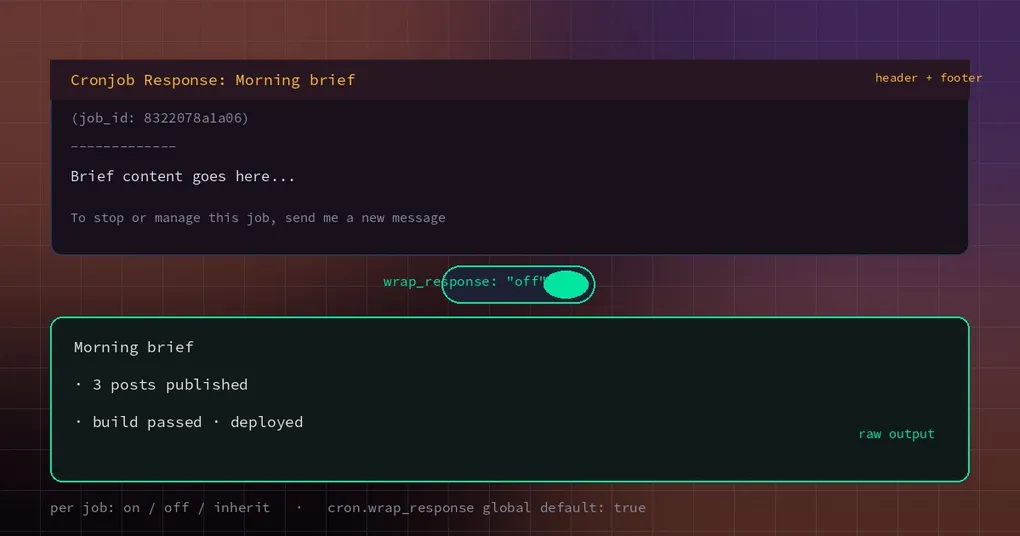
Every morning a brief lands in Telegram: how many PRs merged yesterday, whether the build passed, anything waiting on your decision. The content is fine. The first screen is not:
Cronjob Response: Morning brief
(job_id: 8322078a1a06)
-------------

12 PRs merged yesterday...
Four lines of boilerplate eat the notification preview and make the whole thing read like a system notice you can safely ignore. Scroll to the bottom and there is one more line explaining how to stop the job.
The formatting is the small problem. The bigger one shows up the moment you reply: “what was the third PR?” The agent has no idea what you are talking about, because that message was never part of the conversation — it was a one-way notification.
Both problems have their own switch, and both are per job.
Switch one: stop wrapping the output
The wrapper is on by default, globally, under cron.wrap_response. When it is on, every delivery is dressed like this:
Cronjob Response: <job name>
(job_id: <job id>)
-------------

<the actual content>

To stop or manage this job, send me a new message (e.g. "stop reminder <job name>").
For a one-shot “remind me to take the pasta off in 20 minutes”, that is genuinely useful: you need to know how to cancel it. For a brief that arrives at the same time every day, it is just noise.
Now you can override it per job:
# create it clean
hermes cron create "0 7 * * *" "Summarize yesterday's PRs and build status in under 200 words." \
  --name "Morning brief" --no-wrap-response

# fix an existing job
hermes cron edit 8322078a1a06 --no-wrap-response

# go back to following the global default (which is true)
hermes cron edit 8322078a1a06 --inherit-wrap-response
The three flags are exactly what they sound like: --wrap-response forces the wrapper on, --no-wrap-response forces it off, and --inherit-wrap-response removes this job’s override so it follows cron.wrap_response again. That last one matters after you have experimented: it deletes the field rather than leaving a false behind, so a later change to the global default reaches the job.
If every brief on the machine should be clean, set it globally:
cron:
  wrap_response: false
That applies to existing and future jobs; any job with an explicit setting still wins.
Switch two: give follow-ups their own thread
A notification is fire-and-forget. To make a brief something you can reply into, the job has to be continuable:
cron:
  mirror_delivery: true    # deliveries enter the target conversation's history
or, for a single job:
hermes cron edit 8322078a1a06 --attach-to-sessionWith that on, the behaviour is thread-preferred:
- Thread-capable platforms (Telegram forum topics, Discord / Slack / Matrix threads): each delivery opens a dedicated thread and the brief is seeded into that thread’s session, so a reply continues with the full brief in context.
- DM-only platforms (WhatsApp, Signal, SMS): there are no threads, so the brief is mirrored into the target DM session and the DM itself is the continuation surface.
- The mirror is written as a labelled user turn,
[Cron delivery: <job name>], which keeps history readable and keeps turn alternation legal across providers.
There is one detail that trips people up: a job created inside a Telegram topic keeps delivering to that topic, because its origin pins the target. That is precisely what a recurring brief does not want — otherwise yesterday’s follow-up and today’s brief share a thread, and “what about the second one?” is ambiguous.
For those jobs there is a platform-level switch:
platforms:
  telegram:
    extra:
      cron_fresh_thread_per_run: true
It only affects deliveries back to the job’s own topic; an explicit chat_id:thread_id target is never overridden. Discord is the exception: it cannot nest a thread inside the job’s thread, so a job created in a Discord thread keeps delivering there.
While you are in there: two timing knobs
Two more per-job settings explain most “why did my brief not arrive today” questions.
catch_up: what happens to runs missed while the machine was off. --catch-up on runs the missed occurrence once on return; off skips it and books it as a missed row in hermes cron runs. The default follows cron.catch_up_missed (true) for recurring jobs, and one-shots skip — a “20 minutes from now” reminder is worthless two hours late.
grace_minutes: how late a run may be. The default window is half the period, clamped to 2–120 minutes. --grace-minutes 0 is a real value, not “unset”: it never catches up, so a missed occurrence is skipped instead of running late. A nightly job that must run even if the laptop wakes up late can be widened up to 1440 minutes (a day).
--timezone: which wall clock the cron expression is read in. Omit it and the profile’s zone applies. The classic bug it fixes is “I definitely wrote 9am” — written in a zone you did not mean.
A configured example
Put together, a clean, askable, 7am-Hong-Kong brief looks like this:
hermes cron create "0 7 * * *" \
  "Collect yesterday's PRs, build and deploy results into a brief under 200 words; if nothing is wrong, say so in one line." \
  --name "Morning brief" \
  --timezone Asia/Hong_Kong \
  --no-wrap-response \
  --attach-to-session \
  --catch-up on
and in config.yaml, a fresh thread per run on Telegram:
platforms:
  telegram:
    extra:
      cron_fresh_thread_per_run: true
The result: a clean brief in its own thread at 7am, and when you reply “who merged the third PR?” the agent knows which brief and which item you mean.
Edges worth knowing
- Turning off the wrapper changes nothing about delivery itself — target, failure notices and retries are untouched; only the text decoration goes away.
- Failure notices have their own switch.
failure_deliverroutes failure messages elsewhere, andlocalsuppresses them entirely while still recording the failure inhermes cron listandhermes cron runs. - Continuable is not “one endless session”. Threads are per run and histories are per thread. If you want a job to see its own previous output across runs, that is
--continuity, a different feature — do not mix them up. - Not every target can be continuable. Broadcast expansions (
deliver: all) are never mirrored, because that would rewrite several conversations at once.
If your cron setup is misbehaving in general, start with hermes cron doctor; if you want a job that remembers what it reported last time, read cron memory continuity. The full flag list is in the hermes cron reference, and this change landed in v0.23.2.
The short version
Whether a brief reads like a machine notice or a message from a colleague comes down to two layers: the wrapper (wrap_response) decides how it looks, and continuable delivery (attach_to_session, plus a fresh thread per run) decides whether you can reply to it. Both are one flag per job, both take under a minute, and both pay off every single morning.