"showing last 0 chars": when the completion notice threw the whole answer away
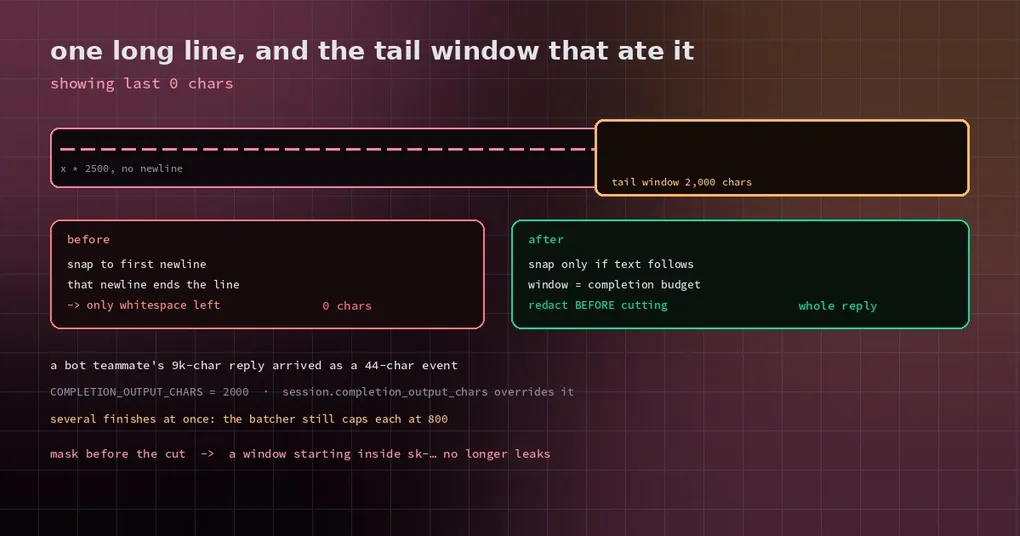
Three in the morning: you started a background job and asked it to message you when it finished. It ran for forty minutes, the notice arrived on time — and the body was one line, [… output truncated — showing last 0 chars], followed by nothing. The job succeeded. The result is gone. You go back to the logs.
On another machine a bot teammate answered with a JSON blob of nine thousand characters. On the phone it arrived as a 44-character event.
Both are the same bug, and it is not in the job. It is in the step that packs output into a notification.
How the tail window aligns
When a notification carries output, Hermes does not ship the whole thing — it takes a tail window: the last N characters. Reading a truncated log that starts mid-line is annoying, so there is an alignment rule: if the window’s start lands mid-line, move forward to the next newline and start at the beginning of a line.
The problem is that the move had no condition attached. Say the output is one line of 2,500 characters ending in a newline:
xxxxxxxx...xxxx (2,500 chars) \nThe window takes the last 2,000 characters; the start lands mid-line; so it snaps forward to that line’s own newline — the very last \n. Everything from there to the end is whitespace. The length comes out as zero, the notice says “showing last 0 chars”, and the body is empty.
The same bug has several shapes, all from that one unconditional snap:
| Output | Before the fix |
|---|---|
2,500 chars + \n |
showing last 0 chars, empty body |
2,500 chars + \n\n |
showing last 1 chars, whitespace only |
2,500 chars + \n \n |
showing last 2 chars, whitespace only |
2,500 chars + \r\n |
showing last 0 chars |
| multi-line output | fine (snaps to a line start, 653 chars) |
Note the last row: multi-line output was always correct. That is what made the bug so quiet. If you write multi-line scripts you never see it; only single-line output — a JSON payload, a one-line API result, a bot reply — can hit it.
There was a second contributor: the window size was hardcoded to 2,000 characters, even for a process that had asked for a larger completion budget.
The fix: three conditions
First, the snap only happens when non-whitespace text follows the first newline; otherwise the full window is kept. That alone removes every “0 chars” case above.
Second, the window size now comes from the session’s own completion budget: it reads session.completion_output_chars and falls back to the COMPLETION_OUTPUT_CHARS constant (2,000) when unset. This is not a new config key — it is the existing per-process field the bot DM runner already sets; this path simply never used it.
Third, the mask now runs before the slice. That reordering fixed a nastier problem: if the cut landed inside an sk-… key while security.redact_secrets was off, the cut-away prefix was invisible to the masker — so the key body went out with the notification. Now the forced mask covers the whole output before slicing, and the final mask on the event output stays. Both ends are covered.
The visible effect is the bot case: a 9,000-character reply with an 18,000 budget used to arrive as an empty 44-character event; now it arrives whole, with no truncation marker.
One 800-character cap remains
One thing was deliberately not changed: when several processes finish in the same instant, the batcher still caps each at 800 characters. That is intentional — six notifications arriving at once, each carrying thousands of characters, is unreadable — and the PR lists it under “not included”.
So if a notice still looks short, check whether several processes finished together. That is the design, not this bug.
What you need to do
Nothing to configure. The fix adds no key and needs no migration:
- completion notices for background processes stop turning single-line output into blank text;
- bot teammate replies arrive whole, within their own budget;
- as a bonus, a cut that lands inside a secret no longer leaks it.
If you previously truncated background output yourself to dodge this (say | tail -c 2000 in the command), you can drop that now — all it does is hide half the result.
Release status: the fix merged on November 25, 2026 (PR #159574, original work in #131824, fixing issues #152075, #131786 and #156760). It is not in v0.23.4; today it lives on main:
Update (2026-11-28): these changes shipped in v0.23.5 (November 28) —
hermes updatebrings them in. The “not in v0.23.4 / onmainonly” wording above is a snapshot from publication time.
hermes update --channel mainOne more thing
These bugs share a shape: they only appear on particular inputs — a single line, trailing whitespace, a start exactly on the window boundary. They do not turn tests red (the old tests covered multi-line output only) and they do not break a build. They just make a job that finished at 3am look like it said nothing at all.
If your own plugin or script does the “take the last N characters, then snap to a line start” dance, it is worth checking whether that snap is conditional — and whether redaction happens before or after the cut.
Bot-to-bot messaging is covered in the peer DM guide; background processes and notification settings live in the gateway command reference.