Bot Replying to Every Side Comment? One Hermes Setting Fixes It
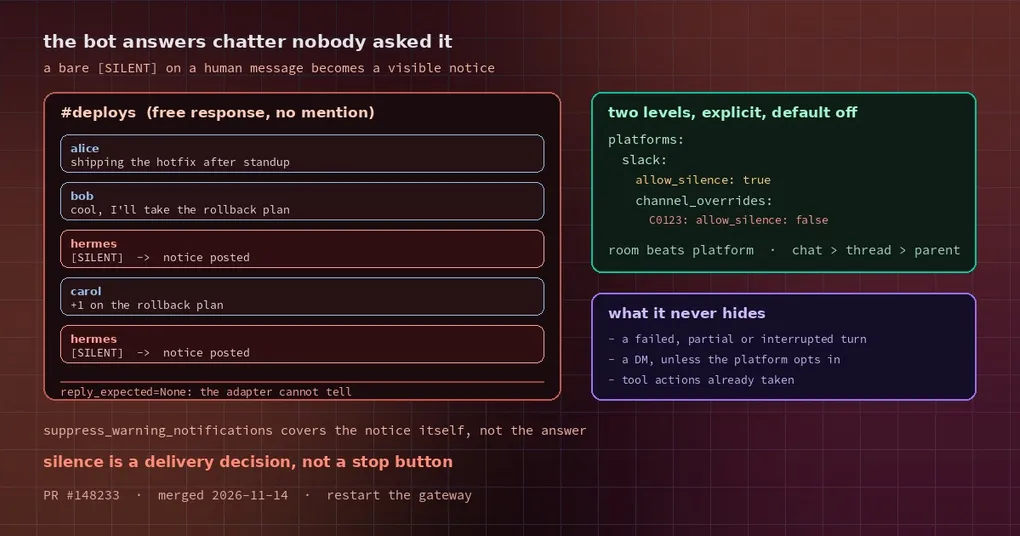
Your Hermes bot sits in a Slack channel set to free response (thread_require_mention: false), so nobody has to mention it. At ten in the morning two colleagues plan a release: one says the hotfix goes out after lunch, the other says they will write the rollback plan. Neither message is for the bot, and the model handles it correctly — it answers with a bare [SILENT].
Then Hermes posts a notice: The model returned only a silence marker for a message that needed a reply.
So the conversation becomes colleague, notice, colleague, notice. The thread doubles in length, and nobody removes the bot because they need it to read logs that afternoon.
The model is not misbehaving. It got the judgement right; the delivery layer’s conservative default answered on its behalf. PR #148233, merged on November 14, hands that decision back to the operator with two switches: platforms.<platform>.allow_silence for platform-wide silence, and display.suppress_warning_notifications extended to cover the notice itself. Here is the mechanism, the config, the traps, and where not to use it.
First: a silence marker is a delivery decision, not a mute button
Hermes recognises a set of silence tokens. If the model’s entire final response is one of them, the gateway does not deliver:
[SILENT]SILENTNO_REPLYNO REPLY[静默]/静默and[沉默]/沉默— what a model produces when it translates the sentinel instead of emitting it literally
Whitespace and case are normalised, but the whole reply must be the token. A sentence like “use [SILENT] when nothing changed” is delivered normally.
One detail most people miss: silence affects delivery only. The assistant turn is still written to the session transcript, so the conversation still alternates properly in the database — no half-broken history where the user spoke twice and the assistant vanished.
Failed turns are not swallowed either. Hermes does not hide an error just because the text resembles a silence marker.
Why it answers with a notice
For a message from a person, a bare silence token is replaced by a short notice, because a message that needed a reply must not vanish. That is deliberate: it stops the model from quietly ignoring someone.
The decision hinges on reply_expected as reported by the platform adapter. Three cases are exempt (silence is allowed):
- internal wakes such as background-process notifications;
- a message the adapter explicitly reports as not addressed to the bot;
- on Slack, messages that open by @mentioning someone else, and unmentioned top-level messages that start a new thread in a free-response channel.
The trouble is shared chats. In Slack free-response threads and WhatsApp groups, people talk to each other inside conversations the bot follows. The adapter reports reply_expected=None for those — it genuinely cannot tell. So silence_allowed() refuses the marker and the bot posts the notice into the conversation, once per side message.
What existed before does not cover it:
- The per-room switch requires listing every chat, thread or parent ID. An entry that only sets
model:also hides the parent’s opt-in. On WhatsApp a direct chat’s ID can arrive as<number>@s.whatsapp.netor<id>@lid, so listing chats is fragile. thread_followup_silenceis a narrower related opt-in: native Slack adapter, channel threads only. Relay-fronted Slack turns carry noreply_expectedat all, and WhatsApp onmainnever sets it.suppress_warning_notificationsused to ignore this notice, because on a human turn the notice is the reply text itself and never reaches the adapter’s warning boundary.
Platform-wide allow_silence: one line, every room
The new setting sits under the platform and defaults to off:
platforms:
  slack:
    allow_silence: true            # every Slack chat this profile serves
With it on, a successful marker-only turn stays silent even when Hermes was mentioned, directly addressed, or the adapter cannot tell.
For finer control, use channel_overrides:
platforms:
  slack:
    allow_silence: true
    channel_overrides:
      "C0123456789":
        allow_silence: false       # except this channel: keep the visible notice
  whatsapp:
    allow_silence: true            # every WhatsApp group and DM
  matrix:
    channel_overrides:
      "!exampleTeamRoom:example.org":
        allow_silence: true        # only this room
The top-level slack: / whatsapp: block form works the same way. A relay-fronted chat uses the block of its underlying platform (platforms.slack for Slack through the relay), matching how its channel_overrides behave.
Room overrides: three-level lookup and two traps
A room’s allow_silence overrides the platform’s. Hermes looks the room up chat ID → thread ID → parent ID, exactly as for other channel overrides, and the first matching entry is the room’s.
Trap one: an entry that sets only other keys still matches first. A thread with just model: is that first match, so its allow_silence counts as unset and falls to the platform value — not to its parent channel’s. If you rely on a parent channel’s room-level opt-in, repeat allow_silence in that entry.
Trap two: the setting wants a real boolean. A quoted "false" counts as false — a falsy token is off at both levels — but opting in requires a real true. The string "true" parses as unset and does nothing.
One more: room IDs must match the chat ID exactly. A WhatsApp group is <id>@g.us, while a direct chat may arrive as <number>@s.whatsapp.net or <id>@lid.
display.suppress_warning_notifications now covers the notice
The second switch is not new, but its coverage changed.
With display.suppress_warning_notifications on for the chat’s platform, the notice itself is hidden in group chats, channels, threads and webhook sources. In those four, a healthy marker-only turn is genuinely silent even where allow_silence is unset.
There is one hard exception, so remember it: this switch never silences a direct message. In a DM the notice is the only answer a question gets. The only way to quiet a DM is allow_silence: true for it or its platform.
And the other direction holds too: an explicit allow_silence: false — on the room or the platform — still keeps the notice. Explicit opt-out beats suppression.
What silence never covers
This section matters most, because allow_silence: true is often misread as “the bot may disappear here”. It may not.
- Empty, failed, partial and interrupted results do not gain permission to disappear.
- Tool actions are not undone; progress already sent is not retracted.
- It does not instruct the model to choose silence — the model still speaks when it should.
- Ordinary replies and conversation history are unchanged.
- When the model wrote a reply beside a housekeeping-only tool call (memory, todo list, skill management, session search) and then ended a complete turn on a bare marker, that reply is delivered as the final answer — in opted-in platforms and rooms too.
- Crash recovery honours a suppression decision only after it was saved for that exact final reply; a crash before that point keeps the human-turn safeguard.
In one line: silence is a delivery decision that applies only when the turn’s final text is exactly a marker.
When not to turn it on
allow_silence means “the model may decide this message needs no answer”. That is right for:
- busy group chats and channels where the bot is a listener;
- colleagues talking to each other in a Slack free-response channel;
- WhatsApp family or project groups;
- any shared conversation where you specifically want the bot to stay quiet.
It is wrong for:
- support DMs. When the model decides a question needs no answer, the user gets nothing at all. Set
allow_silence: falseon those DMs or platforms. - alert channels, where every message should get a response.
- the tuning phase. Watch what the model chooses to silence before you widen the permission.
A middle path: leave the platform off and enable a handful of named rooms (the Matrix example above). Default behaviour stays intact and the risk is bounded.
Applying it and verifying
After editing config.yaml, restart the gateway so every serving profile picks it up:
hermes gateway restartTo confirm the setting is being read, check the log for the resolution:
hermes logs | grep -i allow_silenceIf a room lookup fails you get a warning naming the source (Room allow_silence lookup failed for ...; keeping the reply rule) — note that Hermes keeps the reply rule in that case, so a failure falls back to the visible notice rather than silencing by accident.
Status: main only, not in v0.23.1
PR #148233 merged on November 14, 2026 and lives on main only. v0.23.1 (November 9) does not include it. If you run a stable release, writing these keys changes nothing — the config will not error, it simply has no effect until you upgrade:
Update (2026-11-17): these changes shipped in v0.23.2 (November 16) —
hermes updatebrings them in. The “not in v0.23.1” wording above is a snapshot from publication time.
hermes updateWorth knowing alongside this: the room-level allow_silence (channel_overrides.<id>.allow_silence) already existed before this change. What is new is the platform-level parent key and the inheritance between them. If you hand-maintained a per-room list, you can collapse it into one platform line after upgrading and keep overrides only where you need exceptions.
If you run a multi-platform gateway, two related reads: profile fan-out and gateway resources for the multi-profile cost side, and cron and the silence boundary for the other meaning of “quiet” — the two sound alike and share nothing mechanically.