Hermes Agent Practical Guide: Give Your AI a Secure Mailbox with Agent Mail
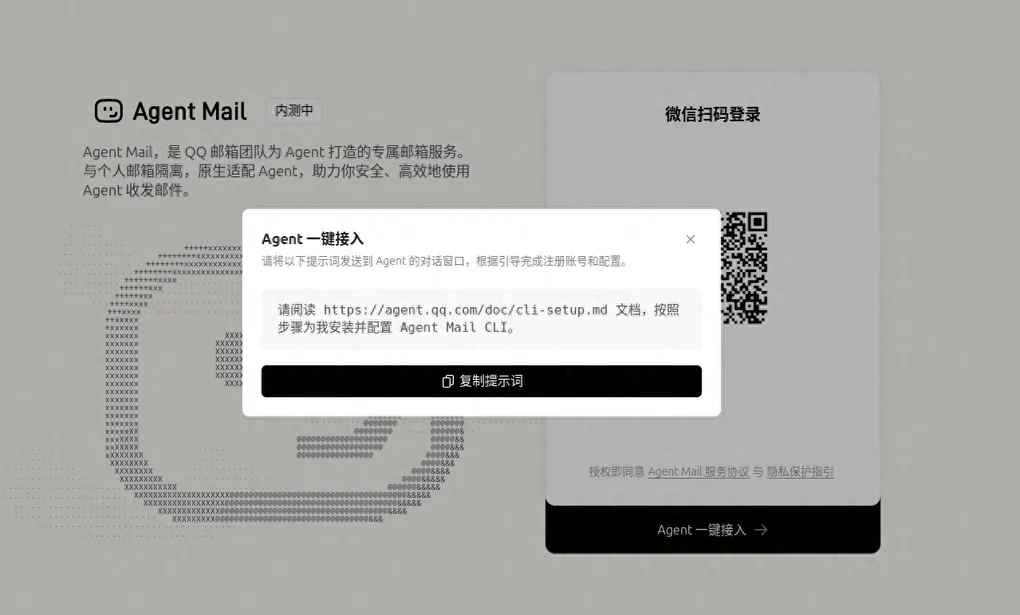
Email is not something most people use heavily anymore, besides the occasional verification code. But when you want to give an AI Agent its own mailbox for notifications, reports, or automated workflows, the setup cost can be surprisingly high. Tools like Himalaya work, but their syntax is often intimidating.
That is why the Tencent QQ Mail team built Agent Mail, a mailbox service designed specifically for Agents. It is isolated from personal inboxes, natively Agent-friendly, and built around security and efficiency. Combined with Hermes Agent’s conversational interface, it makes email almost zero-friction for AI.
This guide walks through the simplest way to let Hermes send and receive email through Agent Mail.
1. Install the Agent Mail CLI
Agent Mail’s pitch is straightforward:
Agent Mail is a dedicated mailbox service built by the QQ Mail team for Agents. It is isolated from personal email accounts, natively designed for Agents, and helps you use Agents to send and receive email securely and efficiently.
The onboarding is equally simple. Just tell Hermes:
Please read the documentation at https://agent.qq.com/doc/cli-setup.md and follow the steps to install and configure the Agent Mail CLI for me.Hermes will guide you through the rest: downloading agently-cli, OAuth login, authorizing scopes, and verifying the mailbox. The whole flow is conversational, so you do not need to hand-edit config files.
Once installed, check your account with:
agently-cli +meThe output includes your Agent Mail address, aliases, and daily sending quota.
2. Security Audit: Where Agent Mail Stores Credentials
Before handing an inbox to AI, it is worth checking the security design. Here is a breakdown of agently-cli.
2.1 Credential Storage
| Item | Detail |
|---|---|
| Encrypted token storage | OAuth token is stored at ~/.local/share/agently-cli/bootstrap_token.enc and encrypted with a 32-byte random key |
| Isolated encryption key | master.key is stored separately with permissions -rw------- (owner only) |
| Isolated data directory | Data directory permissions are drwx------ (owner only) |
| No plaintext leakage | ~/.agently-cli/config.json only stores app_id, not the token |
2.2 Network Communication
- All traffic uses HTTPS on port 443; no plain HTTP.
- API servers are Tencent infrastructure IPs (157.148.28.138 / 163.177.6.12).
- DNS resolution goes through local
systemd-resolved(127.0.0.53:53). - No third-party domains were found in the binary besides Tencent’s.
2.3 Token Lifecycle
- Access tokens expire after about one hour, tracked by
granted_at→expires_at. - Manual refresh:
agently-cli auth refresh. - The SDK also refreshes tokens automatically.
- Logout anytime:
agently-cli auth logoutclears all local credentials.
2.4 Rate Limits
| Limit | Value |
|---|---|
| Daily send quota | 50 emails |
| Hourly requests | 200 |
| Per-minute requests | 10 |
| Attachments per email | 50 |
| Max attachment size | 20 MB |
2.5 Operational Safety
- Two-stage confirmation: sensitive actions like send, reply, forward, and delete require a preview and a confirmation token; execution only happens after user approval.
- Confirmation tokens expire in 5 minutes: prevents replay attacks.
- Untrusted input isolation: email content is not executed as instructions, enforced by built-in high-priority safety rules in the skill.
2.6 OAuth Scope
The requested scopes are minimal:
alias:read— read mailbox aliasesmail:read— read emailsmail:send— send emailsmail:delete— delete emails
2.7 Risks
- The binary is closed-source (Go-compiled), so full source auditing is not possible; behavior can only be observed.
- Upgrade checks contact Tencent servers for version information, recorded in
update-state.json.
3. Full Command Reference
After installation and login, here are the common agently-cli commands.
| Feature | Command | Description |
|---|---|---|
| View profile | agently-cli +me |
Email address, aliases, quotas |
| List messages | agently-cli message +list |
Supports inbox / sent / trash / spam, pagination, unread / attachment / time filters |
| Read message | agently-cli message +read --id msg_xxx |
Full body + attachment list |
| Search messages | agently-cli message +search --q "keyword" |
Full-text search with filters for sender, recipient, date, attachments |
| Watch new mail | agently-cli message +watch |
Long-polling, real-time new-mail notifications |
| Send email | agently-cli message +send |
Multiple recipients, CC / BCC, HTML body, attachments (two-stage confirmation) |
| Reply | agently-cli message +reply --id msg_xxx |
Supports reply-all, CC / BCC, additional attachments |
| Forward | agently-cli message +forward --id msg_xxx |
Keeps original attachments, can add new ones |
| Move to trash | agently-cli message +trash --id msg_xxx |
Soft delete; permanently removed after 30 days |
| Upload attachment | agently-cli attachment +upload --file ./xxx |
Upload a file to use as an attachment |
| Download attachment | agently-cli attachment +download --msg msg_xxx --att att_xxx |
Regular attachments saved locally; oversized attachments return a URL |
| Auth management | agently-cli auth login / logout / status / refresh |
Full OAuth lifecycle management |
In practice, you do not need to memorize these commands. Tell Hermes what you want, for example “check my latest email” or “send a weekly report to [email protected],” and Hermes will invoke the right command and report the result.
4. Typical Use Cases
-
Verification codes and notifications Register services with Agent Mail and let Hermes read verification emails automatically.
-
Scheduled reports Combine with Hermes Cron to generate daily reports and send them with
message +send. -
Email-triggered workflows Use
message +watchto monitor incoming mail and trigger follow-up actions based on subject or sender. -
File transfers Use
attachment +uploadandattachment +downloadto move files between local storage and email. Large attachments return a URL for easy sharing.
5. Summary
Agent Mail makes giving an AI Agent a mailbox surprisingly simple. You no longer need to remember complex mail protocols, IMAP/SMTP settings, or worry about mixing personal email with Agent access. With agently-cli and Hermes’ conversational interface, you can install, authorize, and send your first email in minutes.
The security design is solid for a CLI tool: encrypted credentials, full HTTPS, two-stage confirmation to prevent mistakes, rate limiting to prevent abuse, and minimal OAuth scopes. The main risk is that the binary is closed-source, so deep source auditing is not possible, but observable behavior shows no unexpected third-party connections.
If your Agent needs to receive verification codes, send notifications, or handle email-based workflows, Agent Mail is worth trying first.
agently-cli +me
agently-cli message +list
agently-cli message +send